

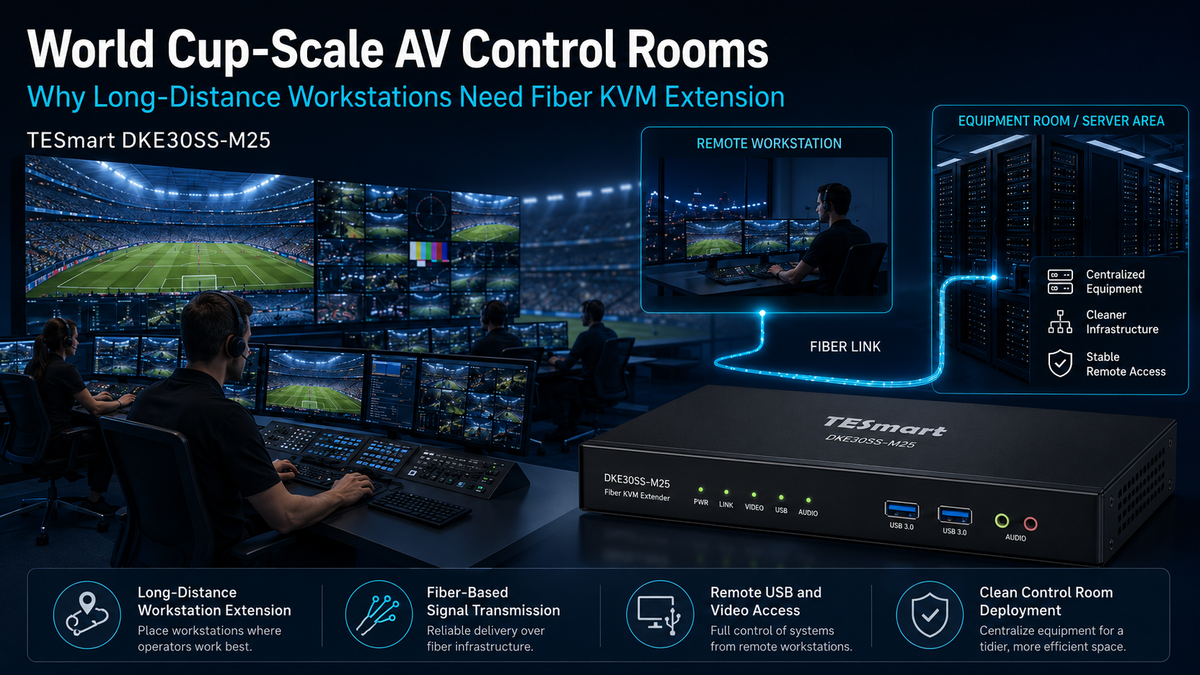
Table of Contents
- Introduction
- What Large-Scale AV Control Rooms Are Actually Trying to Solve
- Why Long HDMI or DisplayPort Cable Runs Become a Risk
- What Makes Fiber KVM Extension Different
- Where Fiber KVM Fits in Sports Broadcasting and Event Operations
- Using TESmart DKE30SS-M25 for Long-Distance Workstation Extension
- What to Check Before Deploying a Control Room KVM Extender
- FAQ
- Conclusion
Introduction
In a World Cup AV control room or any large-scale sports event environment, the workstation problem is rarely limited to connecting one computer to one display. Production teams, security operators, data analysts, media staff, and technical engineers may all need stable access to computers that are not physically located at their desks.
The reason is practical. High-performance computers generate heat and noise, require controlled access, and often belong in a machine room, equipment rack, or secured technical area. Operators, however, need to work from clean consoles inside broadcast rooms, monitoring rooms, media centers, or remote control desks.
This is where long-distance KVM extension becomes important. Instead of stretching ordinary HDMI, DisplayPort, and USB cables across an event site, a fiber KVM extender allows the computer to remain in a managed equipment area while the user operates it remotely with a local monitor, keyboard, mouse, and USB devices.
For World Cup-scale events and similar professional AV deployments, the real question is not simply “Can the cable reach?” The better question is: “Can the workstation remain stable, serviceable, and easy to manage during a live event?”
What Large-Scale AV Control Rooms Are Actually Trying to Solve
Large sports events depend on many workstation types. A broadcast team may need production control stations. Security teams may need monitoring consoles. Event operations staff may need scheduling, communications, and venue control systems. Analysts may need access to data dashboards or replay systems.
These workstations often serve different roles, but they share the same structural challenge: the operator desk and the computer hardware are not always in the same place.
Separating Operators from Equipment
Keeping computers away from operator desks helps reduce fan noise, heat buildup, cable clutter, and accidental interference. In a professional AV workstation environment, this separation also makes maintenance easier because technical staff can service computers in a centralized equipment area without disturbing each operator console.
For live event environments, this matters. A messy desk-level wiring layout is harder to troubleshoot. A centralized workstation architecture gives AV and IT teams a clearer view of what is connected, where each machine is located, and how each operator accesses it.
Supporting Remote Workstation Setup
A remote workstation setup allows the user interface to be placed where the operator needs it, while the computer remains where the technical team can manage it. This is useful in broadcast control rooms, security rooms, media centers, production offices, and temporary event facilities.
Instead of moving full desktop computers into every room, teams can extend video and USB control to the operator position. The workstation behaves locally from the user’s perspective, but the hardware remains in a more controlled location.
Why Long HDMI or DisplayPort Cable Runs Become a Risk
Long HDMI or DisplayPort cables may look like the simplest answer, but large event sites expose the limits of basic cable extension quickly. A cable that works across a desk may not behave the same way when routed through racks, cable trays, temporary floors, production rooms, or equipment corridors.
Signal Degradation Over Distance
Video signals become harder to maintain as cable length increases. Higher resolutions, higher refresh rates, and more complex display handshakes place more demand on the entire signal path. Even when a long cable appears to work during setup, it may become less reliable when the environment changes or when equipment is powered on in a different order.
For event teams, intermittent video loss is often worse than a complete failure. A black screen or unstable image during rehearsal or live operation can interrupt production, monitoring, or decision-making.
USB Control Is a Separate Problem
Video extension alone does not solve workstation control. Operators still need keyboard, mouse, and sometimes USB peripheral access. Running separate USB extension alongside long video cables adds another layer of complexity.
This is why a KVM extender for sports broadcasting is different from a simple video cable. A control room KVM extender is designed around both display output and user control, so the operator can work from a remote console rather than only viewing a remote screen.
Cable Clutter Becomes a Maintenance Issue
In a small office, a few long cables may be acceptable. In a large event environment, repeated point-to-point cable runs can make troubleshooting slower and cable management more fragile.
When a workstation fails, technicians need to identify whether the issue comes from the computer, the display, the USB path, the cable route, the adapter, or the power sequence. Cleaner infrastructure reduces the number of variables that must be checked under time pressure.
What Makes Fiber KVM Extension Different
A fiber KVM extender is designed for long-distance KVM extension where ordinary copper cabling is not the best fit. Fiber transmission is commonly used in professional AV and IT environments because it supports longer cable routes and is less exposed to electromagnetic interference than traditional copper-based signal paths.
For control rooms, the value is not only distance. The value is creating a more predictable workstation architecture.
Computer Side and Console Side
A typical KVM extender workflow separates the system into two ends. One side connects to the computer in the equipment area. The other side connects to the operator’s monitor, keyboard, mouse, and USB devices at the console.
This layout allows the operator to use the workstation from a remote desk while the computer remains in a rack, machine room, or secured technical space.
Fiber KVM Extender vs. Ordinary Cable Extension
Ordinary cable extension usually extends one signal type at a time. A long HDMI cable extends video. A USB extender extends keyboard and mouse. Additional adapters may be needed for audio, control, or display conversion.
A fiber KVM extender is built around the workstation as a complete operating point. It is not just about pushing a video signal farther. It is about extending the user’s working position while keeping video and control behavior organized within one deployment model.
A Better Fit for Large Event Sites
Large-scale sports events often involve temporary builds, long cable paths, dense equipment zones, and multiple teams working in parallel. Fiber-based extension helps AV teams place computers where they are easiest to manage and consoles where operators can work effectively.
This is especially relevant when several rooms need access to systems located in a central technical area. The architecture becomes easier to document, maintain, and scale.
Where Fiber KVM Fits in Sports Broadcasting and Event Operations
World Cup-scale events are useful examples because they combine broadcast, security, media, and venue operations in one environment. A fiber KVM extender can support several of these workflows without requiring computers to sit directly at every operator position.
Broadcast Control Room
In a production control room, operators may need access to graphics systems, replay interfaces, monitoring applications, scheduling tools, or technical control software. These computers may be better placed in a machine room where cooling, power, and service access are more controlled.
A KVM extender for sports broadcasting allows the operator console to remain clean while the computer stays in the equipment area. This helps reduce desk noise and avoids crowding the control room with unnecessary hardware.
Security and Monitoring Rooms
Security operators often monitor multiple systems for venue cameras, access control, alerts, and operational status. Some of these systems may be located in protected equipment zones rather than inside the monitoring room itself.
Using a control room KVM extender allows the monitoring desk to access those systems without relocating the computers. This can simplify the physical security model and reduce the number of devices exposed at the operator level.
Media Center and Event Operations
Media centers and event operations rooms may require access to content systems, data feeds, editing tools, or administrative workstations. A remote workstation setup helps these teams work from practical desk locations while keeping computer hardware centralized.
This is useful when the event layout changes, when desks are temporary, or when technical teams need to keep computers in a controlled equipment room.
Machine Room and Rack Management
For IT and AV engineers, long-distance KVM extension can also support machine room management. Instead of bringing monitors and keyboards to every system, or walking between rooms for routine operation, teams can build defined access points for remote workstation control.
This can reduce unnecessary movement during setup, rehearsal, and live operation.
Using TESmart DKE30SS-M25 for Long-Distance Workstation Extension
For professional environments that need cleaner long-distance workstation deployment, our DKE30SS-M25 is designed for long-distance workstation extension scenarios where the computer and the operator console need to be separated.
In a World Cup-scale AV control room, DKE30SS-M25 fits the type of workflow where computers are better kept in equipment areas, while operators continue working from broadcast desks, monitoring stations, media desks, or technical consoles.
What DKE30SS-M25 Helps Solve
DKE30SS-M25 is best understood as part of a workstation architecture rather than as a simple cable replacement. It helps teams separate noisy or heat-generating computers from operator desks, reduce unnecessary long copper cable runs, and create a cleaner control position for users who need stable remote access.
For professional AV teams, this can make the deployment easier to manage. The computer side can remain near racks, power infrastructure, and service access. The console side can stay focused on the operator’s display, keyboard, mouse, and working space.
A Neutral Fit for World Cup-Scale Workflows
DKE30SS-M25 should not be understood as an official product of any specific tournament or event organization. It is better described as suitable for large-scale event control rooms, sports broadcasting environments, monitoring rooms, remote workstation setups, and professional AV workstation deployments that require long-distance KVM extension.
This distinction matters because every event has its own approved systems, signal standards, and integration requirements. TESmart provides KVM extender solutions that can support these types of professional workflows, but final deployment should always be validated against the actual equipment chain.
Why This Is More Than Buying a Longer Cable
A longer cable only extends a physical connection. A fiber KVM extender helps define where the computer lives, where the operator works, and how the workstation is managed over distance.
For large control rooms, that difference affects reliability, service access, desk cleanliness, and operational discipline. These are the areas that matter most when multiple teams depend on stable workstation access during a live event.
What to Check Before Deploying a Control Room KVM Extender
Before choosing any long-distance KVM extension solution, AV and IT teams should define the workstation requirements clearly. This avoids building a cable path first and discovering later that the display, USB, or control workflow does not match the actual operating need.
Confirm the Workstation Role
Start by identifying what the workstation does. A graphics operator, security monitor, data analyst, and machine room technician may all need different display and USB behavior.
The right KVM extender choice depends on how the station is used, not only on the distance between rooms.
Check Video and USB Requirements
Confirm the display interface, target resolution, refresh rate, and USB device requirements before installation. Do not assume that every adapter, display, or peripheral will behave the same across a long-distance signal chain.
In professional deployments, the complete path matters: computer output, extender input, fiber link, console output, monitor input, USB devices, and power sequence all affect the final user experience.
Plan Cable Routing and Service Access
Fiber KVM extension should be planned as part of the room layout. Teams should define where transmitters, receivers, computers, power supplies, and cable routes will be located.
A clean installation is easier to label, test, and repair. In event environments, clear documentation can save time when a desk needs to be moved or a workstation must be reassigned.
Test Before Live Operation
For any large event deployment, test the full workstation chain before it is needed in production. This includes display wake behavior, USB keyboard and mouse control, peripheral detection, cable routing, and recovery after power cycling.
A control room KVM extender should be evaluated in the same operating conditions expected during the event, not only in a short bench test.
FAQ
What is a fiber KVM extender used for in a control room?
A fiber KVM extender allows a computer to be placed away from the operator desk while the user controls it remotely through a monitor, keyboard, mouse, and USB devices. In control rooms, this helps keep computers in equipment areas while maintaining a clean operator console.
Why not just use a long HDMI or DisplayPort cable?
Long video cables may solve part of the distance problem, but they do not fully address USB control, workstation organization, service access, or signal reliability over complex cable routes. A KVM extender is designed to extend the working position, not just the display signal.
Is DKE30SS-M25 only for sports broadcasting?
No. DKE30SS-M25 is suitable for long-distance workstation extension scenarios across professional AV, control rooms, monitoring environments, remote operation desks, machine rooms, and event production setups. Sports broadcasting is one important example, not the only use case.
Can DKE30SS-M25 be described as a World Cup product?
No. DKE30SS-M25 should not be described as an official World Cup product or as connected to any official tournament organization. It is more accurate to describe it as suitable for World Cup-scale event control rooms and other large professional AV environments.
What should teams verify before choosing a long-distance KVM extension solution?
Teams should verify the required display interface, resolution, refresh rate, USB device behavior, cable route, workstation location, console location, power setup, and the complete signal chain. Final compatibility should always be checked against the actual equipment used in the deployment.
Conclusion
World Cup-scale AV control rooms need more than longer cables. They need a workstation structure that keeps computers manageable, operator desks clean, and remote access stable across broadcast, monitoring, media, and operations environments.
Fiber KVM extension helps solve this by separating the computer side from the operator side while preserving the practical control experience that teams need during high-pressure event workflows.
For professional AV teams building long-distance workstation layouts, TESmart DKE30SS-M25 offers a focused way to support remote workstation setup, cleaner control room deployment, and more organized access to computers placed in equipment rooms or technical areas.
Explore TESmart DKE30SS-M25 to learn how it can support long-distance KVM extension for professional AV control rooms, sports broadcasting workflows, monitoring stations, and large-scale event workstation deployments.
Share:
100M Dual 4K60 KVM Extension: Why Long-Distance Workstations Need More Than Standard Cables
How to Share Two Apple Studio Displays Between a Mac mini and MacBook