

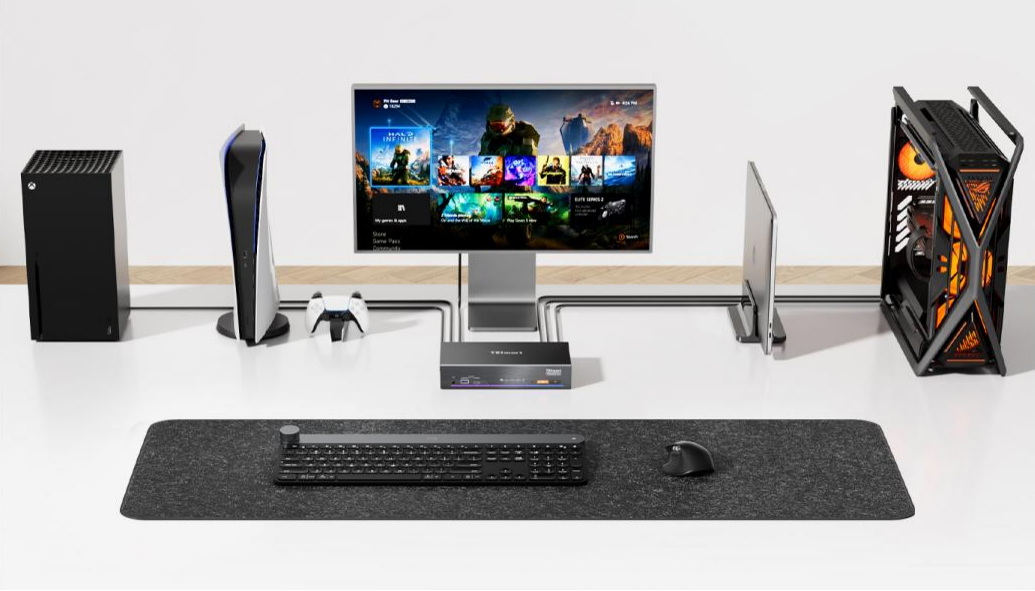
When connecting a PS5 to an Apple Studio Display via an HDMI-to-USB-C adapter, many users encounter a common problem: the video displays perfectly, but the Studio Display's built-in speakers produce no sound.
This is not because the PS5 fails to output audio. Rather, it stems from the fact that the Studio Display operates differently from conventional televisions. The PS5's audio signal must undergo conversion before it can be played through the Studio Display's integrated speaker system.
Why Do Ordinary Displays Output Sound When Connected to a PS5?
For most traditional monitors and televisions, HDMI is inherently a complete audio-visual connectivity standard. For example, when you plug a PS5 into a regular TV using a single HDMI cable, the TV simultaneously displays the gameplay and plays the sound through its built-in speakers.
This is because conventional TVs and monitors can directly read both video and audio signals from the HDMI stream and route them to the screen and speakers respectively. As a result, users typically do not encounter audio compatibility issues with traditional display devices. The workflow is straightforward:
PS5 → HDMI → TV → Video + Audio.

Why Can't the Apple Studio Display Receive HDMI Audio Directly?
The Apple Studio Display differs from ordinary TVs or HDMI monitors in that it does not receive audio-visual signals via HDMI. Instead, it is architected around the Thunderbolt protocol.
When a Mac connects to the Studio Display, both devices communicate over the Thunderbolt architecture, establishing a complete data channel directly. Video, camera, and USB peripheral data all travel through the same Thunderbolt connection without requiring additional conversion. For audio, the Mac transmits USB Audio data to the Studio Display over Thunderbolt, which is ultimately reproduced by the built-in six-speaker system.

However, the PS5 connects differently. The PS5 outputs audio-visual signals through HDMI, whereas the Studio Display operates on the Thunderbolt architecture. Because the two use fundamentally different data transmission methods, the PS5 can output video normally, but the HDMI audio cannot be recognized by the Studio Display's speaker system without additional conversion.
How Does the TESmart THK401-X4 Resolve the Audio Compatibility Issue Between the PS5 and Studio Display?
To enable the PS5 to use the Apple Studio Display's built-in speakers, the key is to incorporate a device capable of performing the necessary audio conversion.
The TESmart THK401-X4 is specifically designed to address this compatibility challenge. It features HDMI audio extraction and USB Audio conversion capabilities, allowing it to connect HDMI source devices—such as the PS5, Windows PCs, and others—and adapt them to the Studio Display's audio architecture.
When the PS5 is connected to the HDMI input port of the THK401-X4, the THK401-X4 receives the full HDMI audio and video signal and processes the video and audio data separately. The video component is converted to DisplayPort Alt Mode and sent to the Apple Studio Display to display the game footage; the audio component is extracted separately, packaged into a USB UAC2 data packet, and transmitted to the Apple Studio Display via the USB channel.

Through this conversion process, the HDMI audio from the PS5—which would otherwise be unrecognizable to the Studio Display—can now be played through the built-in speakers.

Making the Apple Studio Display a Unified Display Hub for PS5, Mac, and Windows PC
The Apple Studio Display offers more than just 5K visual quality. It also integrates high-quality speakers, a camera, and USB expansion capabilities. Therefore, for users who simultaneously use a PS5, Windows PC, Xbox Series X, Nintendo Switch, and Mac, the real challenge is not simply switching video sources, but maintaining a complete desktop experience.
The value of the TESmart THK401-X4 lies in solving this compatibility issue. It not only enables users to switch between multiple devices but also ensures that each device can continue to leverage the Studio Display's video, audio, and USB expansion capabilities.
For users who wish to make the Apple Studio Display the centerpiece of their desktop setup, the THK401-X4 eliminates the need for frequent cable swapping and external speakers, allowing the PS5, Windows PC, Xbox Series X, Nintendo Switch, and Mac all to share the same desktop ecosystem. 
FAQ
Can the Apple Studio Display connect to a PS5?
Yes. With the appropriate conversion device, the PS5 can output video to the Studio Display and utilize its built-in speakers. However, standard HDMI-to-USB-C adapter cables typically only handle video connectivity and cannot transmit audio.
Why does the PS5 display video on the Apple Studio Display but produce no sound?
Because the PS5 outputs HDMI Audio, while the Apple Studio Display employs a USB Audio architecture. Standard HDMI-to-USB-C adapter cables can only transmit video and are incapable of performing the necessary format conversion between the two audio types.
What equipment is needed to connect a PS5 to an Apple Studio Display?
A device that supports HDMI audio conversion is required, such as the TESmart THK401-X4. Common HDMI-to-USB-C adapter cables are generally limited to video transmission only.
Why does a Mac output audio normally when connected to the Apple Studio Display?
Because when a Mac connects to the Studio Display over Thunderbolt, the display is recognized as a USB Audio device, and the Mac transmits the corresponding audio data accordingly.
Can a standard HDMI-to-USB-C adapter cable solve this problem?
In most cases, no. Standard adapter cables are primarily designed for video signal conversion and cannot perform the conversion from HDMI Audio to USB Audio.
Which devices does the TESmart THK401-X4 support?
The THK401-X4 supports Mac, PS5, Windows PC, Xbox Series X, Nintendo Switch, and other HDMI video source devices, enabling them to utilize the display and audio capabilities of the Apple Studio Display.
Learn More
How to Connect PS5 or Nintendo Switch to Apple Studio Display in a Mul – TESmart
How to Connect a Windows PC to the Apple Studio Display – TESmart
Studio Display - Technical Specifications - Apple
Share:
One Desktop and Multiple USB-C Laptops on One Ultrawide: KVM, Dock, or USB Hub?
Can Apple Studio Display Connect to a Windows PC? Share One Display Between Mac and Windows