



CKS202-P23-USBK-N
Dual Monitor USB-C KVM Docking Station Kit - 4K60Hz, MST, EDID for 2 Laptops
- Regular price
-
$419.99 - Regular price
-
$419.99 - Sale price
-
$419.99
Couldn't load pickup availability
Overview & Key Features
TESmart With You. Evolving For You!
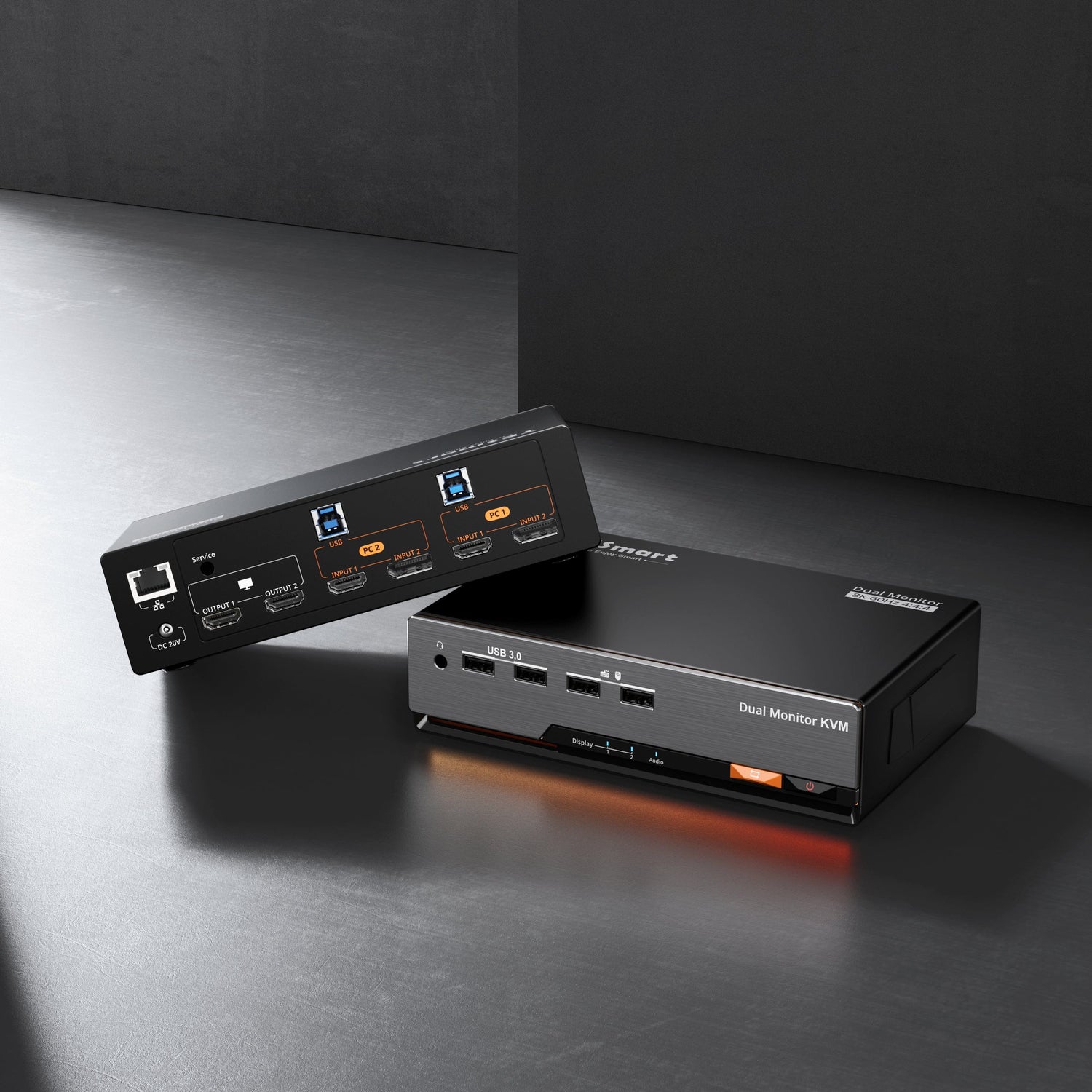
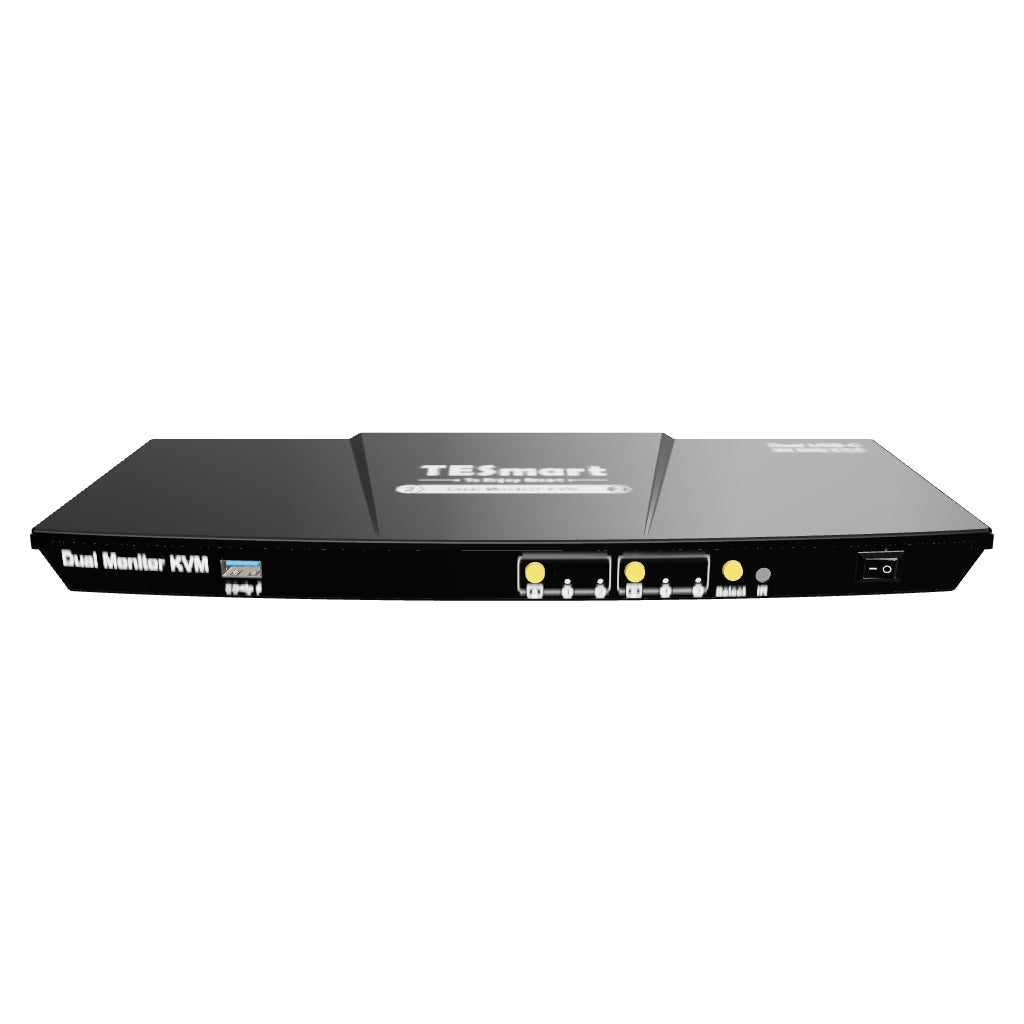
The CKS202-P23 is a USB-C KVM switch with DP1.2 4K@60Hz support, allowing control of two computers via one keyboard, mouse, and two monitors. It supports MST-enabled Windows laptops and MacBooks for an “ABC” dual-display extension. Built-in 60W power and 1000Mbps Ethernet ensure stable power and network. Advanced EDID emulation offers smooth switching. Perfect for everyday use and gaming.
Important Note
• If your laptop charging protocol doesn't support 20V DC voltage, it may only receive 7.5W due to handshake issues. Some ThinkPad models cannot receive 60W power. Please note if your device is a Mac or ThinkPad Yoga/T/X series when placing an order.
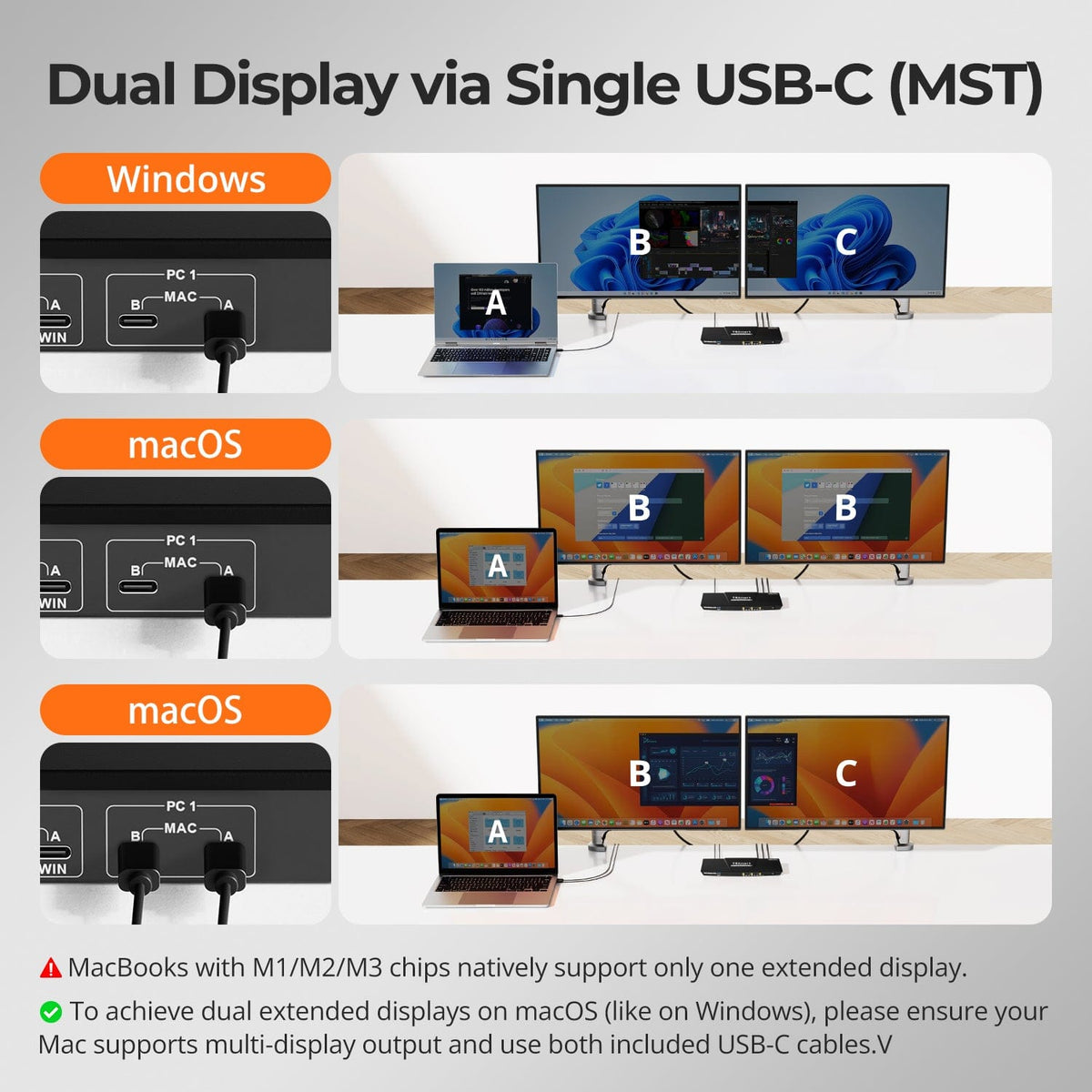
• MacBooks with M1/M2/M3 chips natively support only one extended display.
Why You’ll Love It:
• High resolution & refresh rate: Compatible with HDMI 2.0, supporting up to 4K@60Hz 4:4:4 resolution. Supports 2560×1440@120Hz and 1080P@240Hz/120Hz.
• Multi-system compatibility, 3 fast-switching modes, hot plugging, and device charging support, etc.
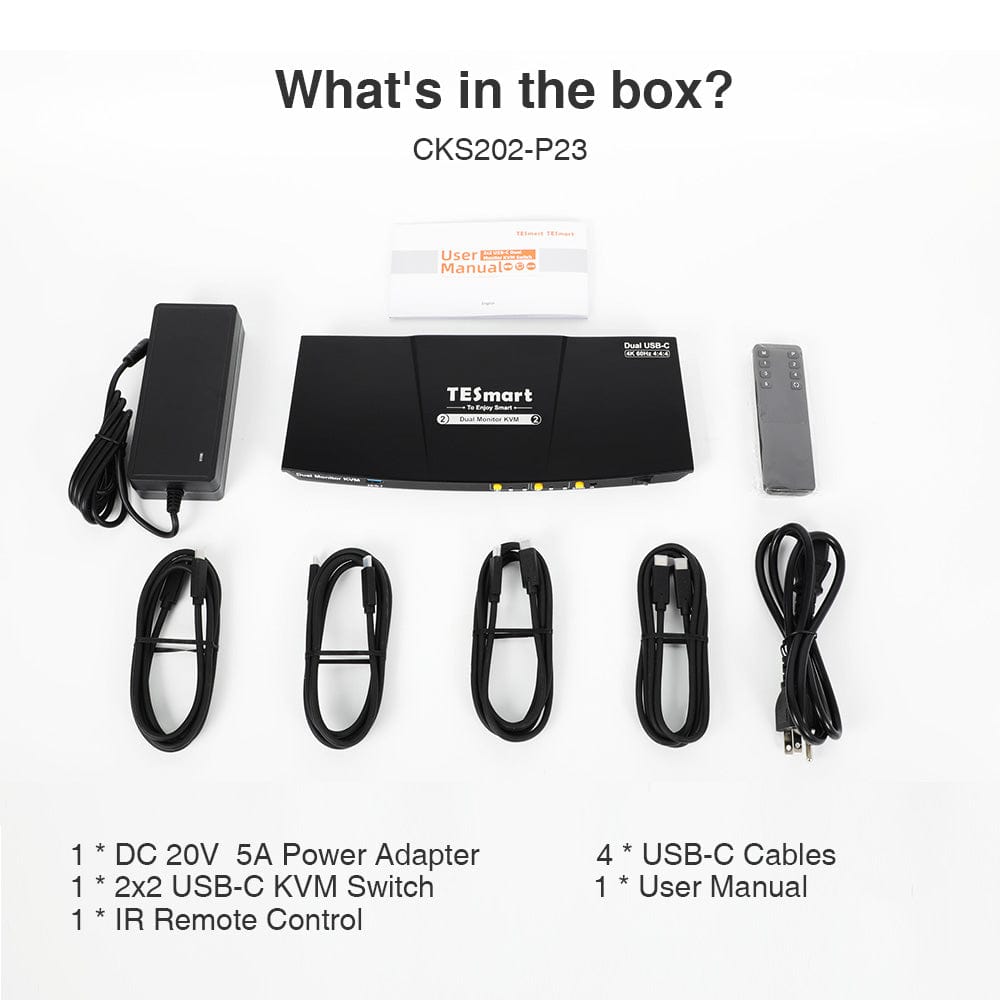
What's in the box
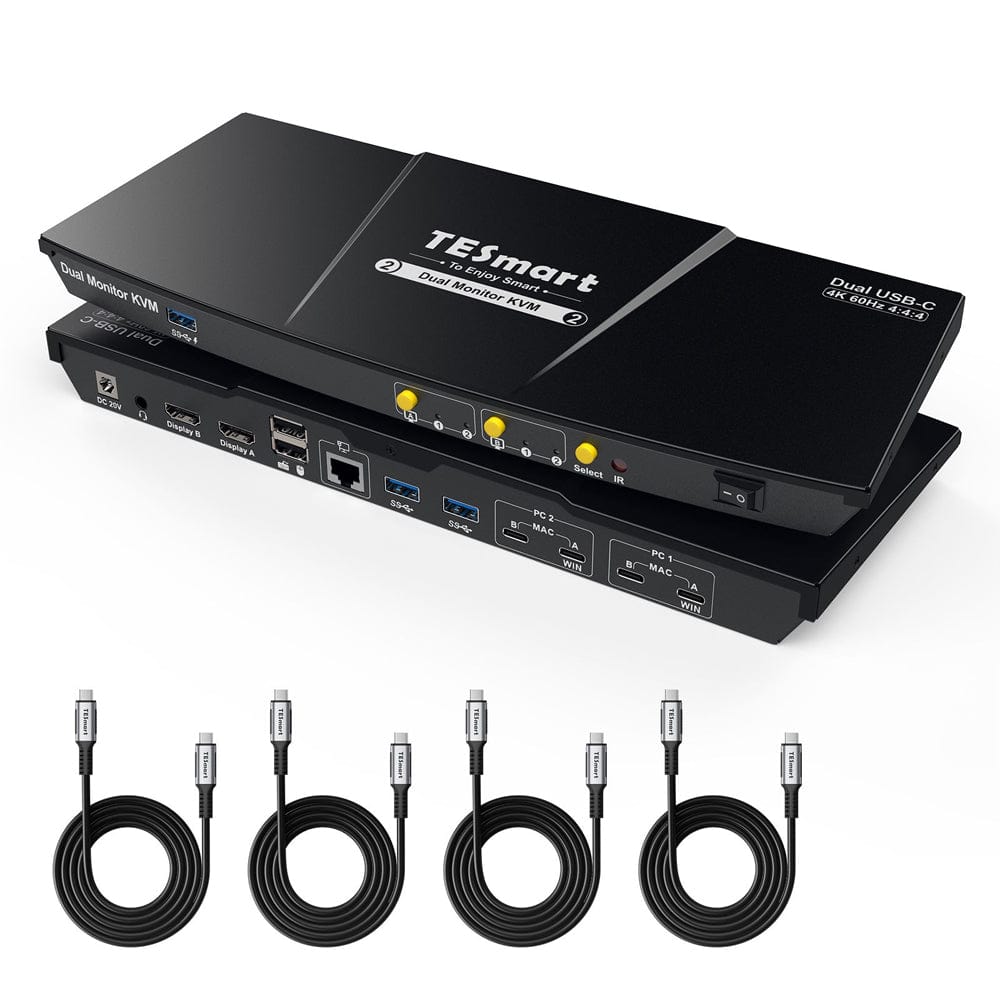
The kvm switch kit comes with complete kvm-to-pcs cables for a complete setup. We ensure that both your 2 laptops are connected to the kvm.
- 1 * 2x2 USB-C KVM Switch
- 4 * USB-C Cables
- 1 * IR Remote Control
- 1 * DC 20V Power Adapter
- 1 * User Manual
Downloads & Manual


| Country or Region | Estimated delivery time | Freight | postman |
| United States (Contiguous 48 States) | 3-5 working days | Free Shipping | UPS/USPS/FedEx/uniuni |
| U.K. | 3 working days | UPS/DPD | |
| Canada | 3-5 working days | Starting at $20 | Purolator/UPS |
| China (Macao SAR, Hong Kong SAR, Taiwan) | 1-3working days | Starting at $30 | SF Express |
| Australia, New Zealand, Saudi Arabia, United Arab Emirates, Israel, United States (Alaska, Hawaii, U.S. Territories & Military Addresses) | 5-12 working days | Starting at $60 | DHL/FedEx/UPS |
| Singapore, Malaysia, Philippines, Thailand | 5-12 working days | Starting at $30 | DHL/FedEx/UPS |
-
Orders cannot be canceled or modified once placed due to automated processing.
-
If a return is needed, contact service@tesmart.com within 30 days of delivery. Items must be in original condition with all packaging and accessories.
-
Return shipping for non-quality issues is the customer’s responsibility.
-
Products from third-party retailers
-
Items damaged by misuse
-
Order number, proof of purchase
-
Photos/videos (if defective), full shipping address, and phone number
-
Within 30 days: Refunds/returns accepted for both quality and non-quality issues
-
30 days–1 year: No returns/refunds; repair or replacement may be offered
-
1–3 years: No returns/refunds; replacement or Upgrade /trade-in up to 50% discount after 3 months (members only)
- Exclusive to official store customers
- Choose the one that best fits your setup
- ❗ Pick only one: a free accessory or an event discount (cannot combine both)
- Select your KVM.
- Pick 1 free accessory in the section below (you can change it if you like).
- Add to cart and check out together.
The return and refund policy process overview is shown below. For the full policy, please refer to the Full Policy page below.

1.Order Cancellation & Modification
-
To ensure timely delivery for every customer, TESmart’s order and shipping system is fully automated. Most orders are processed and dispatched within a few hours, and always within 24 hours depending on warehouse workload. Customers may cancel an order at any time before it ships, including within our 30-day cancellation window. Once an order has shipped, it can no longer be canceled or modified.
-
Please kindly contact us within 30 days of delivery at service@tesmart.com, If you wish to return a product after receiving it, ensure the product and packaging are undamaged and in original condition.
-
⚠️ Return shipping costs for non-quality issues are the responsibility of the customer. For more details, please kindly see below.
2.Return Process
2.1 Return Conditions:
-
Products must be returned in original packaging, including all accessories, manuals, and documentation.
2.2 Items Not Eligible for Return:
-
Products purchased from third-party retailers.
-
Products damaged due to misuse or improper handling by the customer.
2.3 Return Request:
-
Order number
-
Proof of purchase
-
Photos or videos of the defective product (to speed up processing)
-
Full shipping address
-
Contact phone number
2.4 Processing Time:
-
Our support team will respond to your return request within 48 hours and provide the return warehouse address in your country/region.
-
For certain countries/regions (e.g., the U.S., Germany, and the EU), we may provide a prepaid return label after confirming your address to expedite the return/refund process.
2.5 Return Address:
- Please contact our customer service at service@tesmart.com before returning the product. Once confirmed, you may send the item to the designated TESmart return warehouse.
- Unit 108, 8333 Rochester Ave
STX-X166
Rancho Cucamonga, CA 91730
United States
2.6 Warehouse Inspection:
-
Upon receipt, TESmart will inspect the returned item(s).
3. Refund Process
3.1 Refund Trigger:
-
Once the returned product is received and inspected by our warehouse, the refund process will begin.
3.2 Refund Timeframe:
-
Refunds will be processed within 5 business days after the return is received.
3.3 After-Sales Categories:
3.3.1 Within 30 days of delivery:
-
The product is in its original packaging with all accessories.
-
Return photos are provided before shipping.
-
Non-quality issues: Return and refund supported within 30 days. Return shipping is the customer’s responsibility.
-
Quality issues: Return and refund supported within 30 days. Return shipping is covered by TESmart.
3.3.2 From 30 days to 1 year after delivery (warranty period):
-
Return/refund not supported. Please email service@tesmart.com to contact our after-sales support team.
-
After evaluation by our technical team, we may offer product repair or replacement with the same model.
-
To ensure timely service, we prioritize replacements.
3.3.3 From 1 to 3 years after purchase (for VIP Members) :
-
Return/refund not supported.
-
You may contact our after-sales support team for replacement of the same model.
-
If you wish to upgrade the product after 3 months from purchase, members may Upgrade & Trade-in up to 50% discount off the original order’s paid amount toward your new purchase.
For detailed terms and conditions, please visit: https://www.tesmart.com/pages/tesmart-id-trade-in
4. After-Sales Support & Issue Resolution
4.1 Contact Information:
-
For any questions or support requests, please contact TESmart Customer Service: 📧 service@tesmart.com
4.2 Delayed Refunds (if you haven’t received a refund after 5 business days):
-
Check your bank account (ensure it is the one used for the purchase).
-
Contact your card issuer (credit/debit card providers may experience processing delays).
-
Contact your bank to confirm the transaction status.


Tech Specs
| Product Attribut | |
|---|---|
Model (SKU) |
CKS202-P23-USBK-N
|
Compatible Setup |
|
Max Resolution |
|
Supported Resolutions |
|
VRR (Variable Refresh Rate) |
—
|
MST (Multi-Stream Transport) |
|
Laptop Charging |
|
Network Port |
|
Independent Audio Focus Switching |
|
Independent Audio Focus Locking |
—
|
Thunderbolt 4 Ports |
—
|
EDID Emulation |
|
Switching Methods |
|
Assignable Hotkeys |
|
Legacy Emulation Mode |
|
Input Ports |
|
Output Ports |
|
Docking Ports |
|
Display Modes |
|
Manual (PDF) |
|
Why CKS202 Prime (P) Stands Out
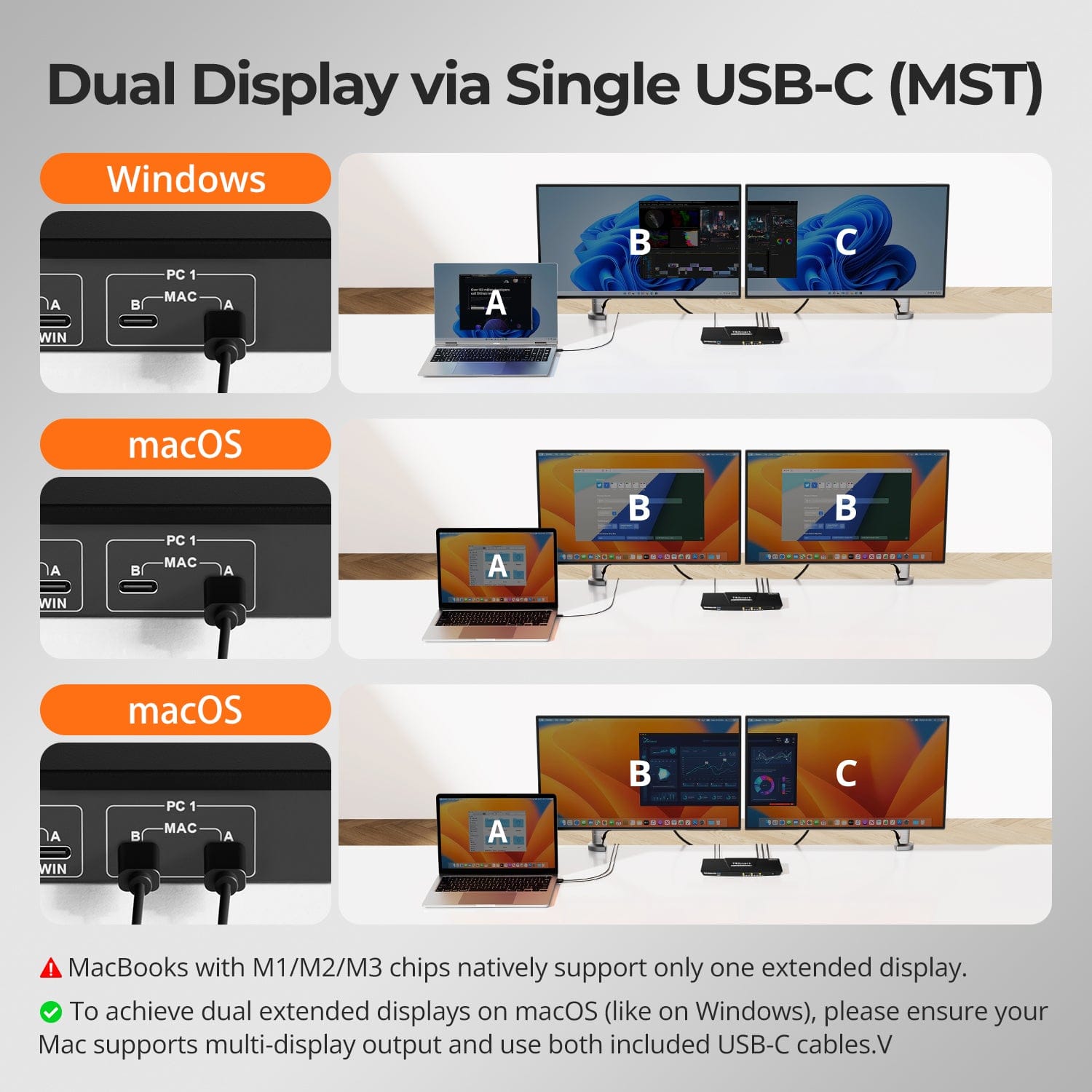
Dual Display via Single USB-C (MST)
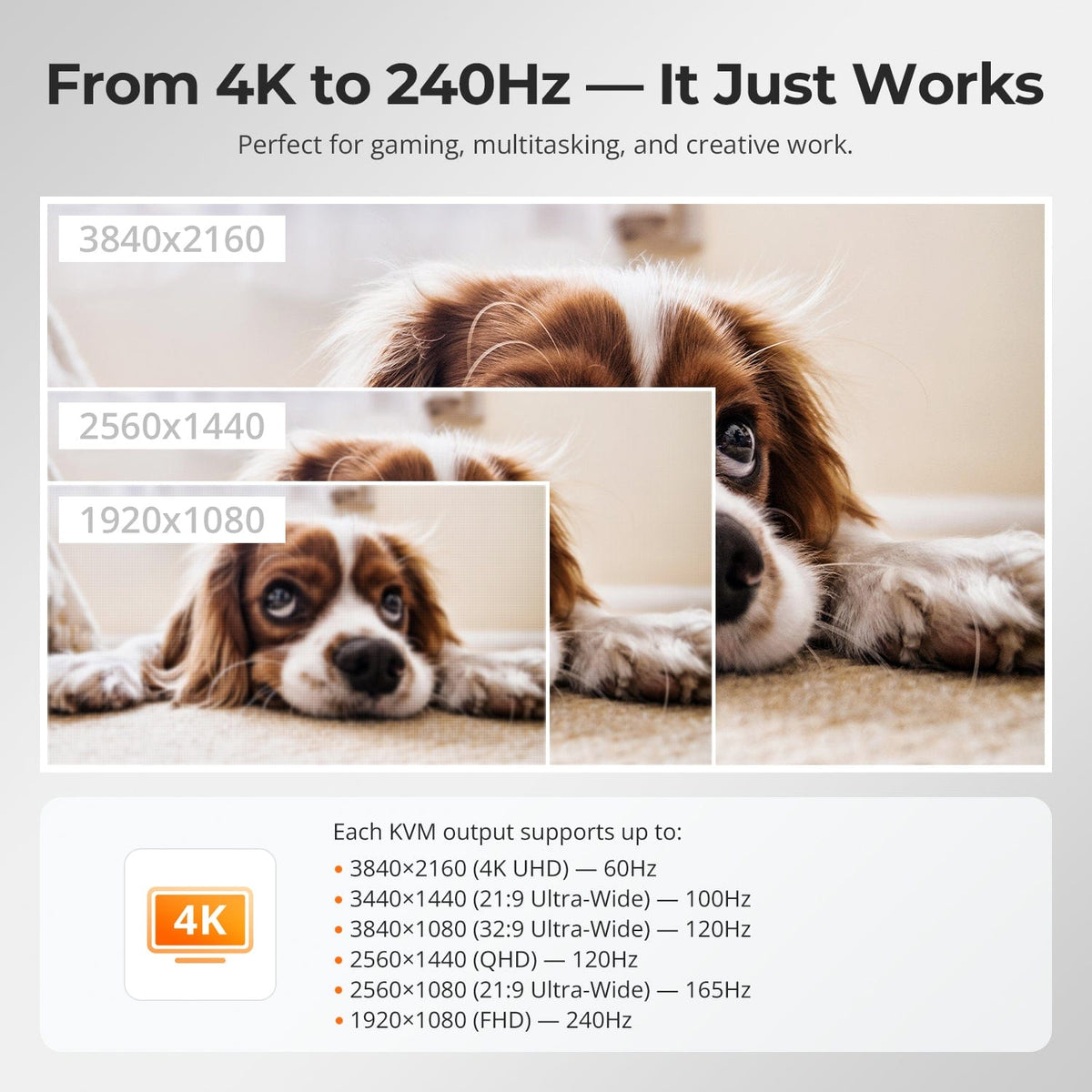
From 4K to 240Hz — It Just Works
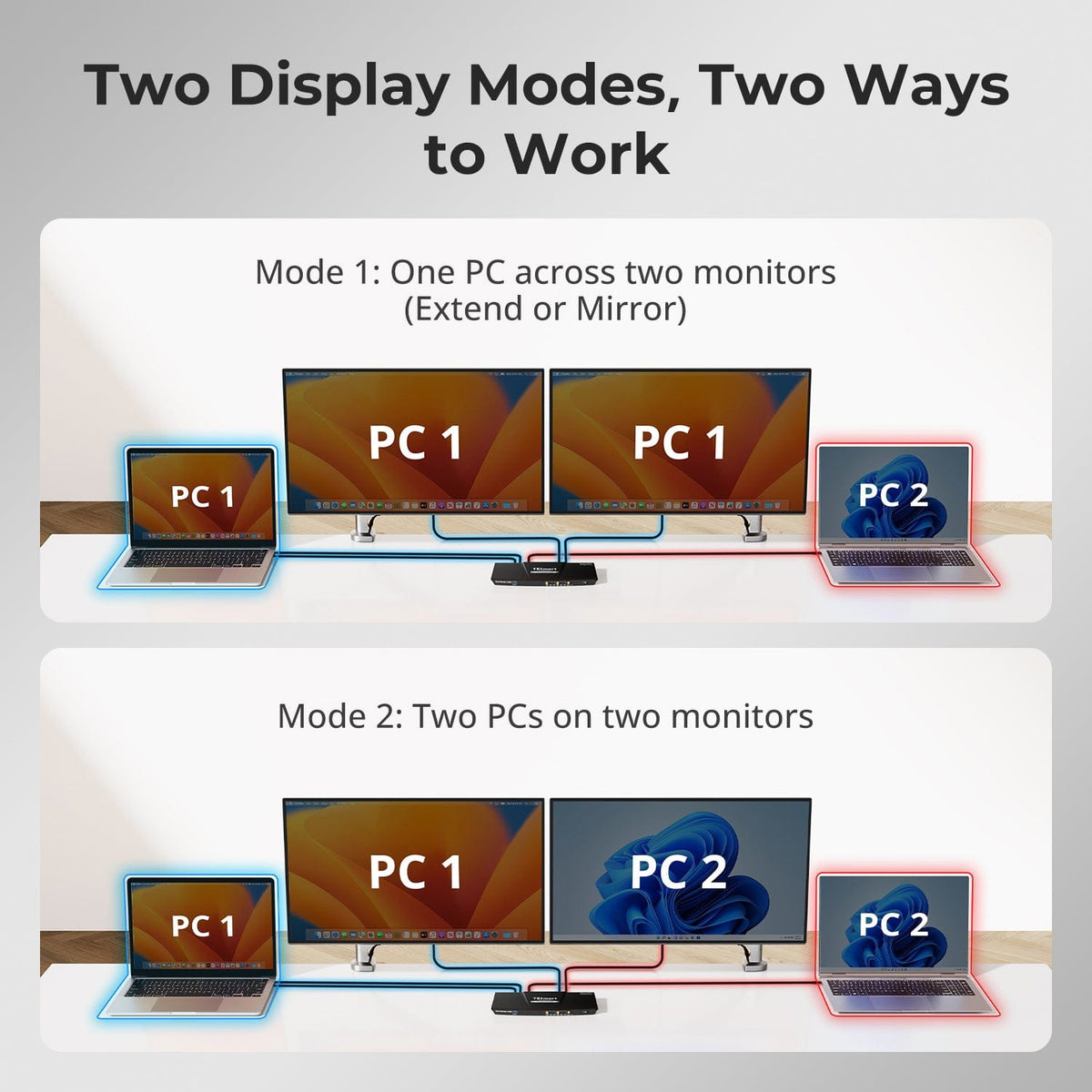
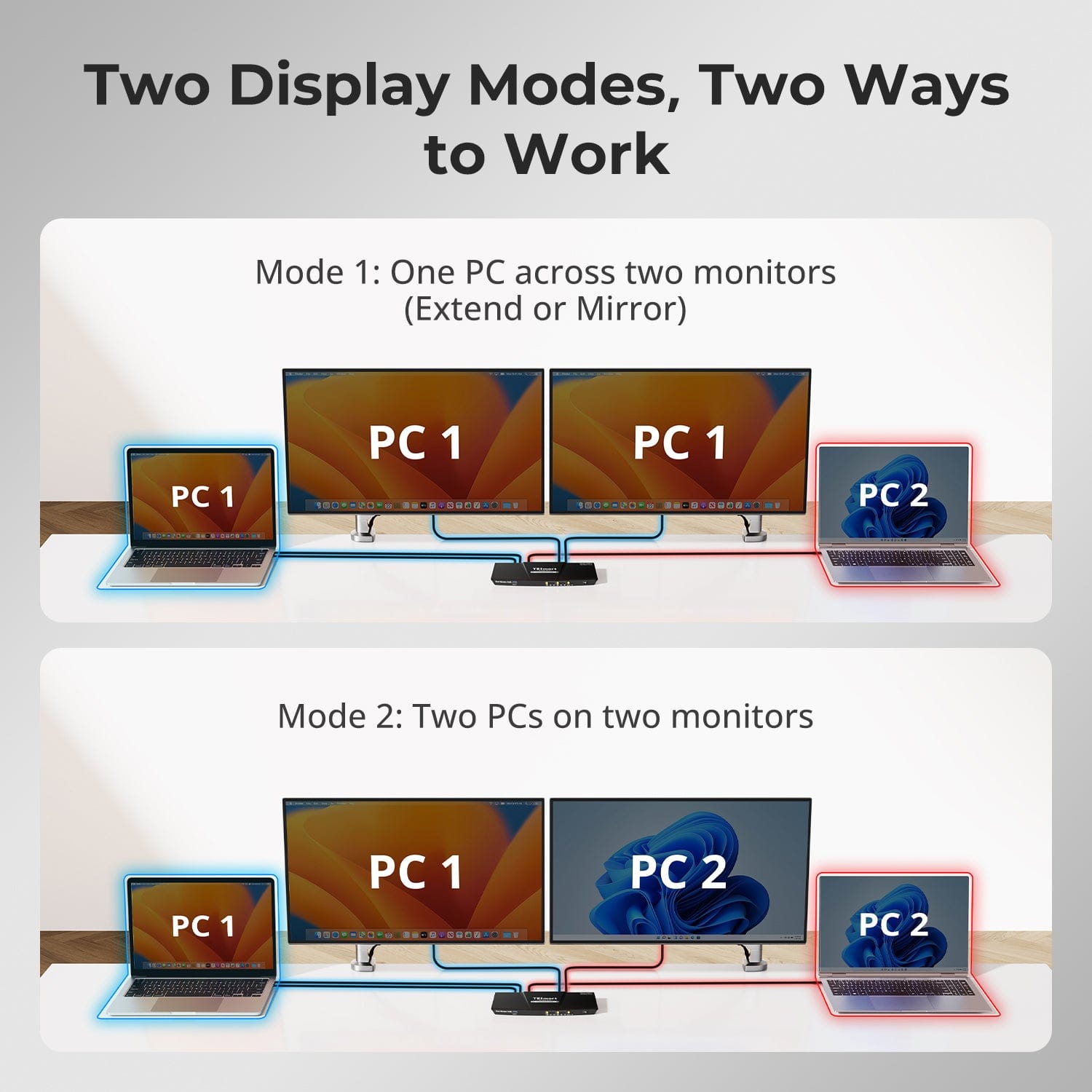
Two Display Modes, Two Ways to Work
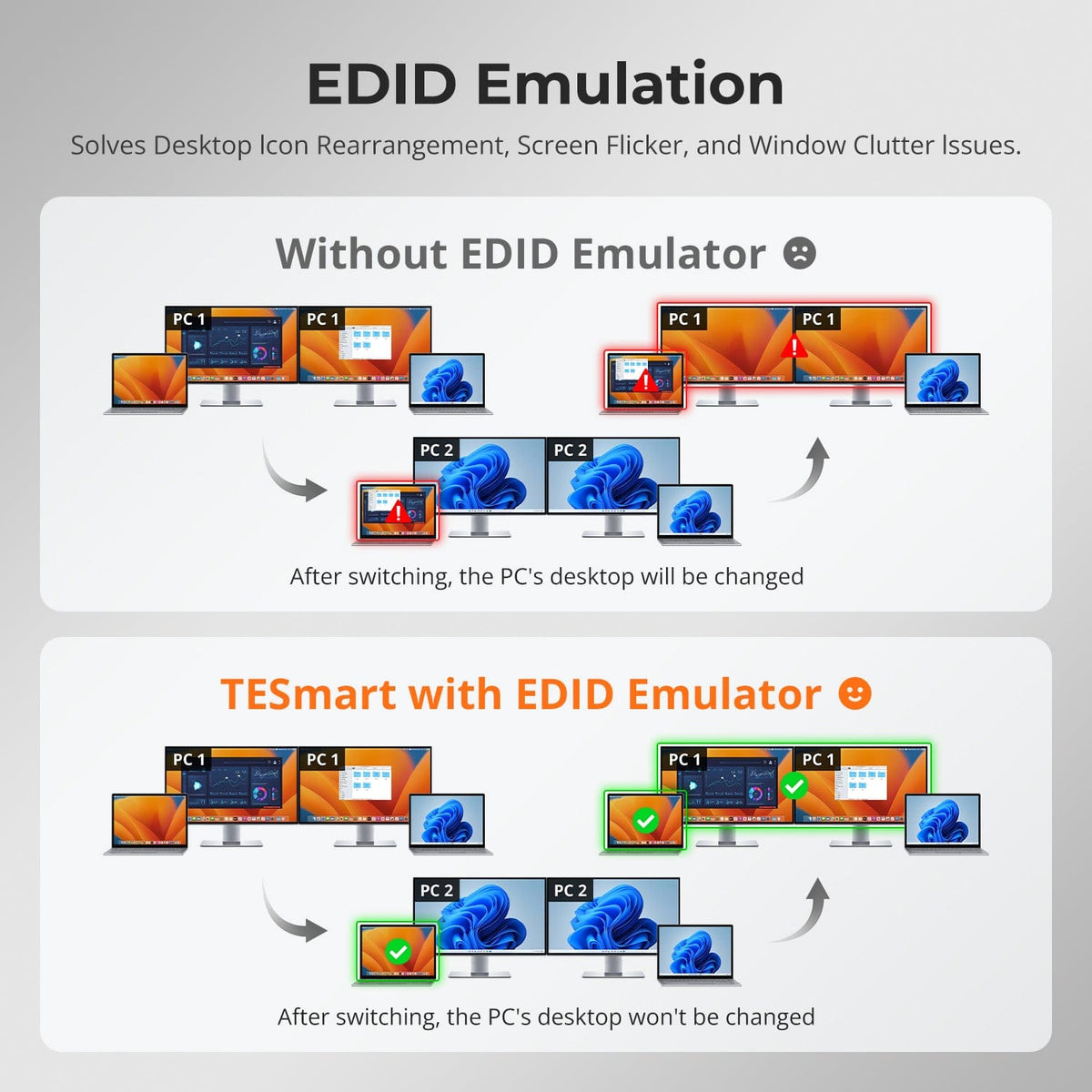
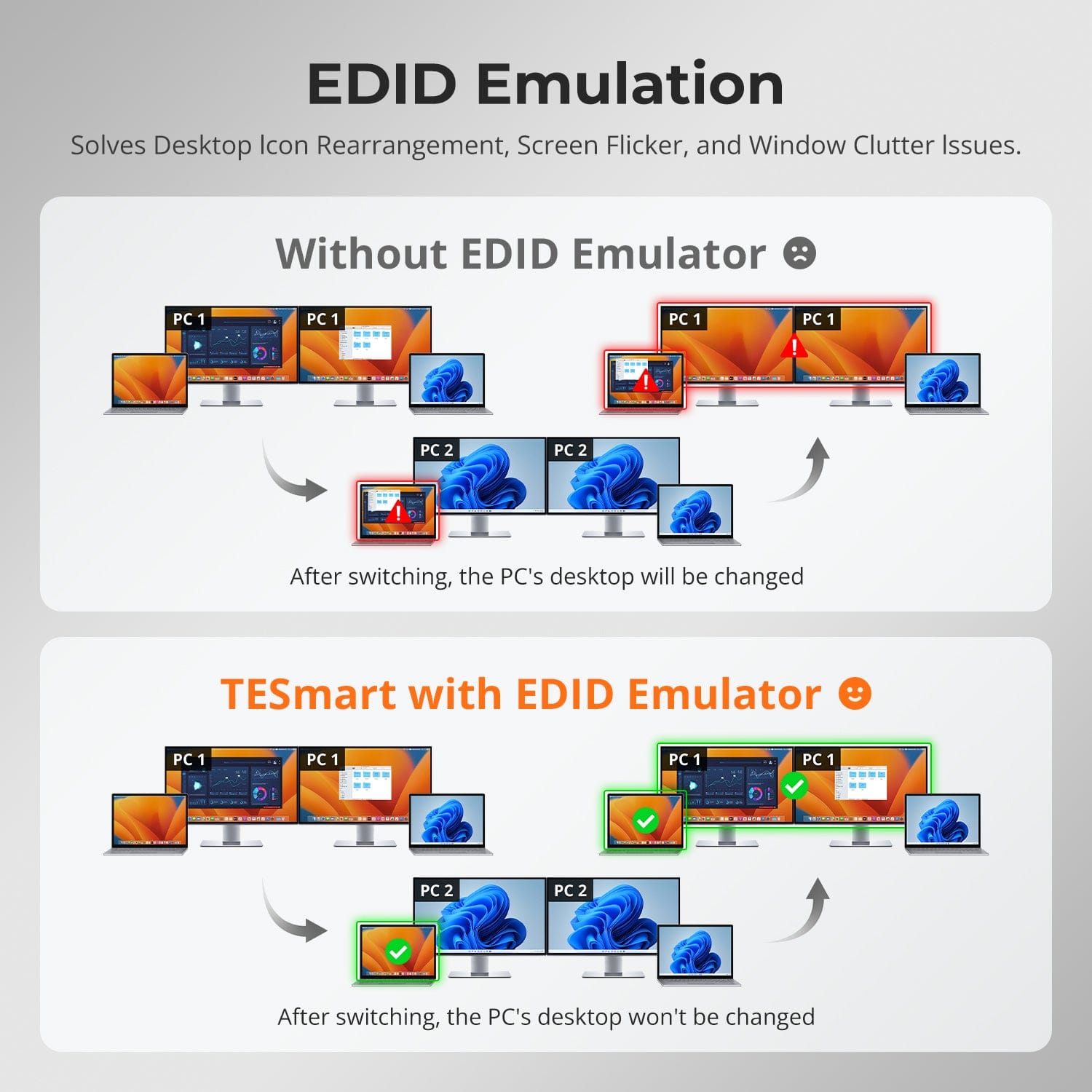
EDID Emulation — Stable Screens, No Surprises
Built-in Shared Docking Station
⚠️ MacBooks with M1/M2/M3 chips natively support only one extended display.
✅ To achieve dual extended displays on macOS (like on Windows), please ensure your Mac supports multi-display output and use both included USB-C cables.
One switch, endless options. Whether for gaming, content creation, or multi-window workflows, our KVM handles a wide range of resolutions and refresh rates with ease.
Each KVM output supports up to:
- 3840×2160 (4K UHD) — 60Hz
- 3440×1440 (21:9 Ultra-Wide) — 100Hz
- 3840×1080 (32:9 Ultra-Wide) — 120Hz
- 2560×1440 (QHD) — 120Hz
- 2560×1080 (21:9 Ultra-Wide) — 165Hz
- 1920×1080 (FHD) — 240Hz
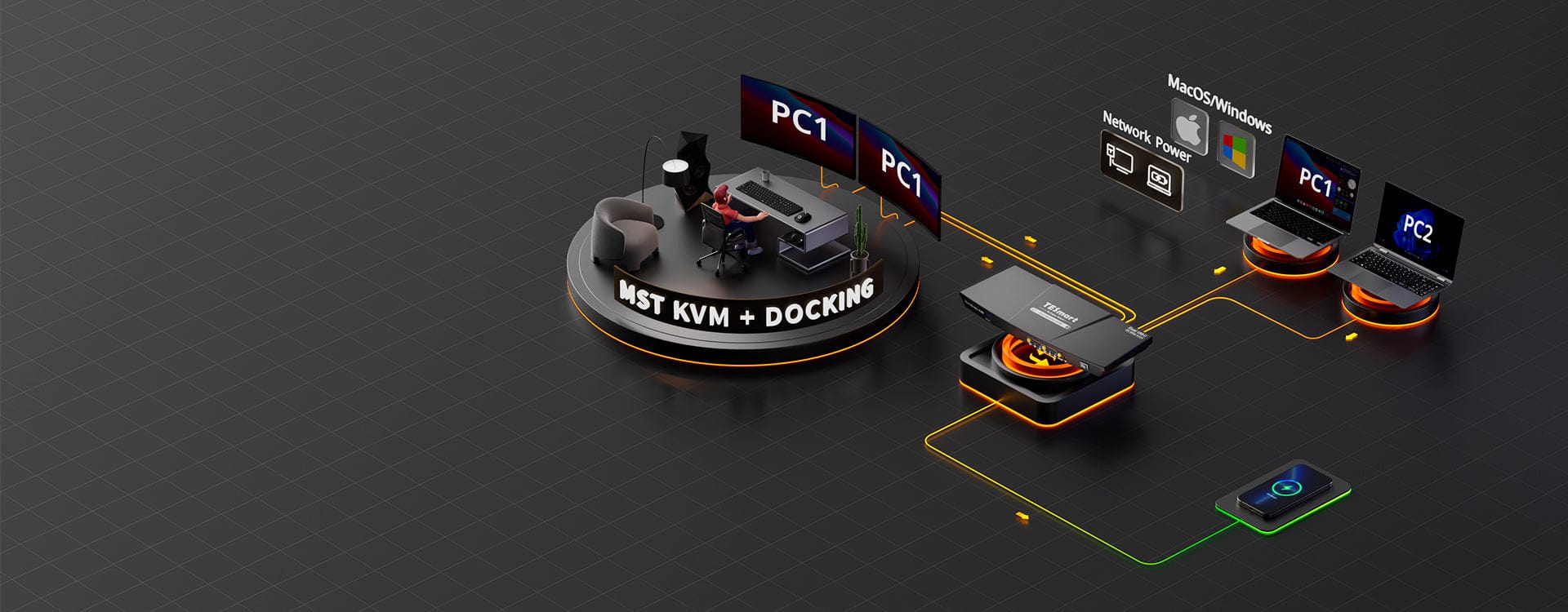
- Mode 1: One PC on Two Monitors (Extend or Mirror)
Extend your desktop across both monitors or mirror your display for presentations. Simply configure in your PC’s display settings — perfect for multitasking or dual-screen workflows.
- Mode 2: Two PCs on Two Monitors
Display two computers side by side — one on each monitor. Use hotkeys to switch the KM focus between them. Ideal for hybrid setups (e.g. Mac + Windows), dev work, or live monitoring.
Switching displays shouldn’t scramble your desktop. Our built-in EDID emulator keeps your layout exactly how you left it.
- No More Icon Mess
Preserves icon positions and window sizes when switching inputs.
- Flicker-Free Switching
Eliminates screen blackouts and flicker caused by display reinitialization.
- Smoother Multitasking
Maintain visual consistency across workstations and monitor setups.
✅ With TESmart EDID emulation: your display stays stable and unchanged — even after switching.
⚠️ Without EDID emulation: icons shift, windows resize, and screen flicker occurs after every switch.
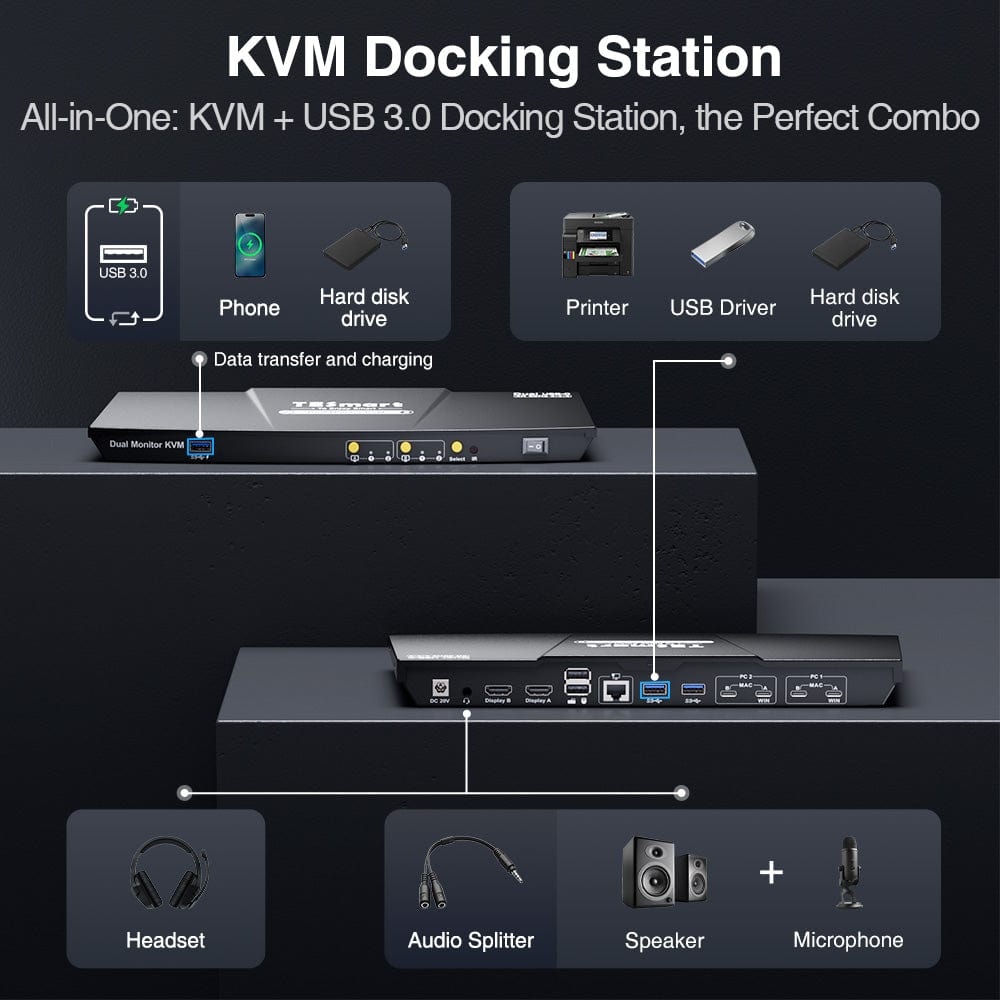
Declutter your desk with a built-in docking station — no extra hubs needed. Share essential ports across all connected devices:
- 60W USB-C PD — Power your laptop while working
- USB 3.0 (5Gbps) — Fast data for drives, webcams, and more
- 1000Mbps Ethernet — Reliable, wired network connection
- Headset Jack — Clear audio input and output for meetings
Perfect for hybrid setups, home offices, and clean cable management.


Easy Switching, 4 Ways
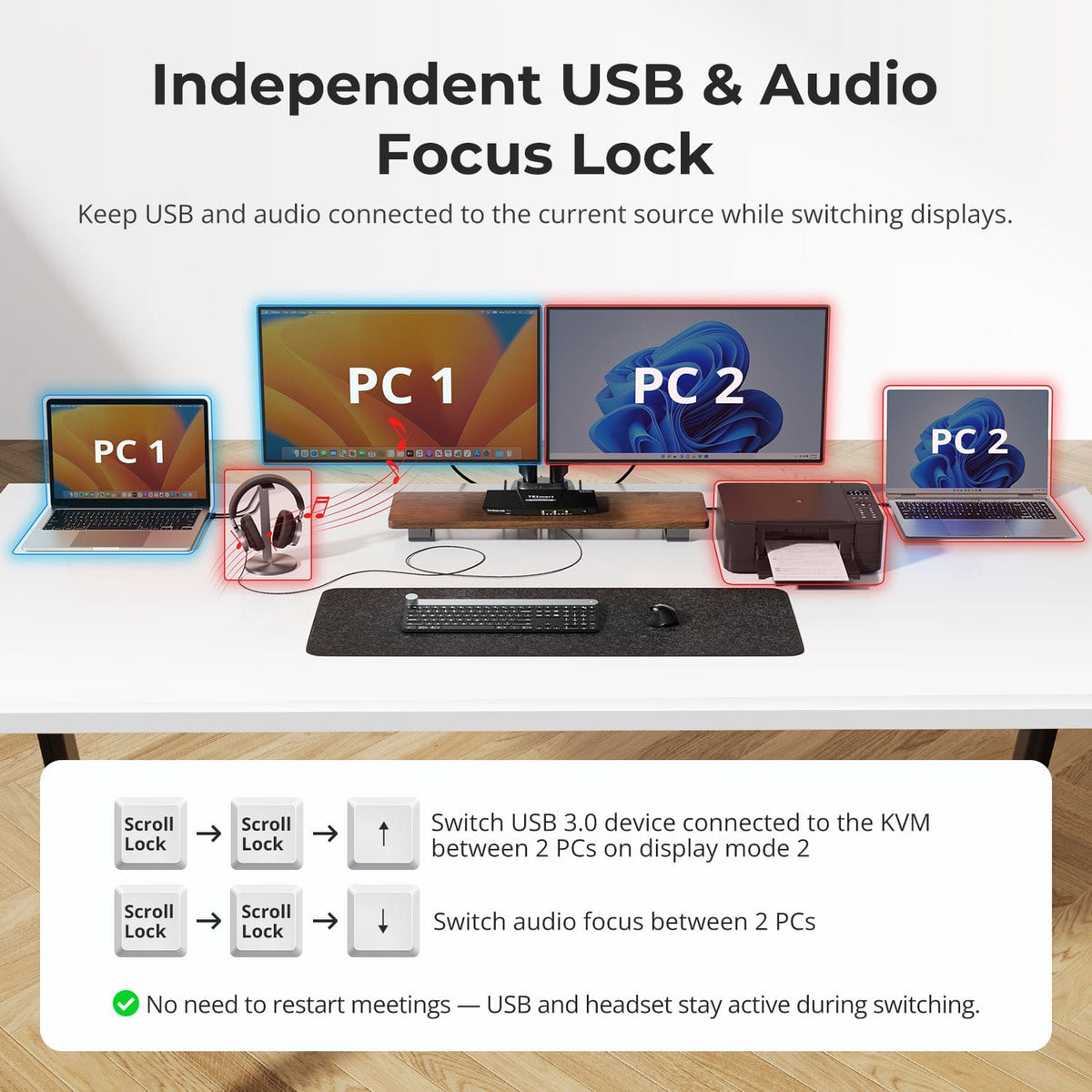
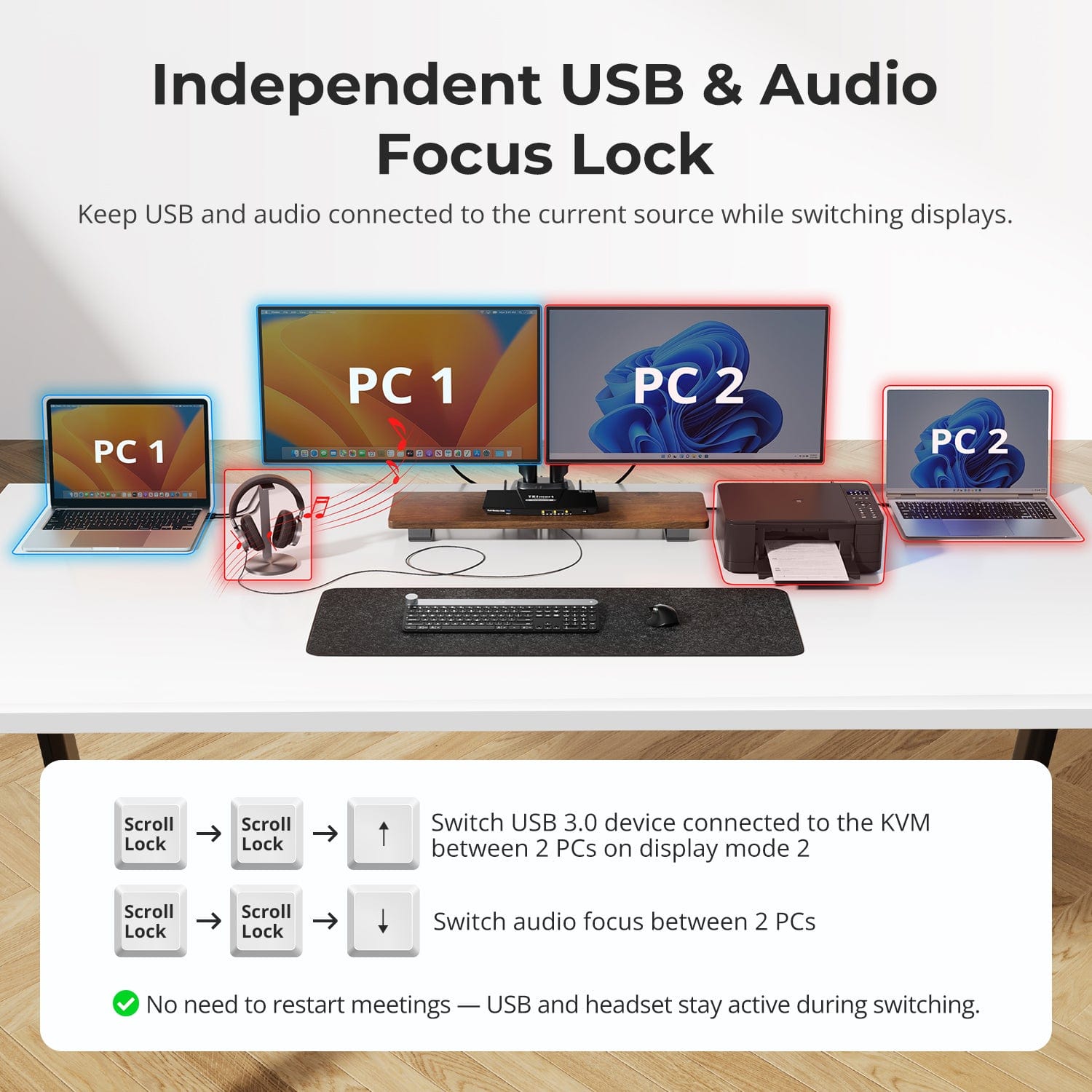
Independent USB & Audio Focus Lock
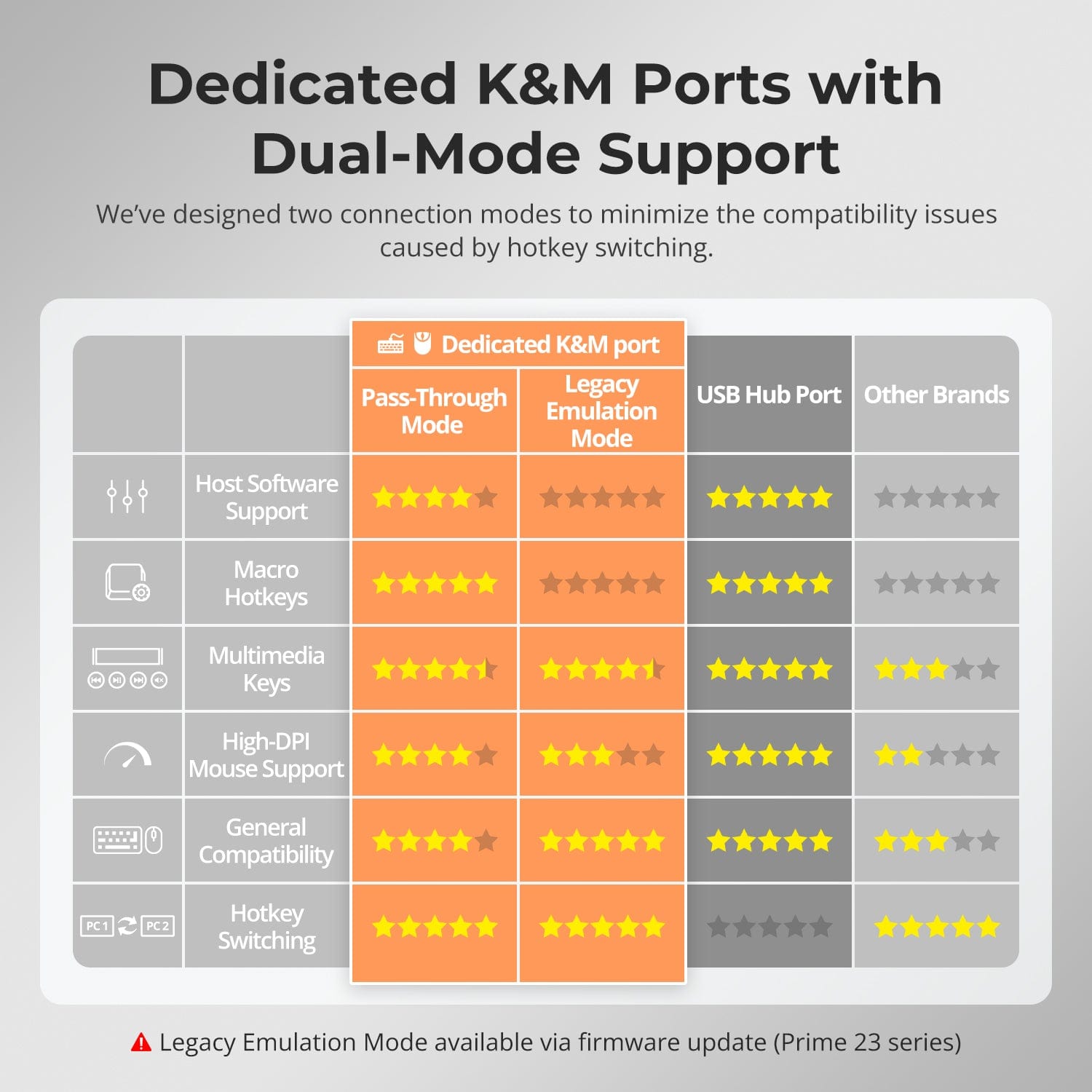
Dedicated K&M Ports with Dual-Mode Support
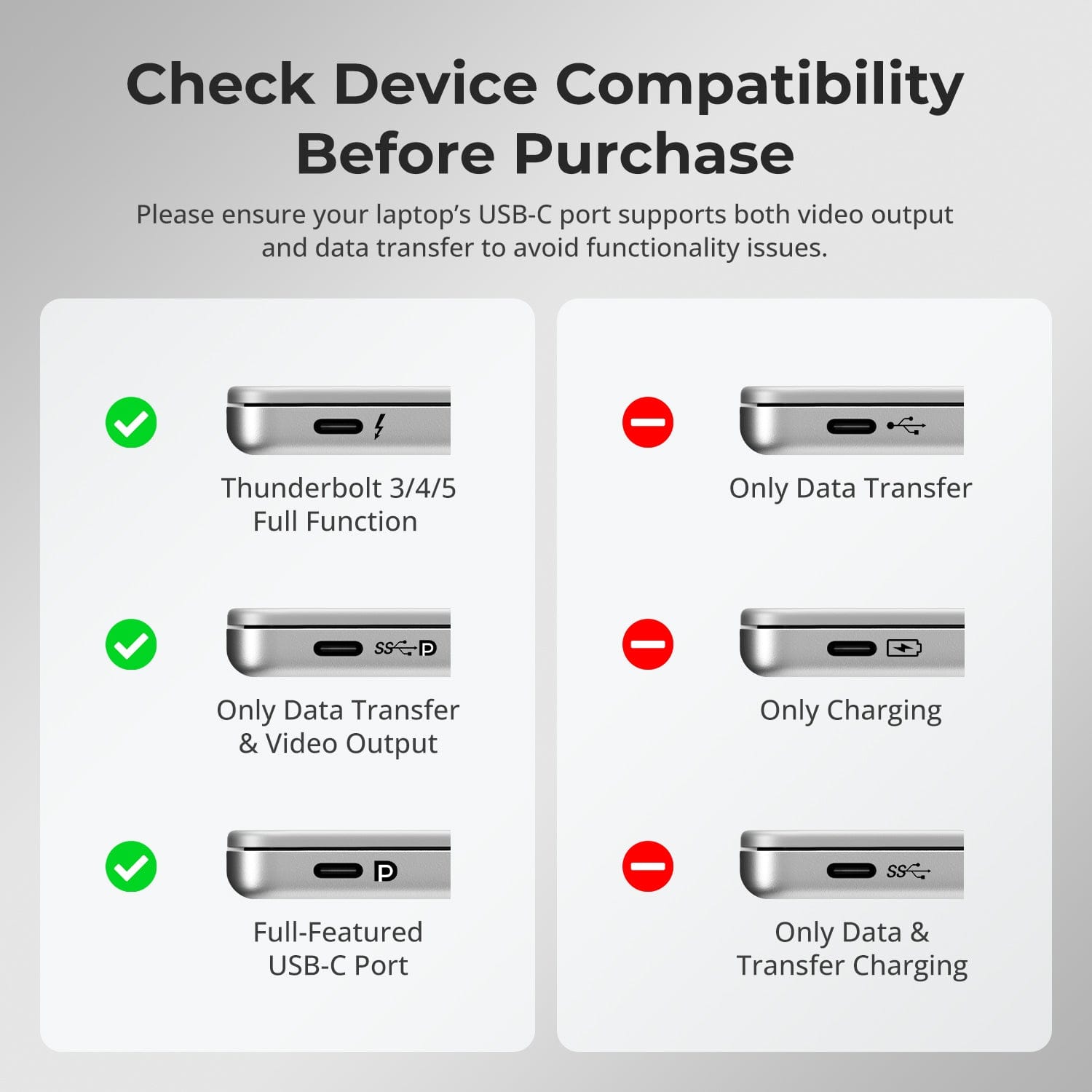
Check Device Compatibility Before Purchase
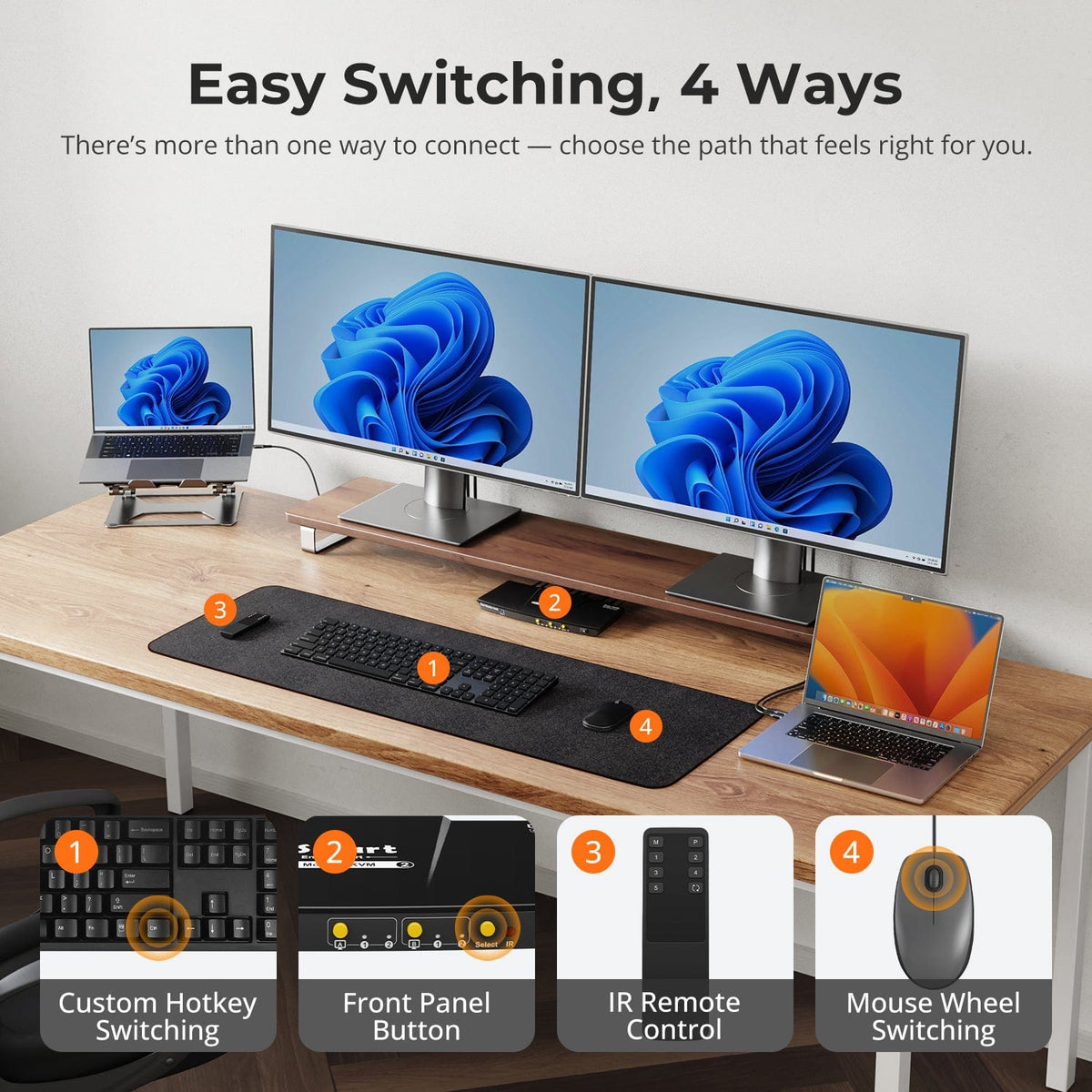
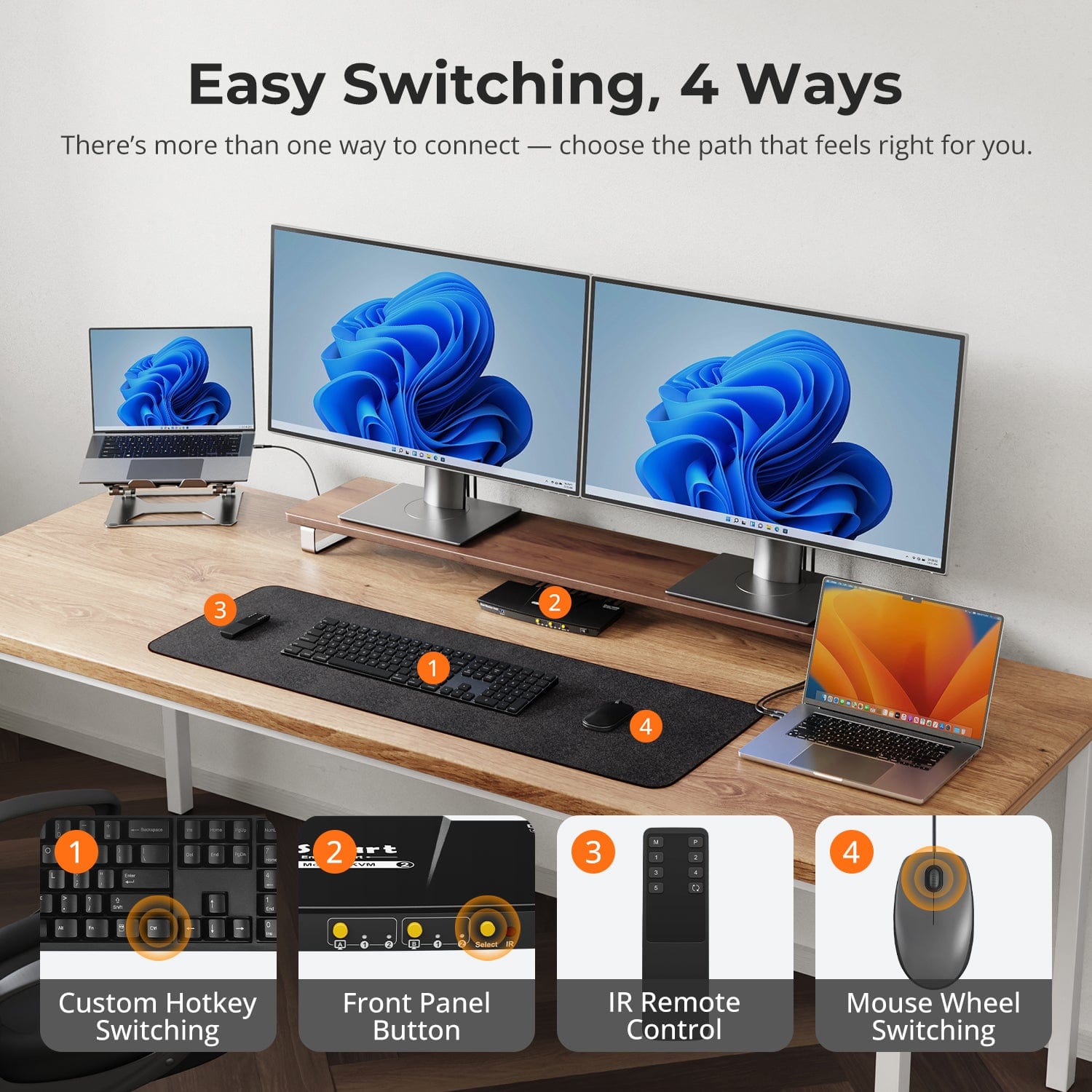
Switching shouldn’t slow you down — we offer four seamless methods to suit any setup or habit:
- Custom Hotkey Switching — Fast keyboard shortcuts for power users
- Front Panel Button — Simple, direct access anytime
- IR Remote — Stay in control from across the desk
- Mouse Wheel — Tap twice for instant switching
Whether you're working, gaming, or presenting — choose the way that works best for you.
Switch displays without interrupting your USB devices or audio.
This KVM lets you lock USB 3.0 and L/R audio focus independently, so your headset, webcam, or external drives stay connected to the current PC — even while switching screens.
Highlights:
- Lock USB and audio separately
- Prevent call or device dropouts
- Lock state remains after reboot
✅ Ideal for meetings, streaming, and multitasking
⚠️ USB focus ≠ keyboard & mouse focus — they switch separately
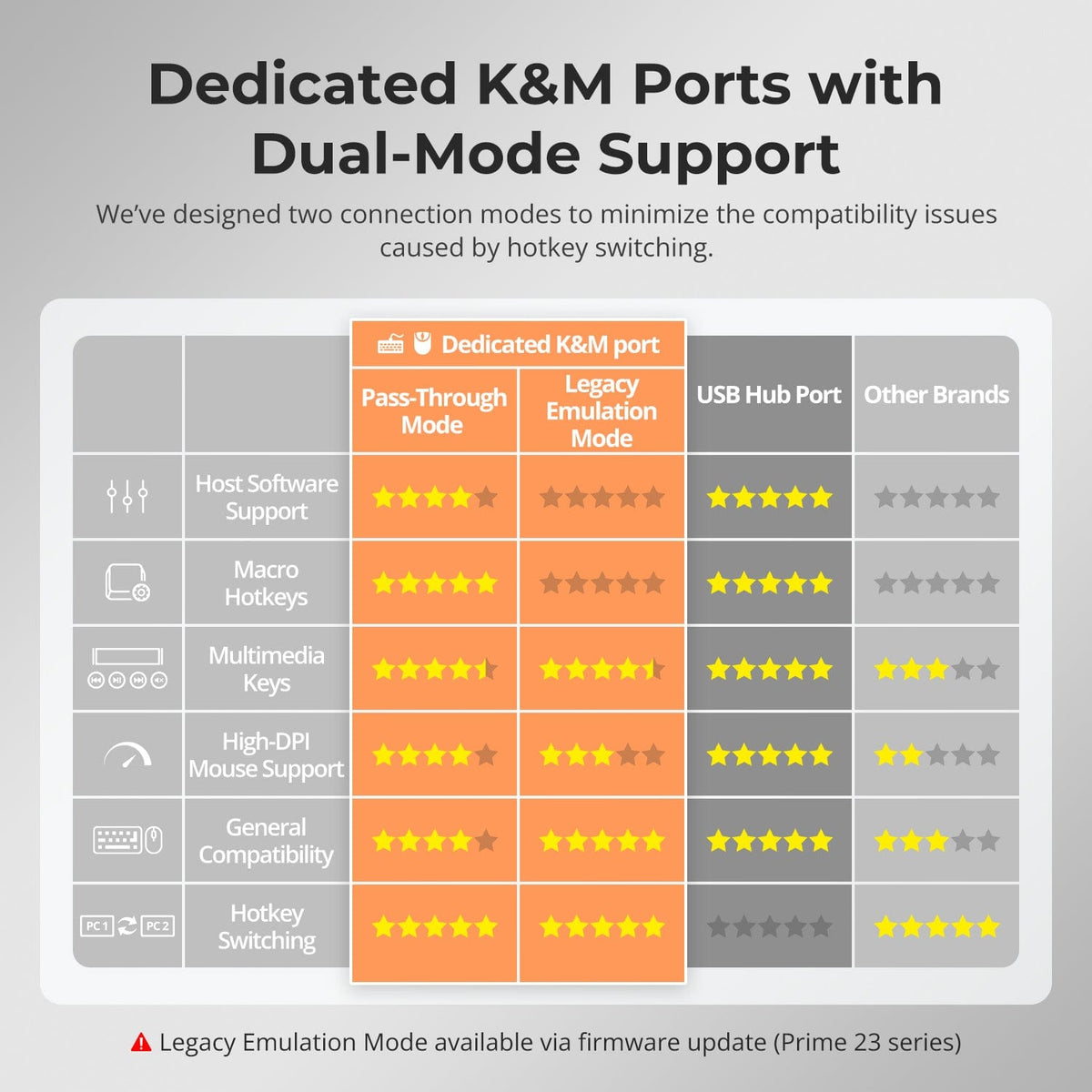
To improve keyboard and mouse compatibility — especially during hotkey switching — we designed two specialized connection modes:
- Pass-Through Mode (Recommended)
Direct passthrough to the PC. Supports advanced drivers, macros, high-DPI mice, and multifunction input devices. Ideal for gaming, design, and pro workflows. - Legacy Emulation Mode
Ensures universal compatibility and stable hotkey functionality across most systems. Best for office or when driver issues occur.
✅ Hotkey commands only work when your keyboard is connected to the dedicated K&M port.
⚠️ Emulation Mode disables driver-based software and advanced features.
⚠️ Bluetooth keyboards/mice are not supported.
⚠️ Legacy Emulation Mode available via firmware update (Prime 23 series)
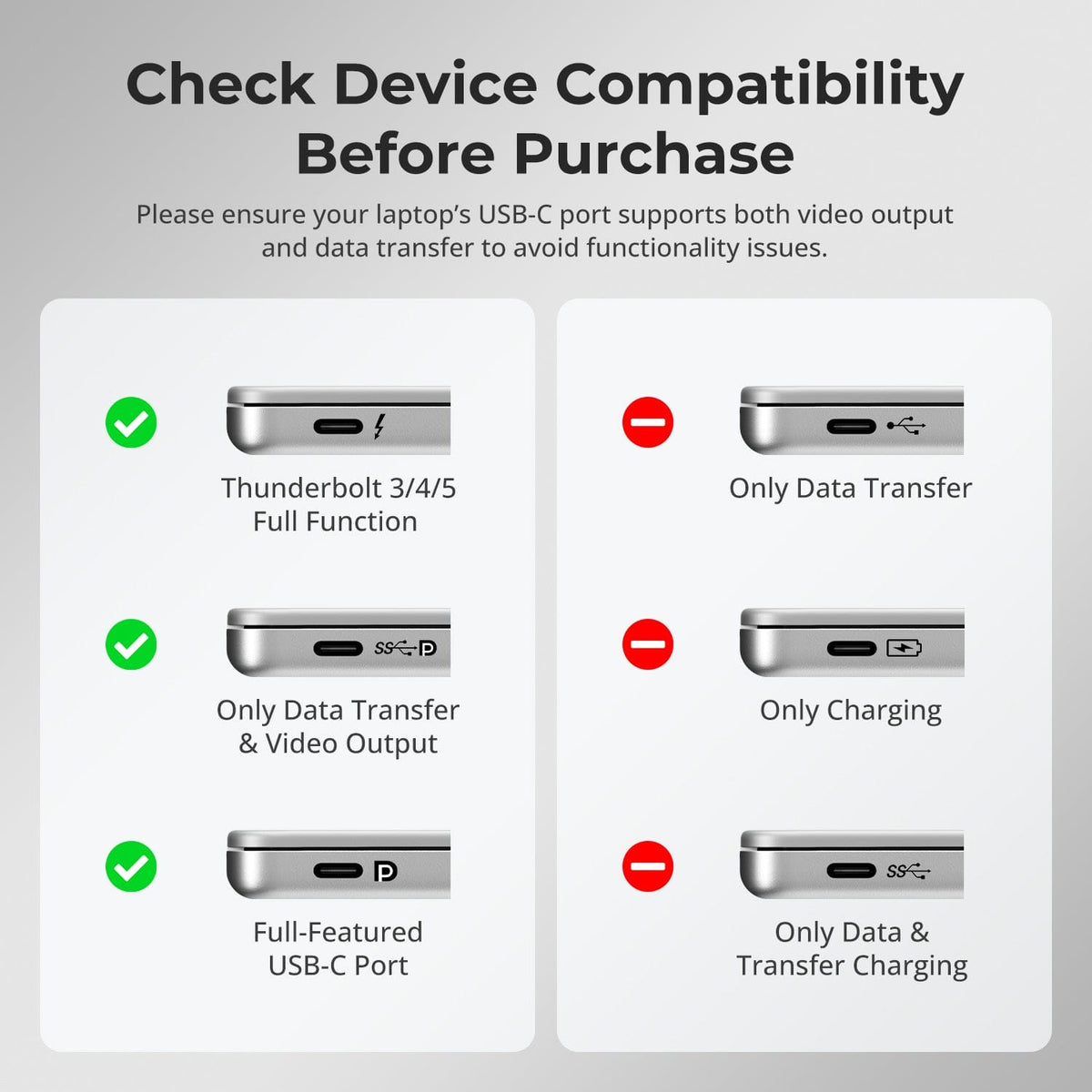
Please ensure your laptop’s USB-C port supports both video output and data transfer to avoid functionality issues.
Looking for a more budget-friendly option?
Certified refurbished units are available for this model — fully tested, guaranteed functional, and offered at a significantly lower price.
FAQs
Does the KVM Switch Support Firmware Upgrades?
Yes, TESmart KVM switches support official firmware upggrades designed to resolve common issues and enhance compatibility.
Important Note:
Firmware upgrades carry inherent risks. Installing an incorrect veersion or performing the process incorrectly may result in device malfunction. Therefore, if your device is functioning normally, it is strongly recommended not to perforrm a firmware update on your own.
If an upgrade is required, please contact our technical support team for:
1) The correct firmware version for your specific model.
2) Step-by-step upgrade instructions.
3) Technical assistance throughout the process.
What to do if video output can work normally, but USB part is not malfunctioning?
- Connect the USB devices to the PC directly bypassing the KVM switch, to check if all USB devices can work normally.
- Make sure that the other types of USB devices are connected to the additional USB 3.0 ports instead of the dedicated K&M ports on the rear panel.
- Pay attention to the total bandwidth occupied by all the external USB devices. The total bandwidth of the USB 3.0 channel on the CKS202-P23 model is 5Gbps, if the total bandwidth occupied by the external USB devices in connection exceeds this upper limit, it will cause the USB devices to be unable to work properly.
- The USB 3.0 port on the front panel supports 7.5W power output, if a USB device that requires more power (e.g. USB mixing consoles) needs to be connected to the KVM, it is recommended that you connect it to the USB 3.0 port on the front panel to ensure it works properly.
What to do if laptop indicates that the charging power is too low?
- Currently the Input A port on the CKS202-P23 supports charging at around 60W; the main reason for limiting the charging power to this standard is due to a combination of factors such as heating concerns that may affect its lifespan. If more charging power needed, you can consider another model as same series, the HDC202-P23, which will provide 60W charging power for the Input 1 port; in the future, we will also release the Plus version of CKS202-P23, which will upgrade to 60W charging power.
What to do if there is no audio output from the 3.5mm audio port?
- For CKS202-P23, the audio signals from 3.5mm audio interface are transmitted through the USB channel. Please confirm if the selected the playback device for audio has been set to "USB Audio" channel.
Does this model support 100M Network card or 1000M Network card?
- Currently this model supports 1000M NIC.
- If you encountered the problem of the USB network interferes with your wired network or wireless WIFI network, you can disable the USB network of the KVM by accessing the network adapter in the computer settings; if you don't have the relevant authority of the working PC, you may need to contact the network administrator to do the operation.
Why Can't My Laptop Access the Network?
- Connection Requirements
1) The KVM Switch relies on ports A of PC1 and PC2 foor network data transmission.Ensure both laptops are securely connected to these ports.
2) Ensure the Ethernet cable is firmly connected to the KVM's LAN port before powering on the KVM Switch.
- Confirm Network Function is Enabled
Enable the feature using the hotkey: [Right Ctrl] + [Right Ctrl]+ [F4].
Note: Enable it will trigger the buzzer to beep twice and disable it will trigger the buzzer to beep
once
-
Recycling & Trade-in
Up to 50% Credit on Recycling
-
Free Shipping
US / UK · 3–5 Business Days
-
30-Day Free Returns
Hassle-Free Return & Purchase Guarantee
-
Extended Warranty: 1+2 Years
Register to unlock 2 extra years of coverage