







HKS202-M24-USBK
HDMI 2.1 Dual 4K144Hz KVM Switch Gaming Dock for 2 PCs & 2 Monitors, w/ ADI Chip, EDID, VRR, FVA, ALLM, and Dynamic HDR
- Regular price
-
$359.00 - Regular price
-
$359.00 - Sale price
-
$359.00
Couldn't load pickup availability
Overview & Key Features
TESmart With You. Evolving For You!
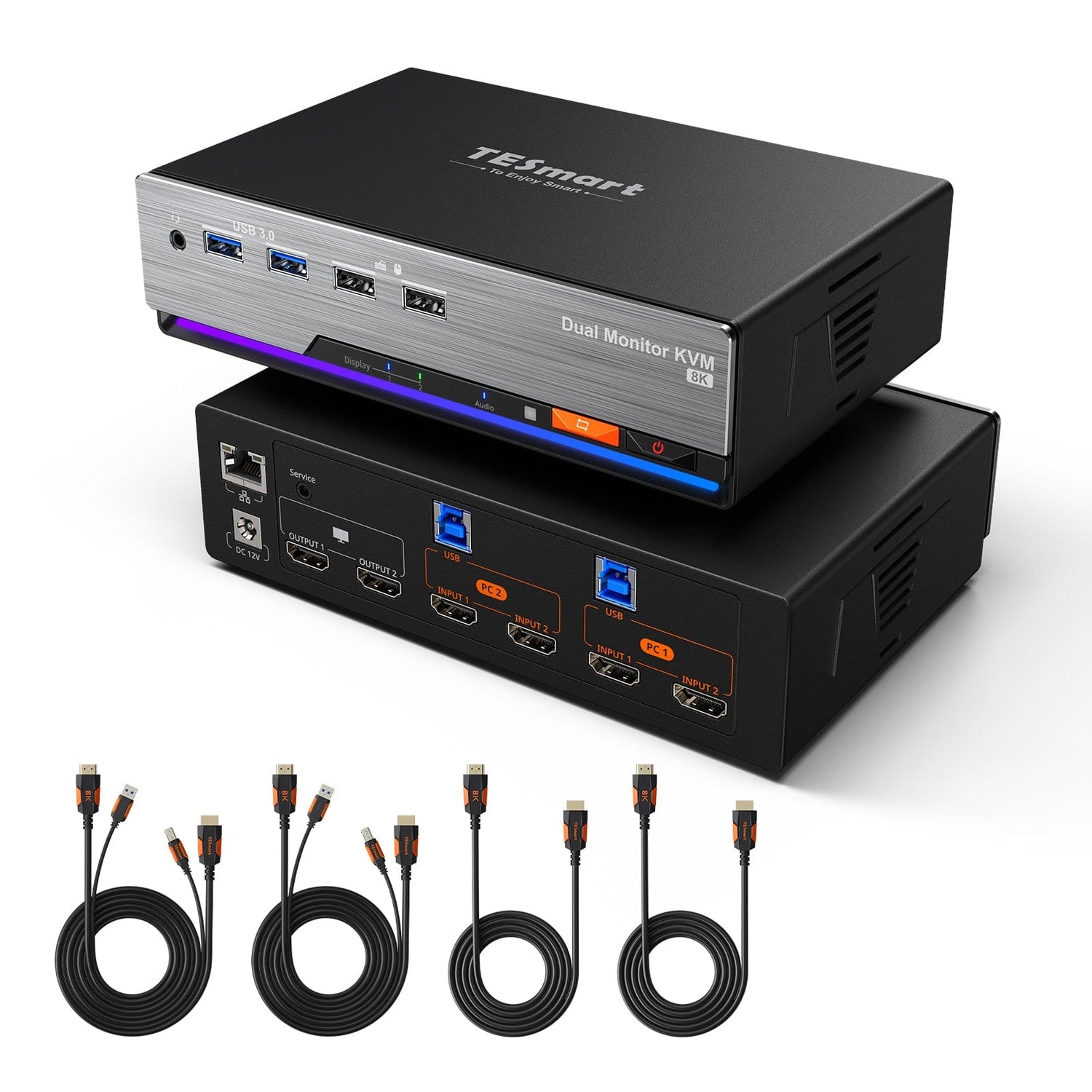
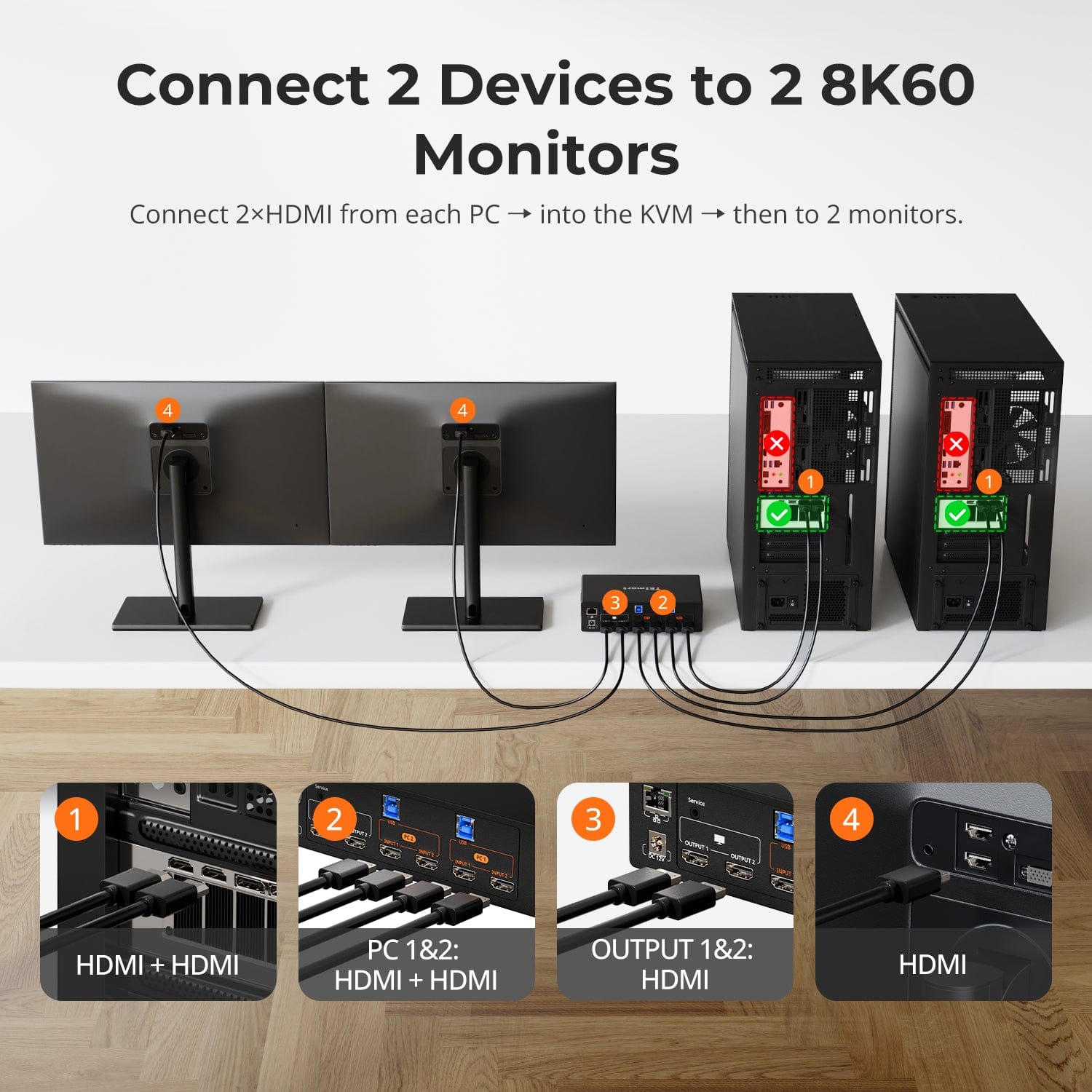
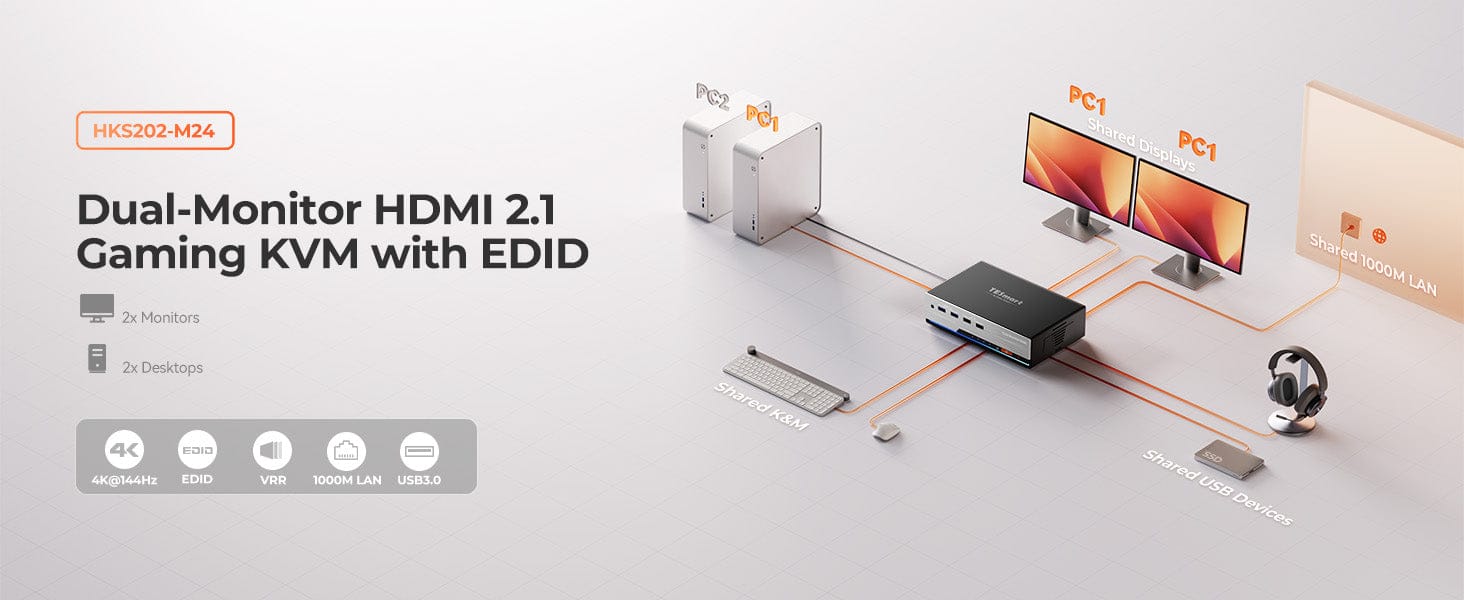
This KVM supports 2pcs & 2 monitors with HDMI 2.1 8K@60Hz lets you say goodbye to screen hassles and take control of your dual-computer setup! Advanced EDID technology ensures no window resets or sudden file pop-ups when switching between computers, while also solving the issue of tangled cables and cluttered desktops. Multiple seamless switching options make it perfect for your diverse needs, whether for work, creativity, or gaming.
Why You'll Love It:
• 8K/4K Perfect Picture Quality: 12-bit color for seamless editing and rendering; 144Hz+HDR for lag-free gaming and smooth performance!
• Single-Cable Networking: Easily share gigabit Ethernet between two computers
• Seamless Switching: Shortcut keys/mouse/buttons/remote control
• Connectivity: Front USB-C port for convenient phone charging + USB 3.0 speed
• RGB Customization: Use shortcut keys to customize
•High Resolution Support: Up to 7680x4320@60Hz with 4:4:4 color format, compatible with
3840x2160@60Hz/ 2560x1440@120Hz /3440x1440@100Hz/ 1920x1080@240Hz.
What's in the box
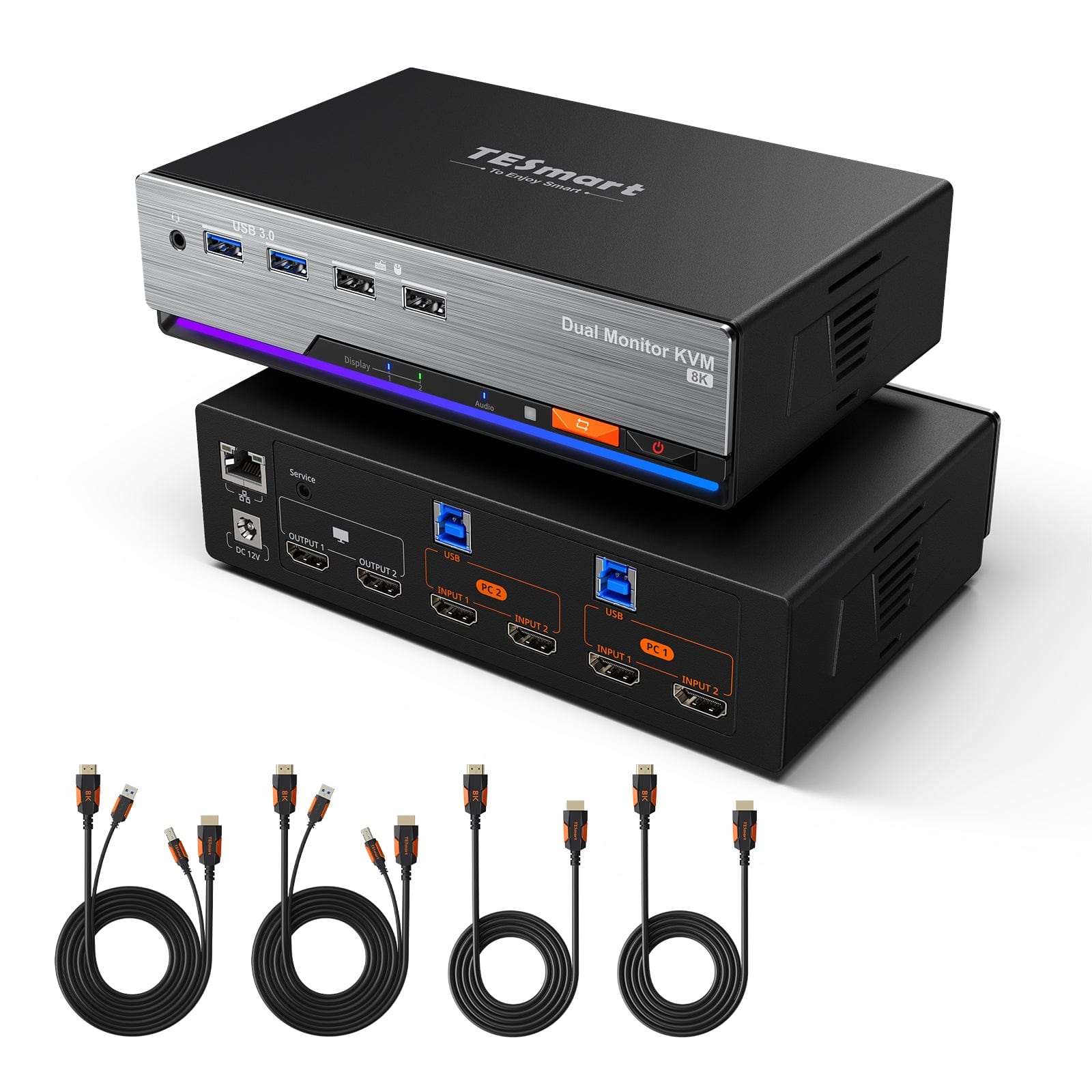
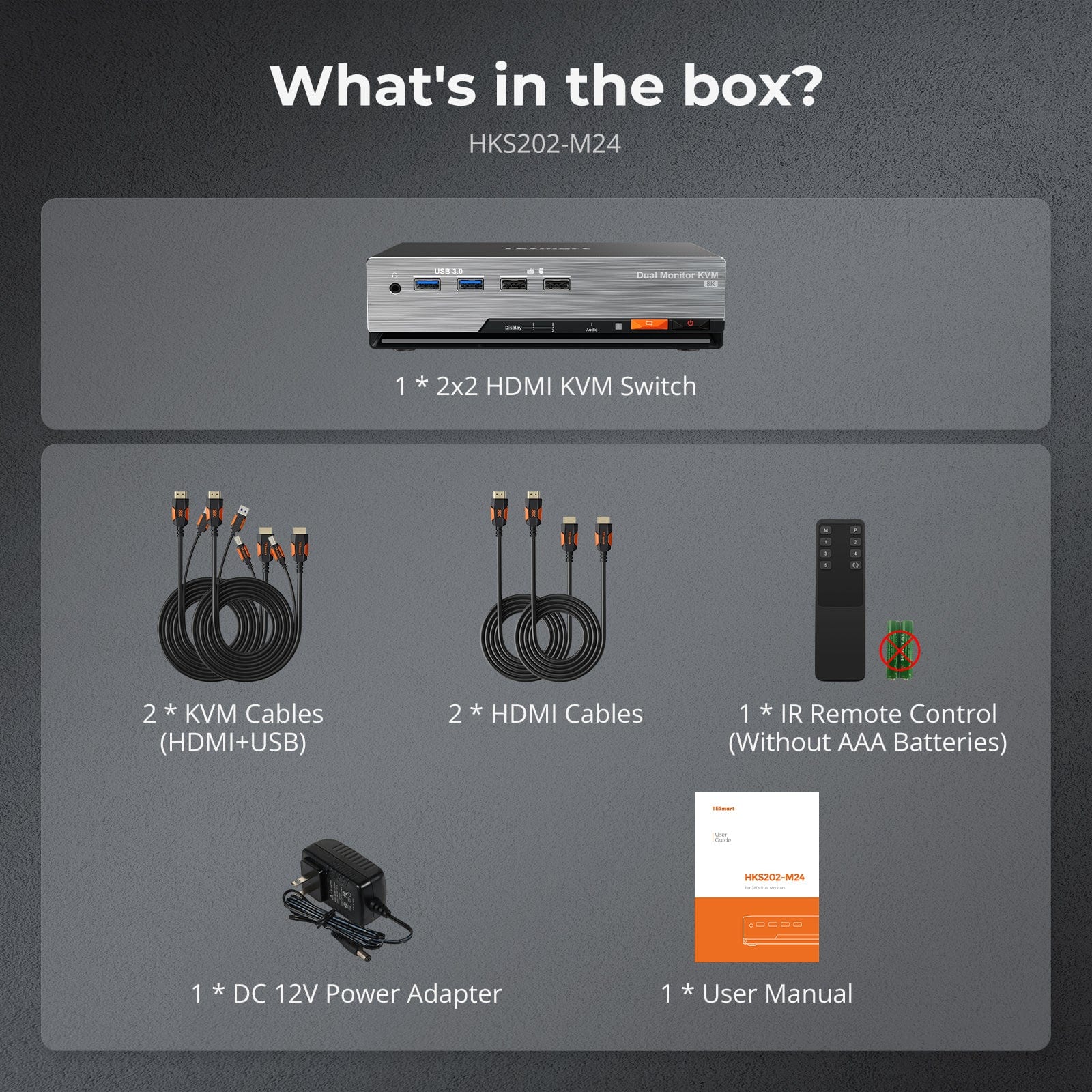
The kvm switch kit comes with complete kvm-to-pcs cables (2 * KVM Cables & 2 * HDMI Cables) for a complete setup.
1 * 2x2 HDMI 2.1 Dual Monitor KVM Switch
2 * KVM Cables
2 * HDMI Cables
1 * IR Remote Control
1 * DC 12V Power Adapter
1 * User Manual
Downloads & Manual

| Country or Region | Estimated delivery time | Freight | postman |
| United States (Contiguous 48 States) | 3-5 working days | Free Shipping | UPS/USPS/FedEx/uniuni |
| U.K. | 3 working days | UPS/DPD | |
| Canada | 3-5 working days | Starting at $20 | Purolator/UPS |
| China (Macao SAR, Hong Kong SAR, Taiwan) | 1-3working days | Starting at $30 | SF Express |
| Australia, New Zealand, Saudi Arabia, United Arab Emirates, Israel, United States (Alaska, Hawaii, U.S. Territories & Military Addresses) | 5-12 working days | Starting at $60 | DHL/FedEx/UPS |
| Singapore, Malaysia, Philippines, Thailand | 5-12 working days | Starting at $30 | DHL/FedEx/UPS |
-
Orders cannot be canceled or modified once placed due to automated processing.
-
If a return is needed, contact service@tesmart.com within 30 days of delivery. Items must be in original condition with all packaging and accessories.
-
Return shipping for non-quality issues is the customer’s responsibility.
-
Products from third-party retailers
-
Items damaged by misuse
-
Order number, proof of purchase
-
Photos/videos (if defective), full shipping address, and phone number
-
Within 30 days: Refunds/returns accepted for both quality and non-quality issues
-
30 days–1 year: No returns/refunds; repair or replacement may be offered
-
1–3 years: No returns/refunds; replacement or Upgrade /trade-in up to 50% discount after 3 months (members only)
- Exclusive to official store customers
- Choose the one that best fits your setup
- ❗ Pick only one: a free accessory or an event discount (cannot combine both)
- Select your KVM.
- Pick 1 free accessory in the section below (you can change it if you like).
- Add to cart and check out together.
The return and refund policy process overview is shown below. For the full policy, please refer to the Full Policy page below.

1.Order Cancellation & Modification
-
To ensure timely delivery for every customer, TESmart’s order and shipping system is fully automated. Most orders are processed and dispatched within a few hours, and always within 24 hours depending on warehouse workload. Customers may cancel an order at any time before it ships, including within our 30-day cancellation window. Once an order has shipped, it can no longer be canceled or modified.
-
Please kindly contact us within 30 days of delivery at service@tesmart.com, If you wish to return a product after receiving it, ensure the product and packaging are undamaged and in original condition.
-
⚠️ Return shipping costs for non-quality issues are the responsibility of the customer. For more details, please kindly see below.
2.Return Process
2.1 Return Conditions:
-
Products must be returned in original packaging, including all accessories, manuals, and documentation.
2.2 Items Not Eligible for Return:
-
Products purchased from third-party retailers.
-
Products damaged due to misuse or improper handling by the customer.
2.3 Return Request:
-
Order number
-
Proof of purchase
-
Photos or videos of the defective product (to speed up processing)
-
Full shipping address
-
Contact phone number
2.4 Processing Time:
-
Our support team will respond to your return request within 48 hours and provide the return warehouse address in your country/region.
-
For certain countries/regions (e.g., the U.S., Germany, and the EU), we may provide a prepaid return label after confirming your address to expedite the return/refund process.
2.5 Return Address:
- Please contact our customer service at service@tesmart.com before returning the product. Once confirmed, you may send the item to the designated TESmart return warehouse.
- Unit 108, 8333 Rochester Ave
STX-X166
Rancho Cucamonga, CA 91730
United States
2.6 Warehouse Inspection:
-
Upon receipt, TESmart will inspect the returned item(s).
3. Refund Process
3.1 Refund Trigger:
-
Once the returned product is received and inspected by our warehouse, the refund process will begin.
3.2 Refund Timeframe:
-
Refunds will be processed within 5 business days after the return is received.
3.3 After-Sales Categories:
3.3.1 Within 30 days of delivery:
-
The product is in its original packaging with all accessories.
-
Return photos are provided before shipping.
-
Non-quality issues: Return and refund supported within 30 days. Return shipping is the customer’s responsibility.
-
Quality issues: Return and refund supported within 30 days. Return shipping is covered by TESmart.
3.3.2 From 30 days to 1 year after delivery (warranty period):
-
Return/refund not supported. Please email service@tesmart.com to contact our after-sales support team.
-
After evaluation by our technical team, we may offer product repair or replacement with the same model.
-
To ensure timely service, we prioritize replacements.
3.3.3 From 1 to 3 years after purchase (for VIP Members) :
-
Return/refund not supported.
-
You may contact our after-sales support team for replacement of the same model.
-
If you wish to upgrade the product after 3 months from purchase, members may Upgrade & Trade-in up to 50% discount off the original order’s paid amount toward your new purchase.
For detailed terms and conditions, please visit: https://www.tesmart.com/pages/tesmart-id-trade-in
4. After-Sales Support & Issue Resolution
4.1 Contact Information:
-
For any questions or support requests, please contact TESmart Customer Service: 📧 service@tesmart.com
4.2 Delayed Refunds (if you haven’t received a refund after 5 business days):
-
Check your bank account (ensure it is the one used for the purchase).
-
Contact your card issuer (credit/debit card providers may experience processing delays).
-
Contact your bank to confirm the transaction status.

Tech Specs
| Product Attribut | |
|---|---|
Model (SKU) |
HKS202-M24-USBK
|
Compatible Setup |
|
Max Resolution |
|
Supported Resolutions |
|
VRR (Variable Refresh Rate) |
|
MST (Multi-Stream Transport) |
|
Laptop Charging |
|
Network Port |
|
Independent Audio Focus Switching |
|
Independent Audio Focus Locking |
|
Thunderbolt 4 Ports |
|
EDID Emulation |
|
Switching Methods |
|
Assignable Hotkeys |
|
Legacy Emulation Mode |
|
Input Ports |
|
Output Ports |
|
Docking Ports |
|
Display Modes |
|
Manual (PDF) |
|
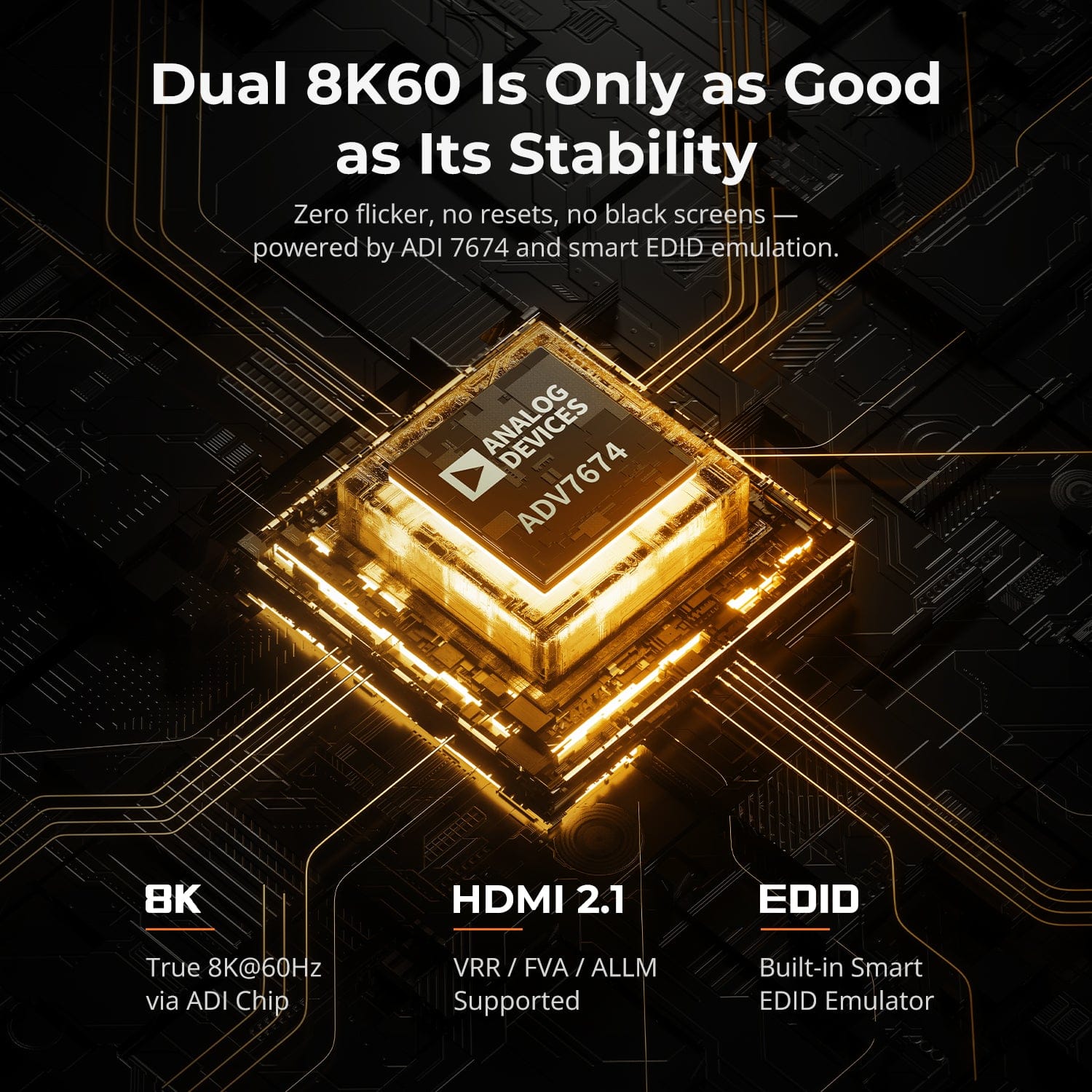
Dual 8K60 Is Only as Good as Its Stability
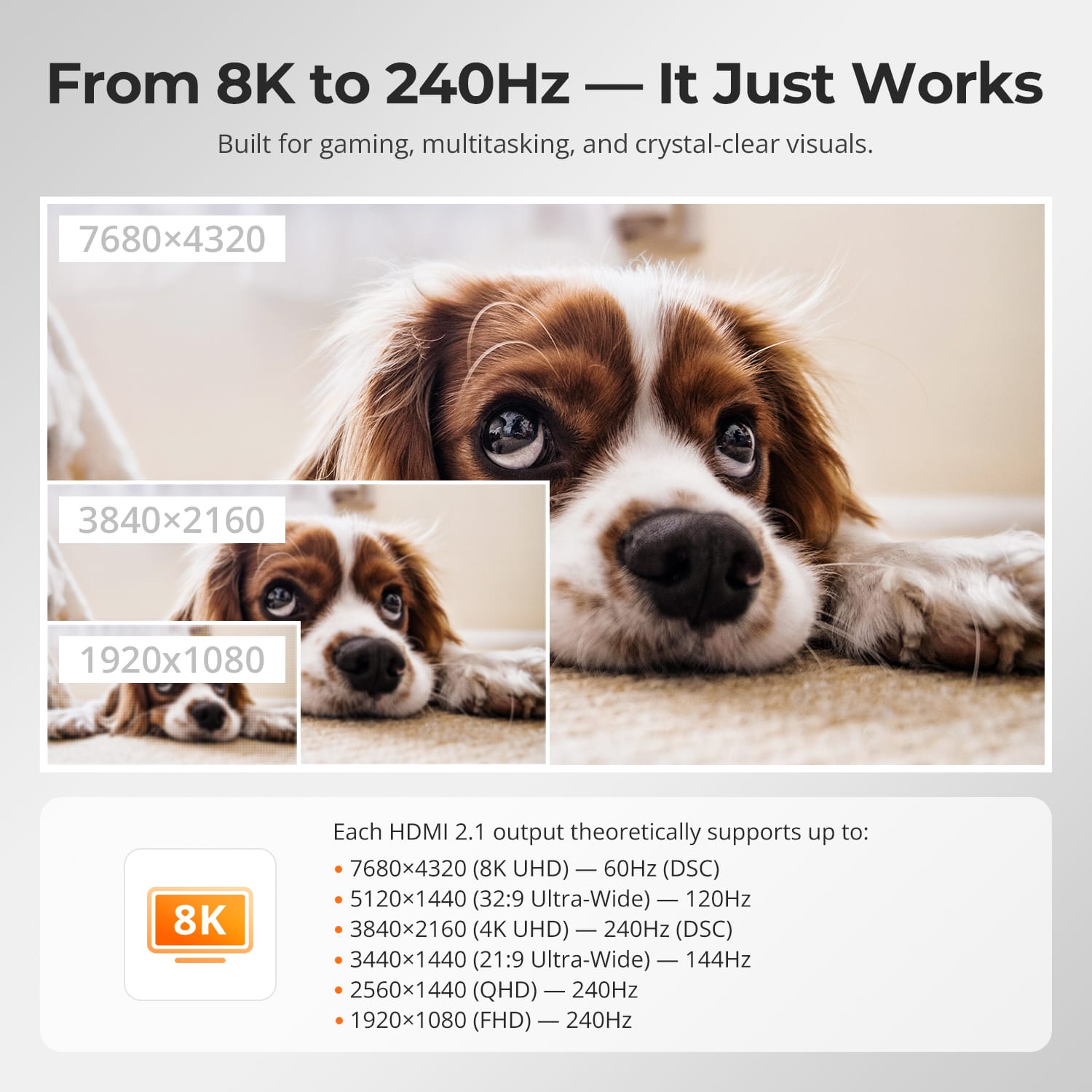
From 8K to 240Hz — It Just Works
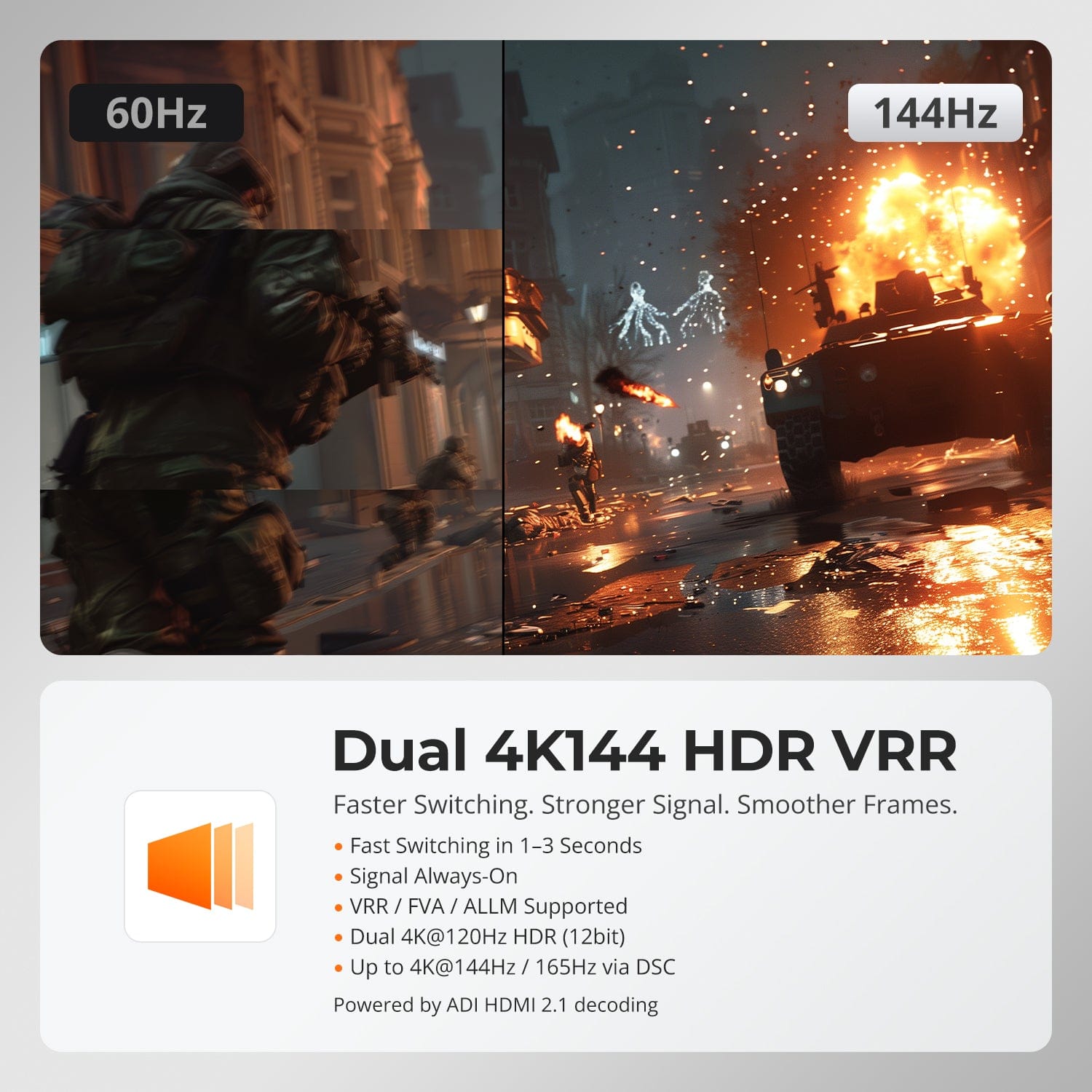
Dual 4K144 HDR VRR
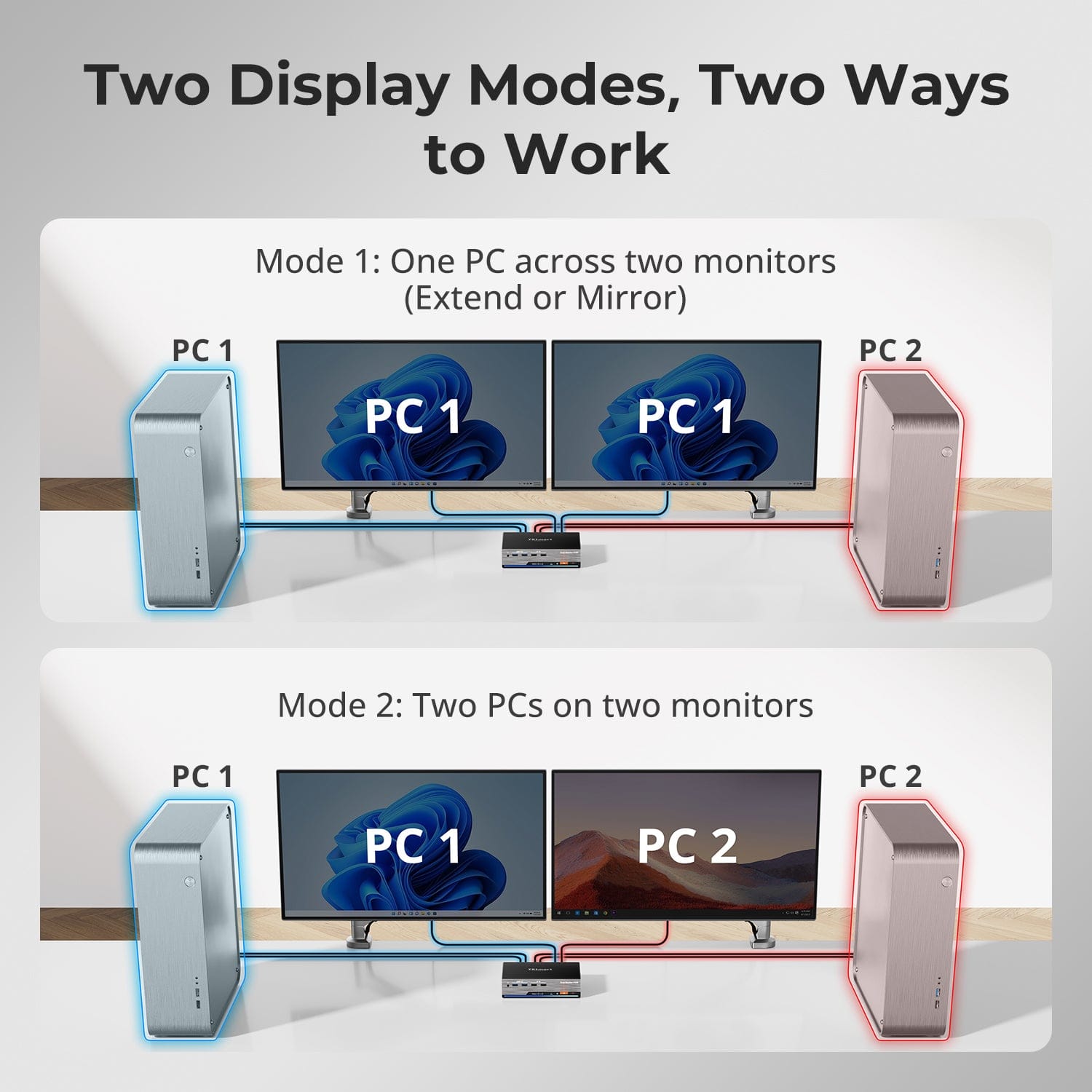
Two Display Modes, Two Ways to Work
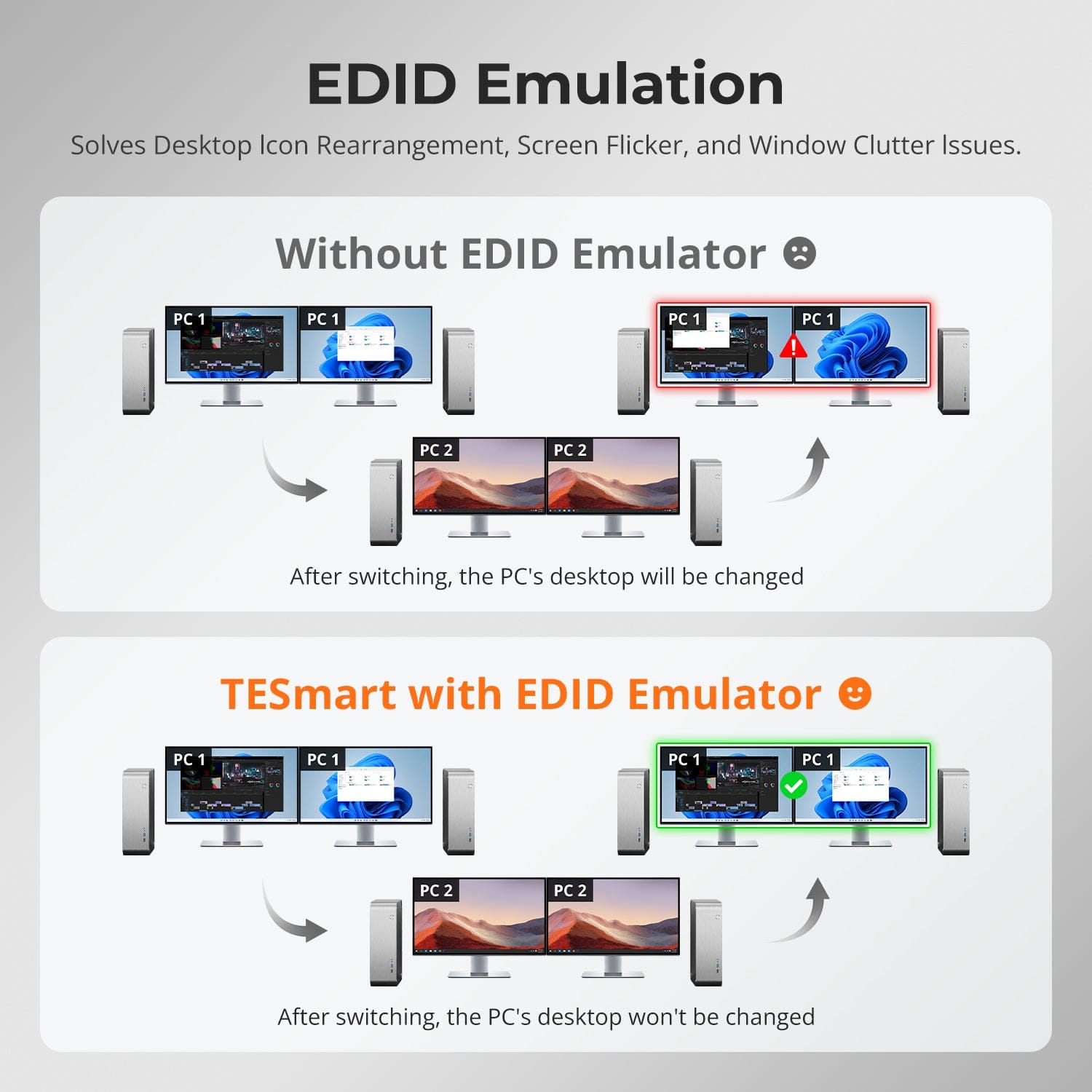
EDID Emulation — Stable Screens, No Surprises
Zero flicker. No resets. No black screens.
Powered by ADI 7674 decoding and advanced EDID emulation, this KVM ensures stable multi-monitor output even under high bandwidth loads.
Why it’s built different:
• ADI 7674: industry-grade HDMI 2.1 decoding
• Smart EDID: signal always-on, no display loss
• VRR / FVA / ALLM supported for smooth, tear-free gaming
• Ideal for high FPS gaming and critical creative workflows
Built for smooth gameplay, creative workflows, and ultra-clear visuals. With HDMI 2.1 and DSC, our KVM supports extreme resolutions and high refresh rates across a wide range of displays.
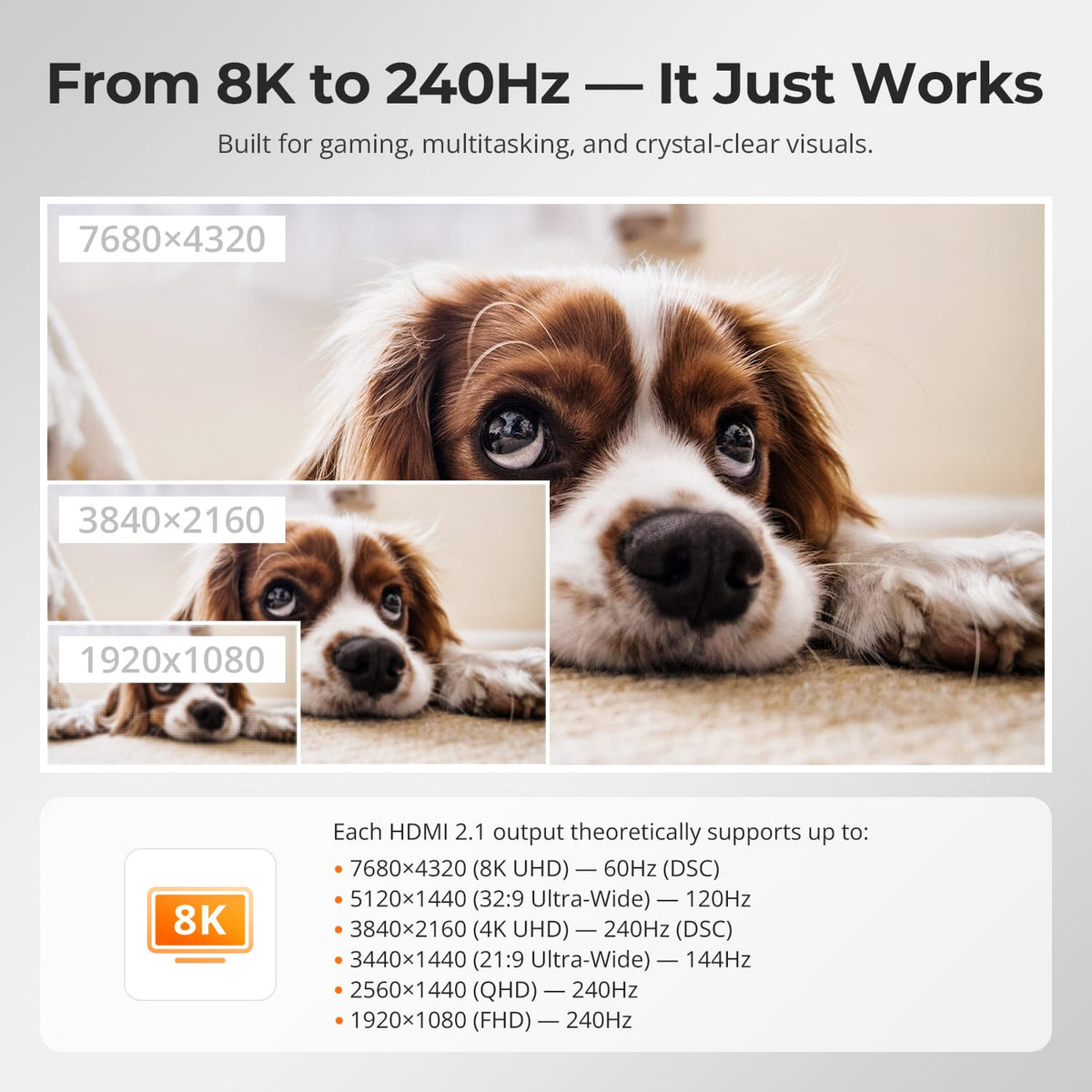
Each HDMI 2.1 output theoretically supports up to:
• 7680×4320 (8K UHD) — 60Hz (DSC)
• 5120×1440 (32:9 Ultra-Wide) — 120Hz (DSC)
• 3840×2160 (4K UHD) — 240Hz (DSC)
• 3440×1440 (21:9 Ultra-Wide) — 144Hz
• 2560×1440 (QHD) — 240Hz
• 1920×1080 (FHD) — 240Hz
Faster Switching. Stronger Signal. Smoother Frames.
• Fast Switching in 1–3 Seconds: No blackouts, no resets
• Signal Always-On: No disconnects during switch
• VRR / FVA / ALLM Supported: Tear-free, low-lag gaming
• Dual 4K@120Hz HDR (12bit): Stunning clarity and colors
• Up to 4K@144Hz / 165Hz via DSC: Built for fast-action games
Powered by ADI HDMI 2.1 decoding — boosts weak signals and ensures seamless multi-monitor stability
• Mode 1: One PC on Two Monitors (Extend or Mirror)
Extend your desktop across both monitors or mirror your display for presentations. Simply configure in your PC’s display settings — perfect for multitasking or dual-screen workflows.
• Mode 2: Two PCs on Two Monitors
Display two computers side by side — one on each monitor. Use hotkeys to switch the KM focus between them. Ideal for hybrid setups (e.g. Mac + Windows), dev work, or live monitoring.
Switching displays shouldn’t scramble your desktop. Our built-in EDID emulator keeps your layout exactly how you left it.
• No More Icon Mess
Preserves icon positions and window sizes when switching inputs.
• Flicker-Free Switching
Eliminates screen blackouts and flicker caused by display reinitialization.
• Smoother Multitasking
Maintain visual consistency across workstations and monitor setups.
✅ With TESmart EDID emulation: your display stays stable and unchanged — even after switching.
⚠️ Without EDID emulation: icons shift, windows resize, and screen flicker occurs after every switch.


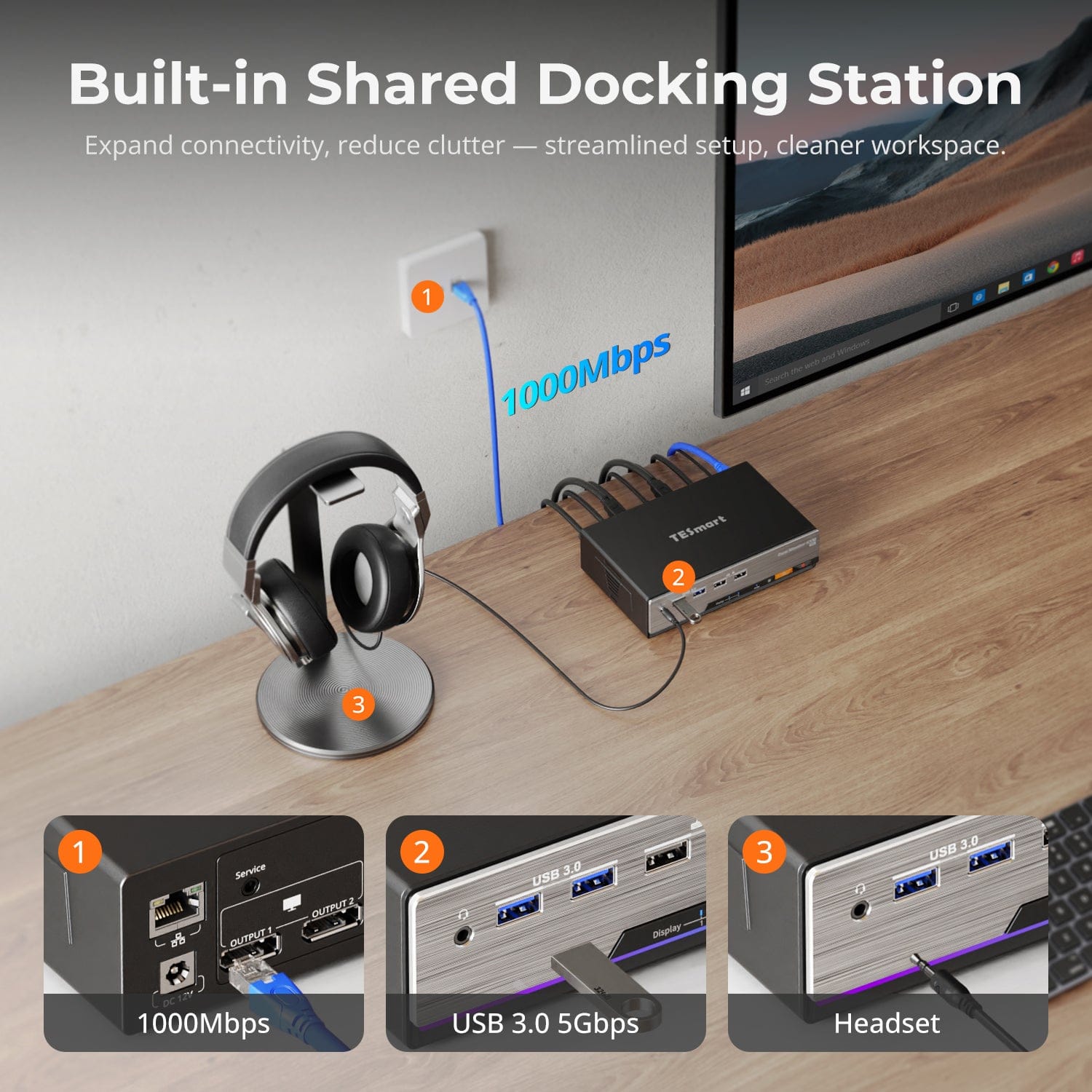
Built-in Shared Docking Station
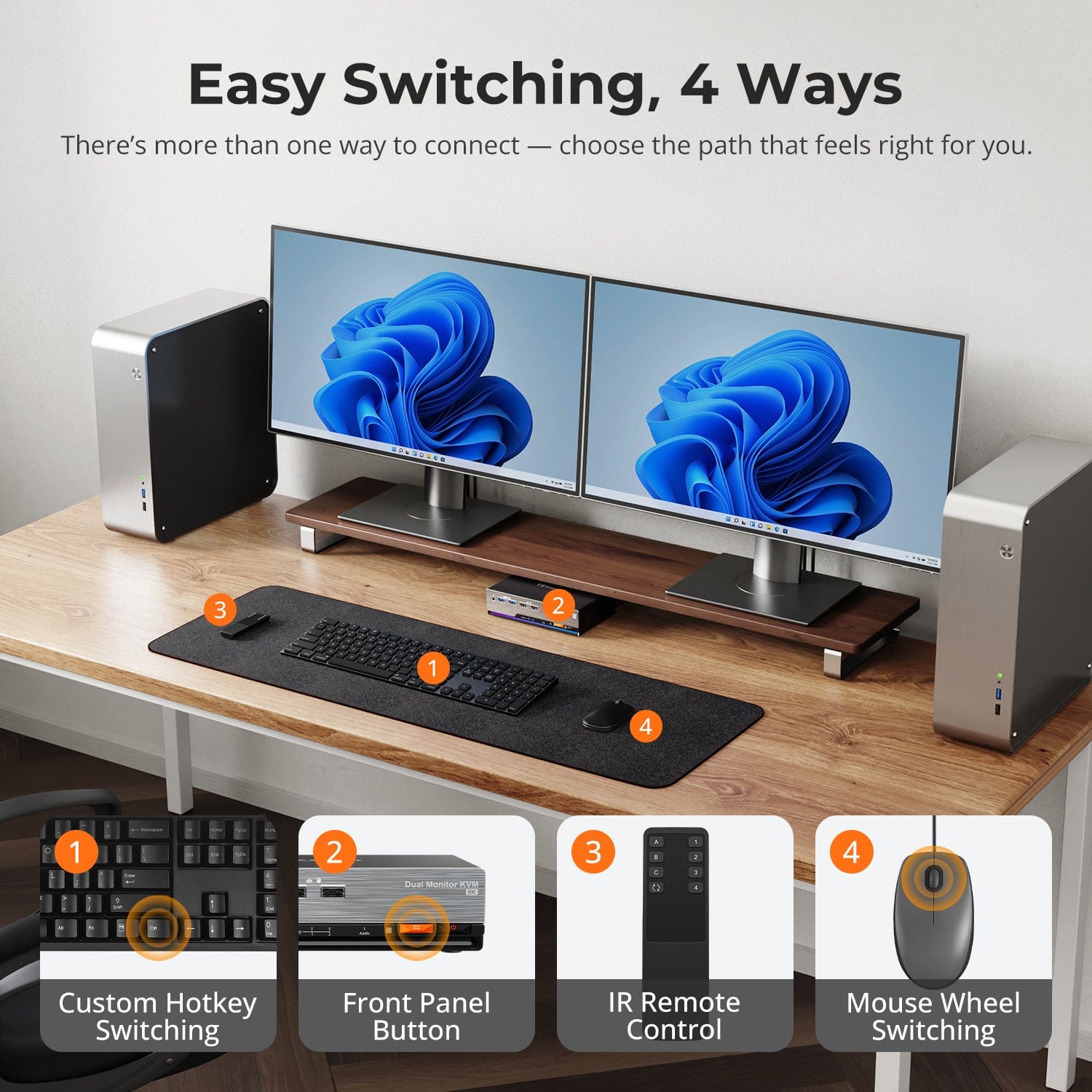
Easy Switching, 4 Ways
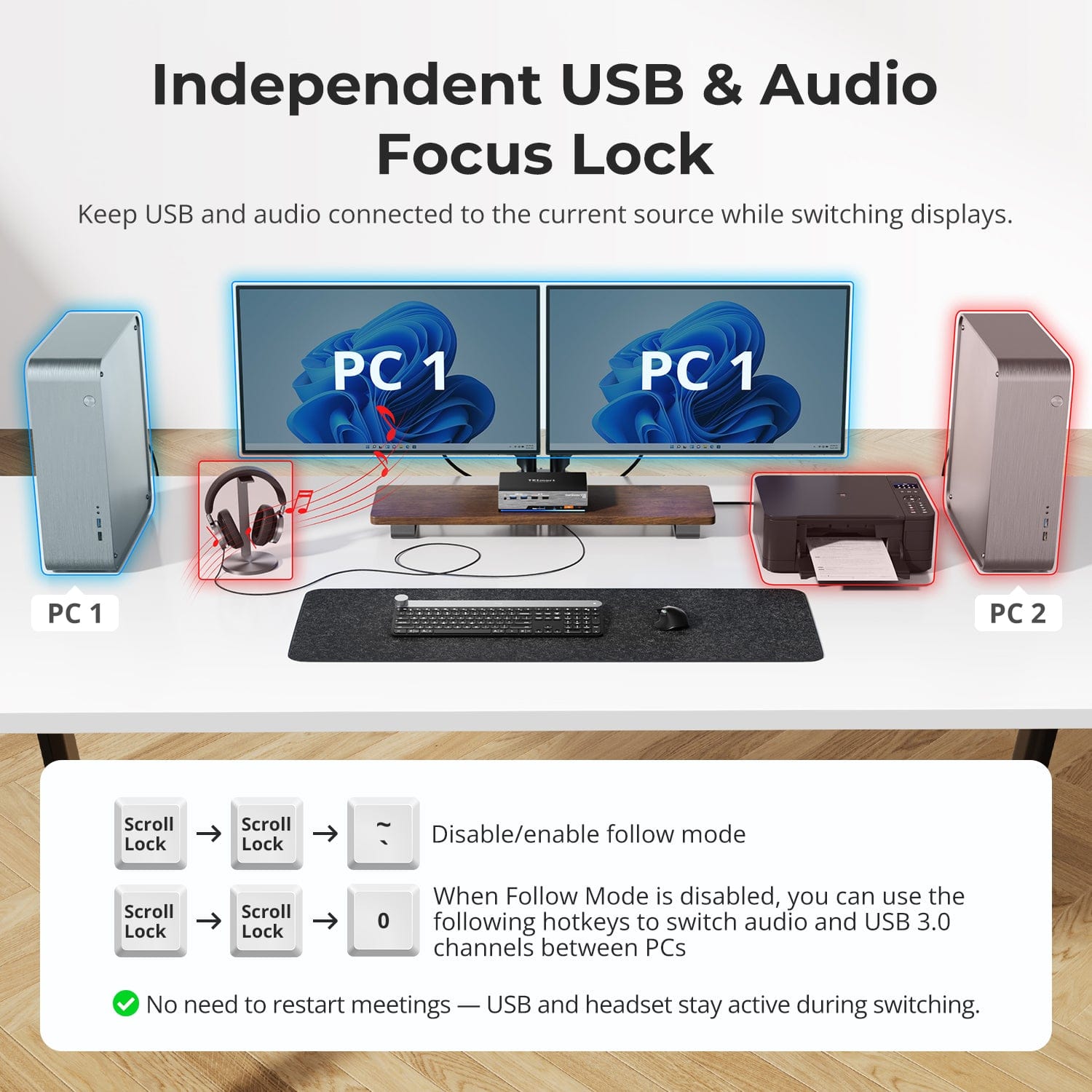
Independent USB & Audio Focus Lock
Dedicated K&M Ports with Dual-Mode Support
One-Touch Switching, Simplified for You
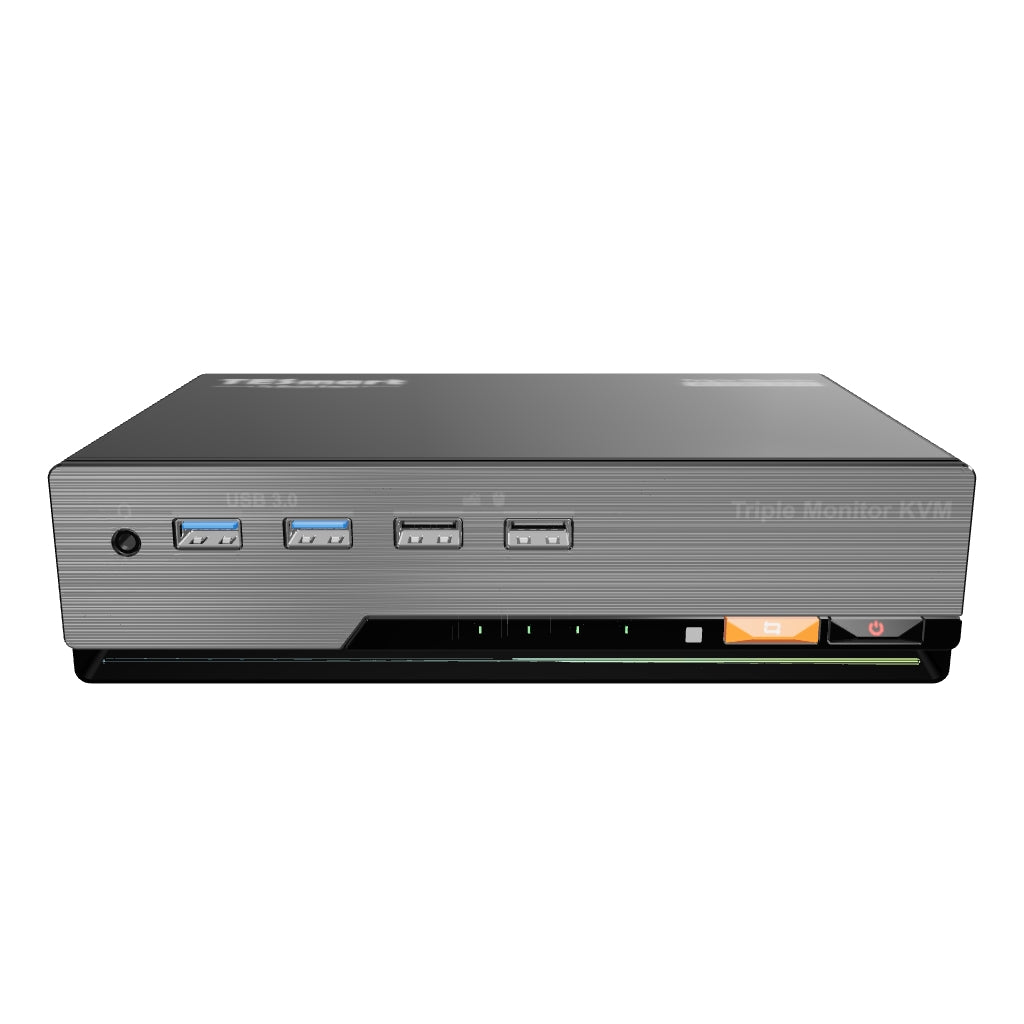
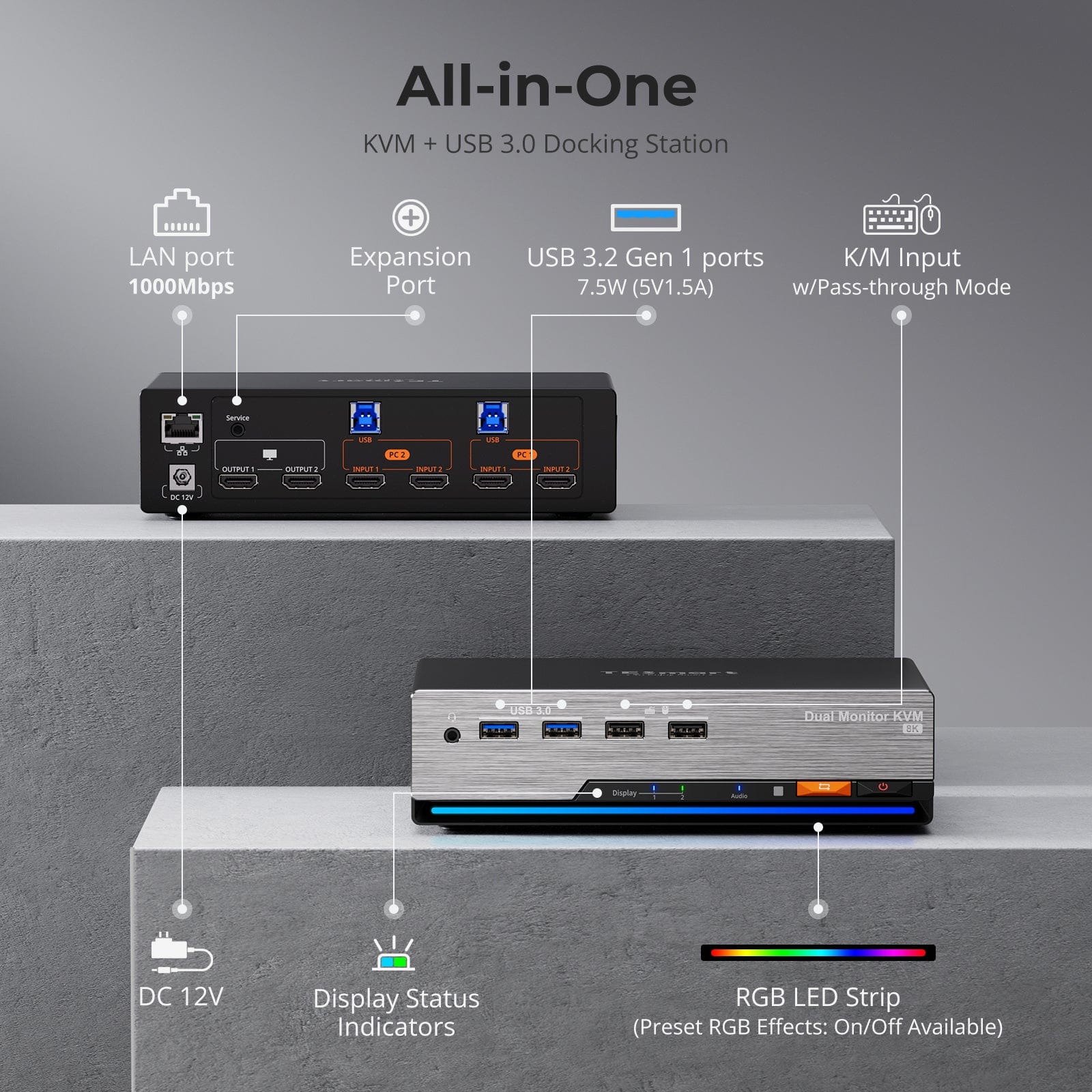
Streamline your setup with a built-in docking station that keeps everything connected — no extra hubs required.
• USB 3.0 (5Gbps) — High-speed data for drives and peripherals
• Gigabit Ethernet (1000Mbps) — Stable, wired internet for all devices
• 3.5mm Headset Jack — Unified audio input/output for meetings and calls
A cleaner, more efficient workspace — ideal for work-from-home or shared desk environments.
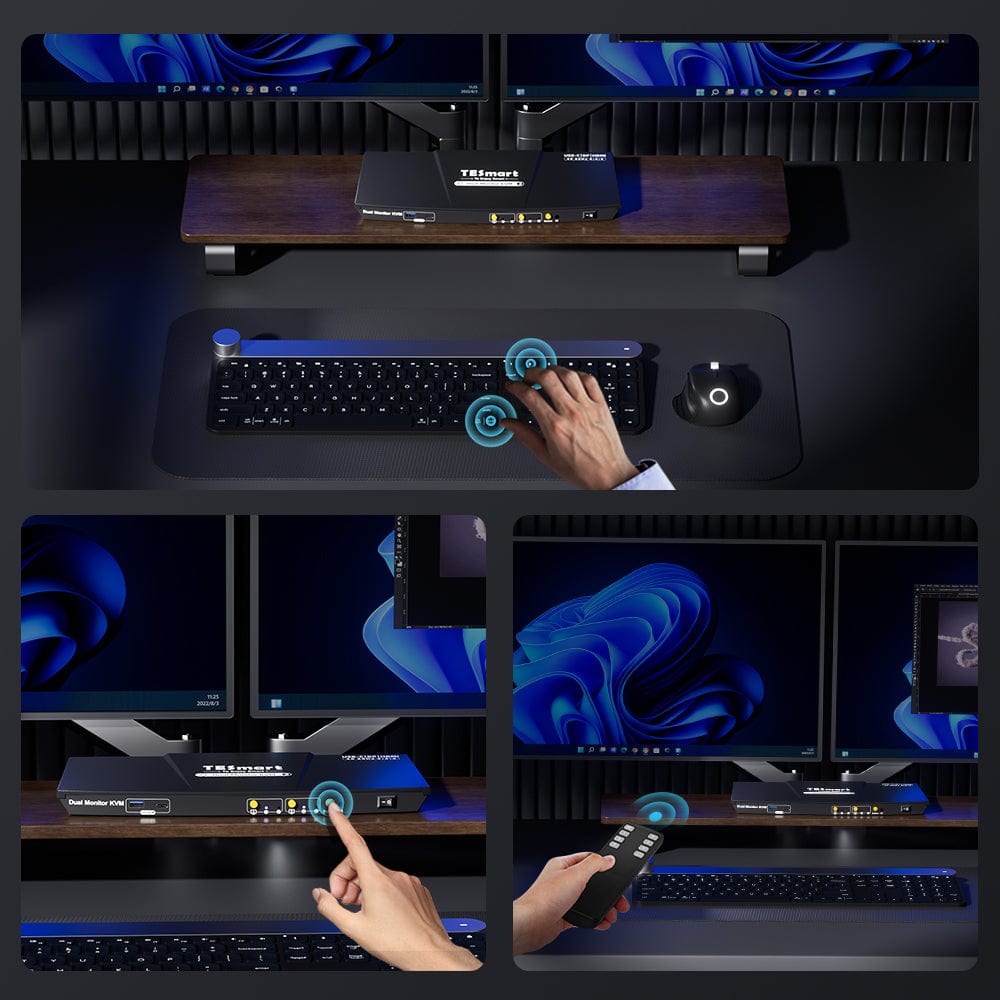
Switching shouldn’t slow you down — we offer four seamless methods to suit any setup or habit:
• Custom Hotkey Switching — Fast keyboard shortcuts for power users
• Front Panel Button — Simple, direct access anytime
• IR Remote — Stay in control from across the desk
• Mouse Wheel — Tap twice for instant switching
Whether you're working, gaming, or presenting — choose the way that works best for you.
Switch displays without interrupting your USB devices or audio.
This KVM lets you lock USB 3.0 and L/R audio focus independently, so your headset, webcam, or external drives stay connected to the current PC — even while switching screens.
Highlights:
• Lock USB and audio separately
• Prevent call or device dropouts
• Lock state remains after reboot
✅ Ideal for meetings, streaming, and multitasking
⚠️ USB focus ≠ keyboard & mouse focus — they switch separately
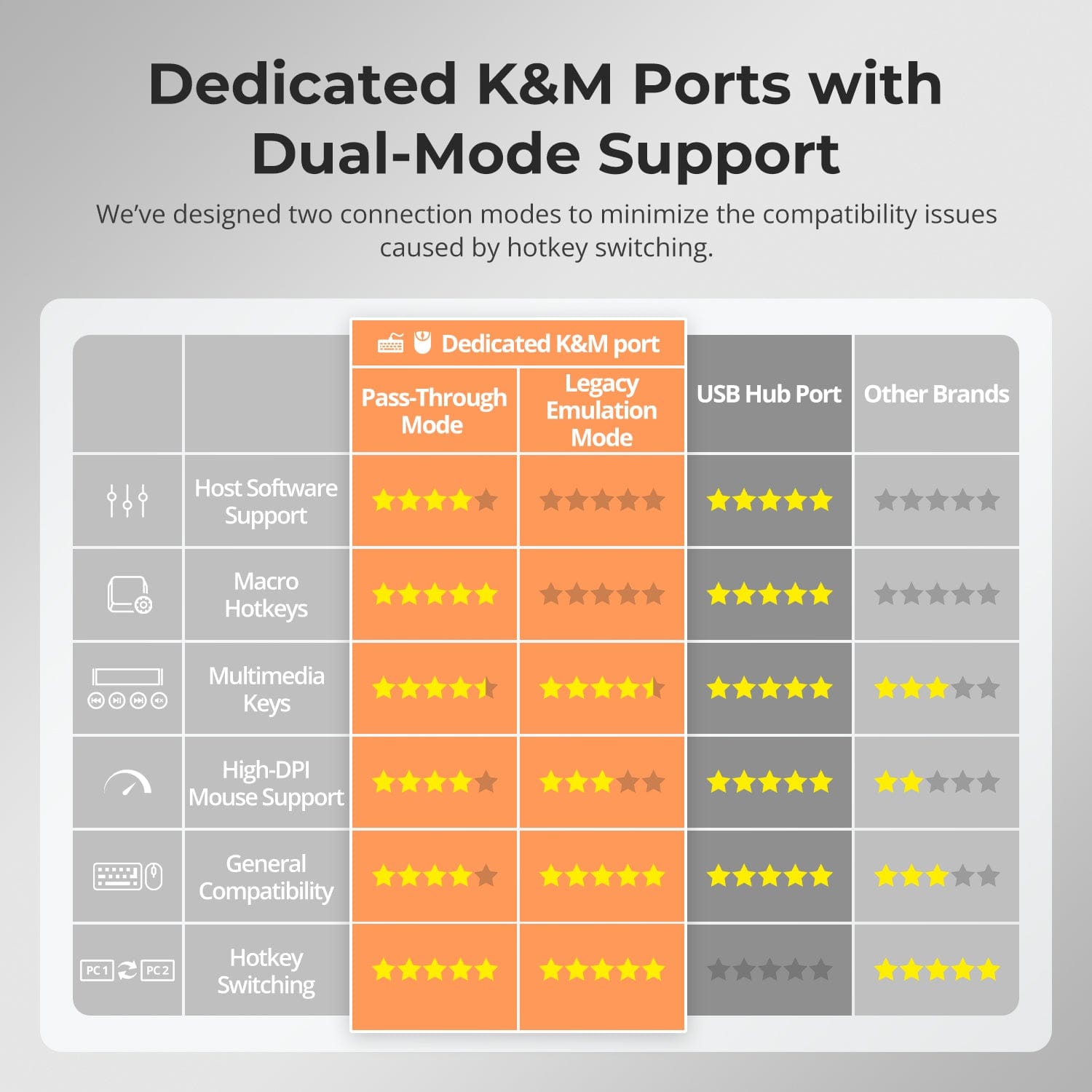
To improve keyboard and mouse compatibility — especially during hotkey switching — we designed two specialized connection modes:
• Pass-Through Mode (Recommended)
Direct passthrough to the PC. Supports advanced drivers, macros, high-DPI mice, and multifunction input devices. Ideal for gaming, design, and pro workflows.
• Legacy Emulation Mode
Ensures universal compatibility and stable hotkey functionality across most systems. Best for office or when driver issues occur.
✅ Hotkey commands only work when your keyboard is connected to the dedicated K&M port.
⚠️ Emulation Mode disables driver-based software and advanced features.
⚠️ Bluetooth keyboards/mice are not supported.
Switch inputs effortlessly with our KVM switch's one-touch functionality. Effortlessly switch inputs using hotkeys, the front panel button, or the remote control. Seamless K&M operation after switching. Move between computers with a single button press, streamlining your workflow and reducing the hassle of manual input adjustments.


FAQs
What to do when the monitors are displaying a black screen after connecting all devices to the KVM?
- Connect the each computer directly to the monitor, bypassing the KVM switch, to check if they work properly. If any one of them can not display correctly, the problem may be with the computer port, the monitor port, or the cable between them. Try replacing the monitor or the cables connected to the KVM to troubleshoot.
- If the problem only occurs when switching to a specific input source, try to swap the port connection between this PC and another working PC, to observe if the monitor can display properly in the configuration.
- If none of the above steps solve the problem, in addition to the damage of the KVM itself, we may consider the following technical compatibility reasons:
What refresh rates does this KVM support in 8K, 4K resolutions?
The HKS202-M24 models support HDMI2.1 protocol, with a maximum bandwidth of up to 48Gbps.
- 7680x4320@30Hz 8bit
- 3840x2160@144Hz 8bit
- 7680x4320@60Hz (DSC) 8bit
- 3840x2160@120Hz (DSC) 12bit
The user manual inside the box does not contain detailed information on how to operate the KVM Switch, where to get the instructions?
In order to be environmentally friendly and to reduce the use of paper and hard brushing film, we have uploaded the detailed instructions in electronic form to the Support Centre of TESmart official website, you can scan the QR code on the user manual included in the box (the second page and the back cover) to get access to the detailed operation instructions.
What to do if the hotkey switching is not working?
Please make sure the keyboard is connected to the dedicated keyboard port on the front panel (with keyboard and mouse marks).
The default hotkey for HKS202-M24 is the [Right Ctrl]. If you need to use a different trigger key, please customize the hotkey settings accordingly.
The HKS202-M24 models support both pass-through mode and legacy emulation mode for keyboard and mouse control. For pass-through mode, it features good compatibility with the mainstream keyboards and mice on the market. However, with the iterative upgrading of the keyboards and mice, it is inevitable that there will be some special models of keyboard and mouse which may have potential compatibility issues with our KVM, therefore, to get better compatibility experience, it is available to turn to legacy emulation mode.
- If you encounter some issues with the keyboard and mouse in pass-through mode, please connect a basic keyboard to the dedicated keyboard port on the front panel of the KVM and switch to legacy emulation mode using the hotkey combination [Hotkey + Hotkey + F2]. This mode theoretically enhances the compatibility mode between the keyboard and mouse and our KVM. Once set successfully, you can reconnect your original keyboard and mouse instead and continue to use them.
What are the differences between the keyboard and mouse pass-through mode and legacy emulation mode, and how to switch between them?
- Legacy emulation mode provides the PC with preset basic keyboard and mouse data information, ensuring basic functionality while improving compatibility theoretically. This means that the computer connected will not be able to recognize the actual keyboard and mouse specification, and the control software of keyboard and mouse will not work. If the keyboard and mouse function properly in pass-through mode, it is recommended to maintain pass-through mode.
- The default keyboard and mouse control mode is pass-through mode. You can switch between them using the hotkey combination [Hotkey + Hotkey + F2]. After pressing the hotkey, two beeps is emitted to indicate entry into legacy emulation mode, while one beep is emitted to indicate entry into pass-through mode.
Can the USB 3.2 Gen 1 port on the front panel charge the computer connected? If so, what’s the power output?
- The USB 3.2 Gen 1 port on the front panel indeed feature a built-in charging module that supports charging your phone, tablet, and other mobile devices but not the computer connected, with a maximum output power of 7.5W.
- It is designed under the BC1.2 protocol and the voltage and current can be automatically adjusted to match the specification of the device to be charged, ensuring safe charging.
Why is there no sound when an audio device is plugged into the 3.5mm audio port of the KVM?
For HKS202-M24 model, they both feature an integrated microphone and L/R audio output port, and the audio signals from the audio interface are transmitted through the USB channel. Please confirm if the selected the playback device for audio has been set to "USB Audio" channel.
-
Recycling & Trade-in
Up to 50% Credit on Recycling
-
Free Shipping
US / UK · 3–5 Business Days
-
30-Day Free Returns
Hassle-Free Return & Purchase Guarantee
-
Extended Warranty: 1+2 Years
Register to unlock 2 extra years of coverage
