




HDC402-P23-USBK
Dual Monitor Hybrid USB-C/HDMI/DP 4K60Hz KVM Switch Pro Hub for 2 Laptops & 2 PCs, w/ MST Mode, EDID Emulation, Gigabit LAN, and Dual Charging
- Regular price
-
$749.00 - Regular price
-
$749.00 - Sale price
-
$749.00
Couldn't load pickup availability
-
Hurry, only 13 items left in stock!
Overview & Key Features
TESmart With You. Evolving For You!
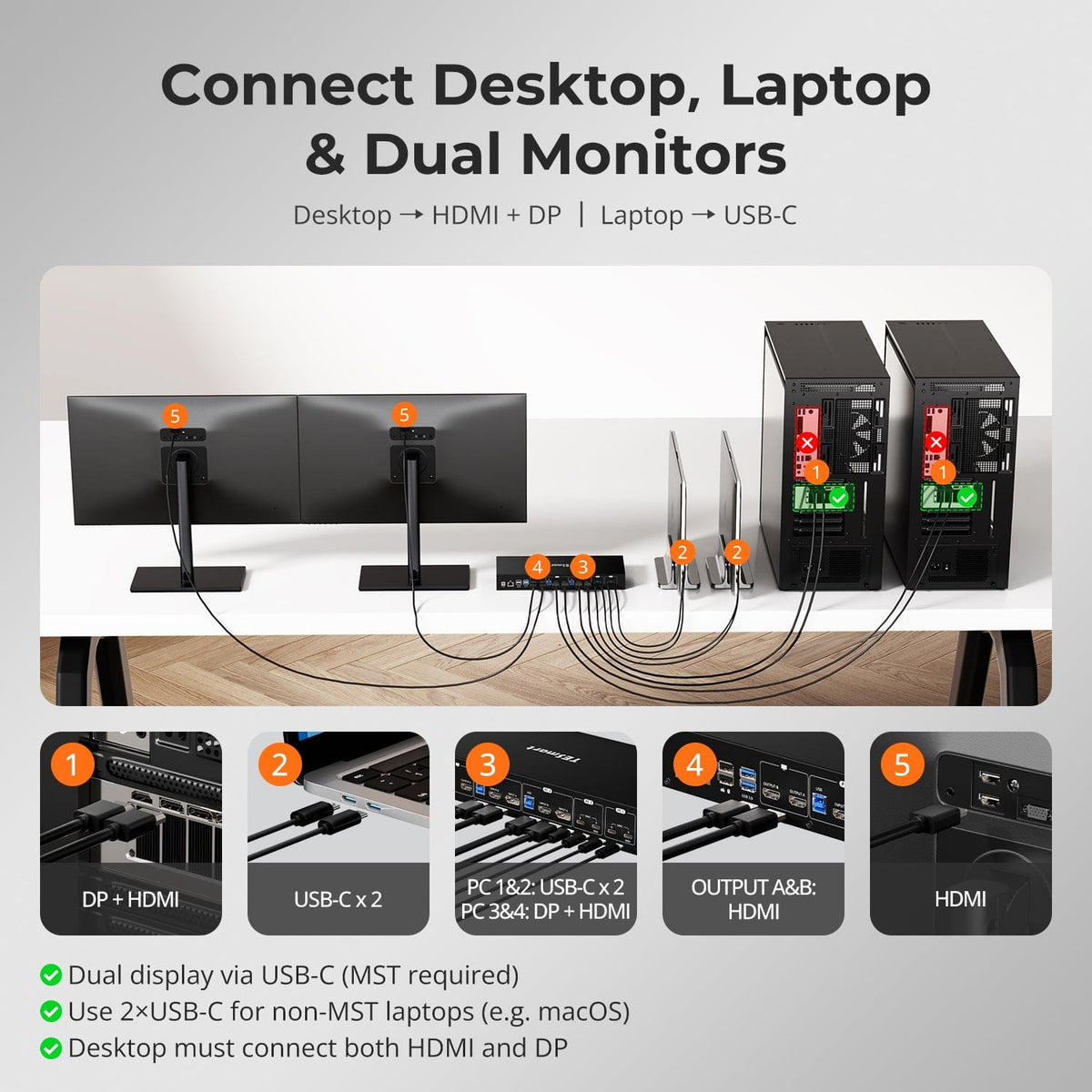
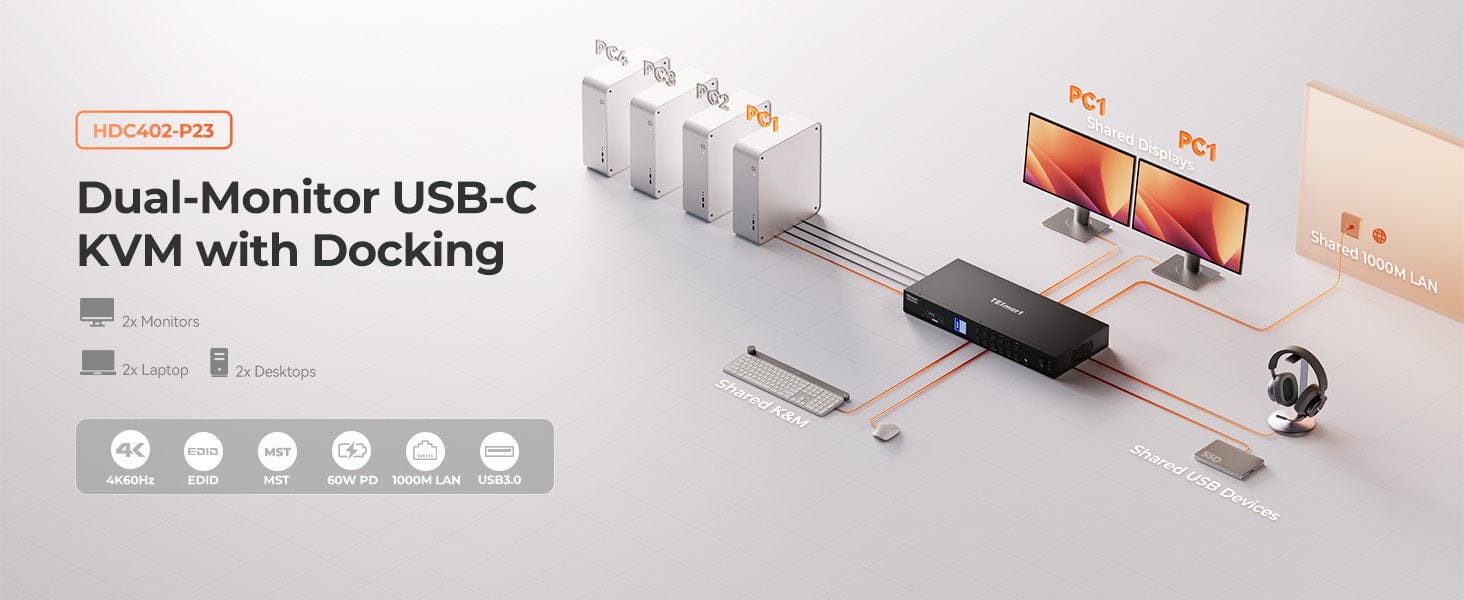
The HDC402-P23 is a high-performance KVM switch supporting 4K@60Hz via HDMI 2.0 and USB-C (DP1.2 Alt Mode with MST). MST enables dual 4K@60Hz output through one USB-C cable, simplifying cable management. With advanced EDID, built-in 1000Mbps Ethernet, and a cooling fan for long-lasting performance, it’s perfect for studios with 2 desktops + 2 laptops, meeting both gaming and productivity needs.
Important Note:
If your laptop doesn't support 20V charging, it may only receive 7.5W due to handshake failure. Some ThinkPad models (Yoga, T, X series) may not reach 60W charging. Please leave a note at checkout if using Mac or ThinkPad.
Why You’ll Love It:
• 3840×2160@60Hz, 3440×1440@100Hz, 2560×1440@120Hz, 1920×1080@240Hz
• MST: Dual 4K@60Hz via one cable – clean & efficient setup
• USB-C charging up to 60W
• Built-in fan for better cooling and stability
• Audio lock & USB function
• Pass-through & legacy emulation modes
• HPD hold keeps displays stable during switching
• Detachable rack ears for easy integration
What's in the box
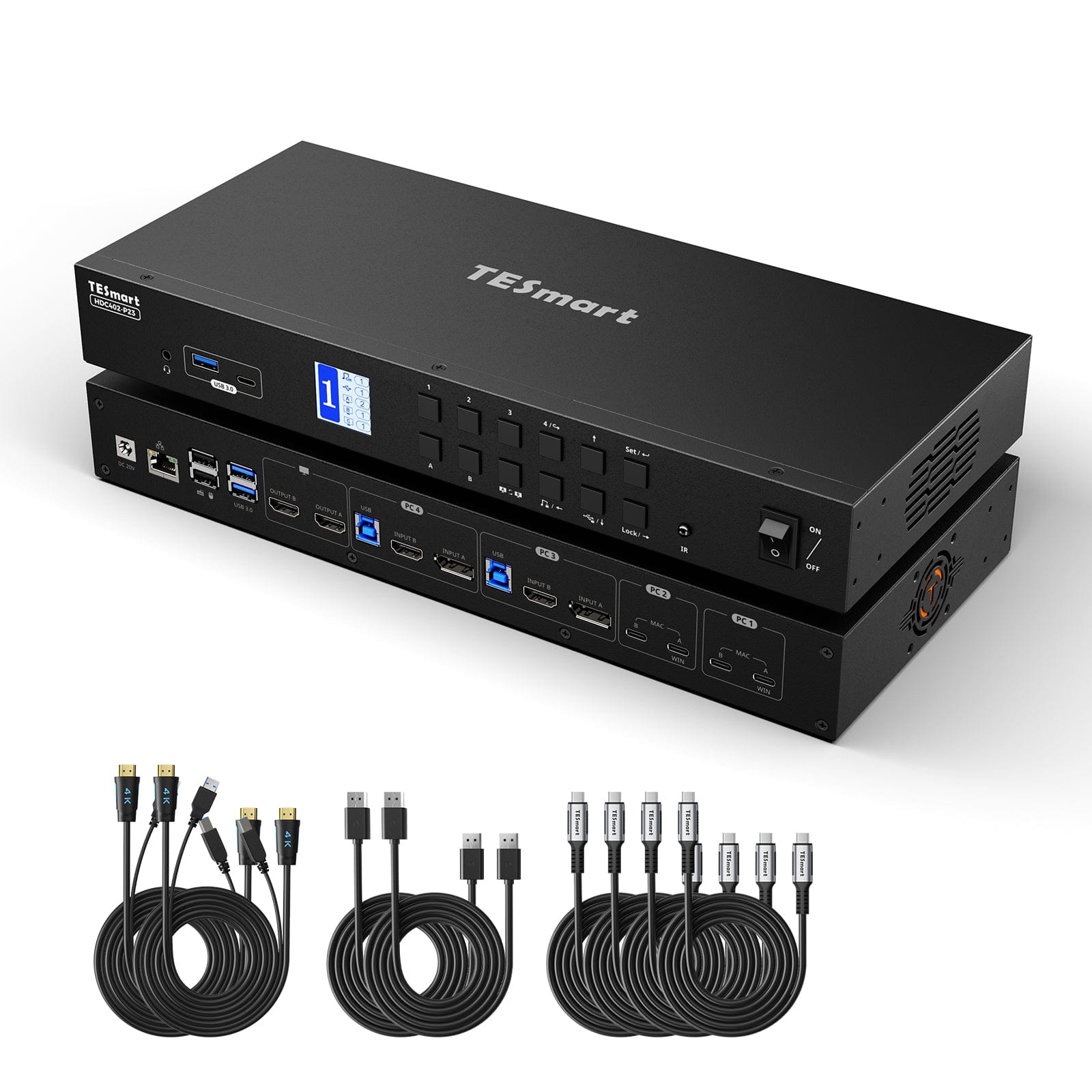
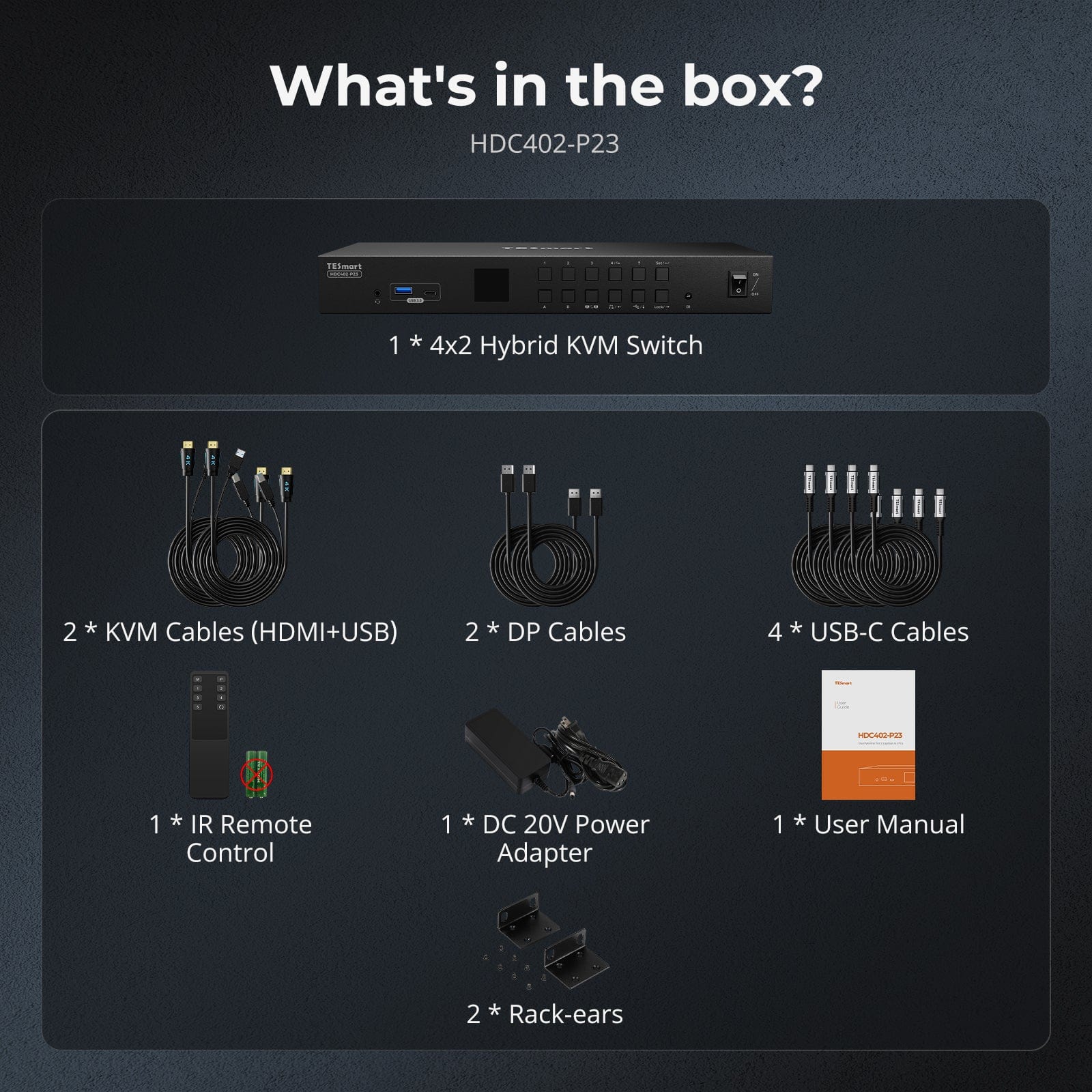
The kvm switch kit comes with complete kvm-to-pcs cables (4 * USB-C Cable, 2 * KVM Cable and 2 * DP Cables) for a complete setup.
- 1 * 4x2 Hybrid KVM Switch
- 2 * KVM Cables
- 2 * DP Cables
- 4 * USB-C Cables
- 1 * IR Remote Control
- 1 * DC 20V Power Adapter
- 1 * User Manual
- 2 * Rack-ears
Downloads & Manual




| Country or Region | Estimated delivery time | Freight | postman |
| United States (Contiguous 48 States) | 3-5 working days | Free Shipping | UPS/USPS/FedEx/uniuni |
| U.K. | 3 working days | UPS/DPD | |
| Canada | 3-5 working days | Starting at $20 | Purolator/UPS |
| China (Macao SAR, Hong Kong SAR, Taiwan) | 1-3working days | Starting at $30 | SF Express |
| Australia, New Zealand, Saudi Arabia, United Arab Emirates, Israel, United States (Alaska, Hawaii, U.S. Territories & Military Addresses) | 5-12 working days | Starting at $60 | DHL/FedEx/UPS |
| Singapore, Malaysia, Philippines, Thailand | 5-12 working days | Starting at $30 | DHL/FedEx/UPS |
-
Orders cannot be canceled or modified once placed due to automated processing.
-
If a return is needed, contact service@tesmart.com within 30 days of delivery. Items must be in original condition with all packaging and accessories.
-
Return shipping for non-quality issues is the customer’s responsibility.
-
Products from third-party retailers
-
Items damaged by misuse
-
Order number, proof of purchase
-
Photos/videos (if defective), full shipping address, and phone number
-
Within 30 days: Refunds/returns accepted for both quality and non-quality issues
-
30 days–1 year: No returns/refunds; repair or replacement may be offered
-
1–3 years: No returns/refunds; replacement or Upgrade /trade-in up to 50% discount after 3 months (members only)
The return and refund policy process overview is shown below. For the full policy, please refer to the Full Policy page below.

1.Order Cancellation & Modification
-
To ensure timely delivery for every customer, TESmart’s order and shipping system is fully automated. Most orders are processed and dispatched within a few hours, and always within 24 hours depending on warehouse workload. Customers may cancel an order at any time before it ships, including within our 30-day cancellation window. Once an order has shipped, it can no longer be canceled or modified.
-
Please kindly contact us within 30 days of delivery at service@tesmart.com, If you wish to return a product after receiving it, ensure the product and packaging are undamaged and in original condition.
-
⚠️ Return shipping costs for non-quality issues are the responsibility of the customer. For more details, please kindly see below.
2.Return Process
2.1 Return Conditions:
-
Products must be returned in original packaging, including all accessories, manuals, and documentation.
2.2 Items Not Eligible for Return:
-
Products purchased from third-party retailers.
-
Products damaged due to misuse or improper handling by the customer.
2.3 Return Request:
-
Order number
-
Proof of purchase
-
Photos or videos of the defective product (to speed up processing)
-
Full shipping address
-
Contact phone number
2.4 Processing Time:
-
Our support team will respond to your return request within 48 hours and provide the return warehouse address in your country/region.
-
For certain countries/regions (e.g., the U.S., Germany, and the EU), we may provide a prepaid return label after confirming your address to expedite the return/refund process.
2.5 Return Address:
- Please contact our customer service at service@tesmart.com before returning the product. Once confirmed, you may send the item to the designated TESmart return warehouse.
- Unit 108, 8333 Rochester Ave
STX-X166
Rancho Cucamonga, CA 91730
United States
2.6 Warehouse Inspection:
-
Upon receipt, TESmart will inspect the returned item(s).
3. Refund Process
3.1 Refund Trigger:
-
Once the returned product is received and inspected by our warehouse, the refund process will begin.
3.2 Refund Timeframe:
-
Refunds will be processed within 5 business days after the return is received.
3.3 After-Sales Categories:
3.3.1 Within 30 days of delivery:
-
The product is in its original packaging with all accessories.
-
Return photos are provided before shipping.
-
Non-quality issues: Return and refund supported within 30 days. Return shipping is the customer’s responsibility.
-
Quality issues: Return and refund supported within 30 days. Return shipping is covered by TESmart.
3.3.2 From 30 days to 1 year after delivery (warranty period):
-
Return/refund not supported. Please email service@tesmart.com to contact our after-sales support team.
-
After evaluation by our technical team, we may offer product repair or replacement with the same model.
-
To ensure timely service, we prioritize replacements.
3.3.3 From 1 to 3 years after purchase (for VIP Members) :
-
Return/refund not supported.
-
You may contact our after-sales support team for replacement of the same model.
-
If you wish to upgrade the product after 3 months from purchase, members may Upgrade & Trade-in up to 50% discount off the original order’s paid amount toward your new purchase.
For detailed terms and conditions, please visit: https://www.tesmart.com/pages/tesmart-id-trade-in
4. After-Sales Support & Issue Resolution
4.1 Contact Information:
-
For any questions or support requests, please contact TESmart Customer Service: 📧 service@tesmart.com
4.2 Delayed Refunds (if you haven’t received a refund after 5 business days):
-
Check your bank account (ensure it is the one used for the purchase).
-
Contact your card issuer (credit/debit card providers may experience processing delays).
-
Contact your bank to confirm the transaction status.

Tech Specs
| Product Attribut | |
|---|---|
Model (SKU) |
HDC402-P23-USBK
|
Compatible Setup |
|
Max Resolution |
|
Supported Resolutions |
|
VRR (Variable Refresh Rate) |
|
MST (Multi-Stream Transport) |
|
Laptop Charging |
|
Network Port |
|
Independent Audio Focus Switching |
|
Independent Audio Focus Locking |
|
Thunderbolt 4 Ports |
|
EDID Emulation |
|
Switching Methods |
|
Assignable Hotkeys |
|
Legacy Emulation Mode |
|
Input Ports |
|
Output Ports |
|
Docking Ports |
|
Display Modes |
|
Manual (PDF) |
|
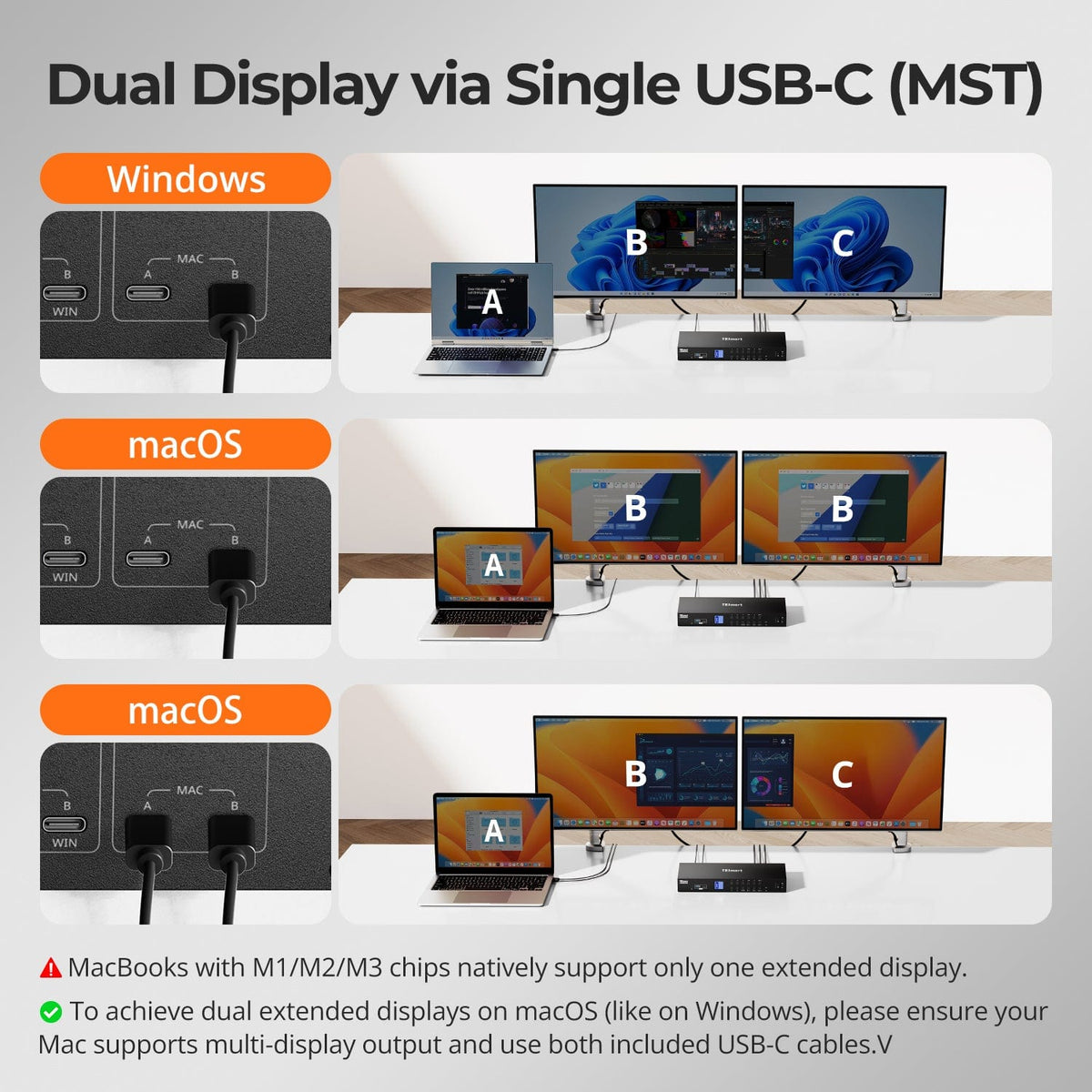
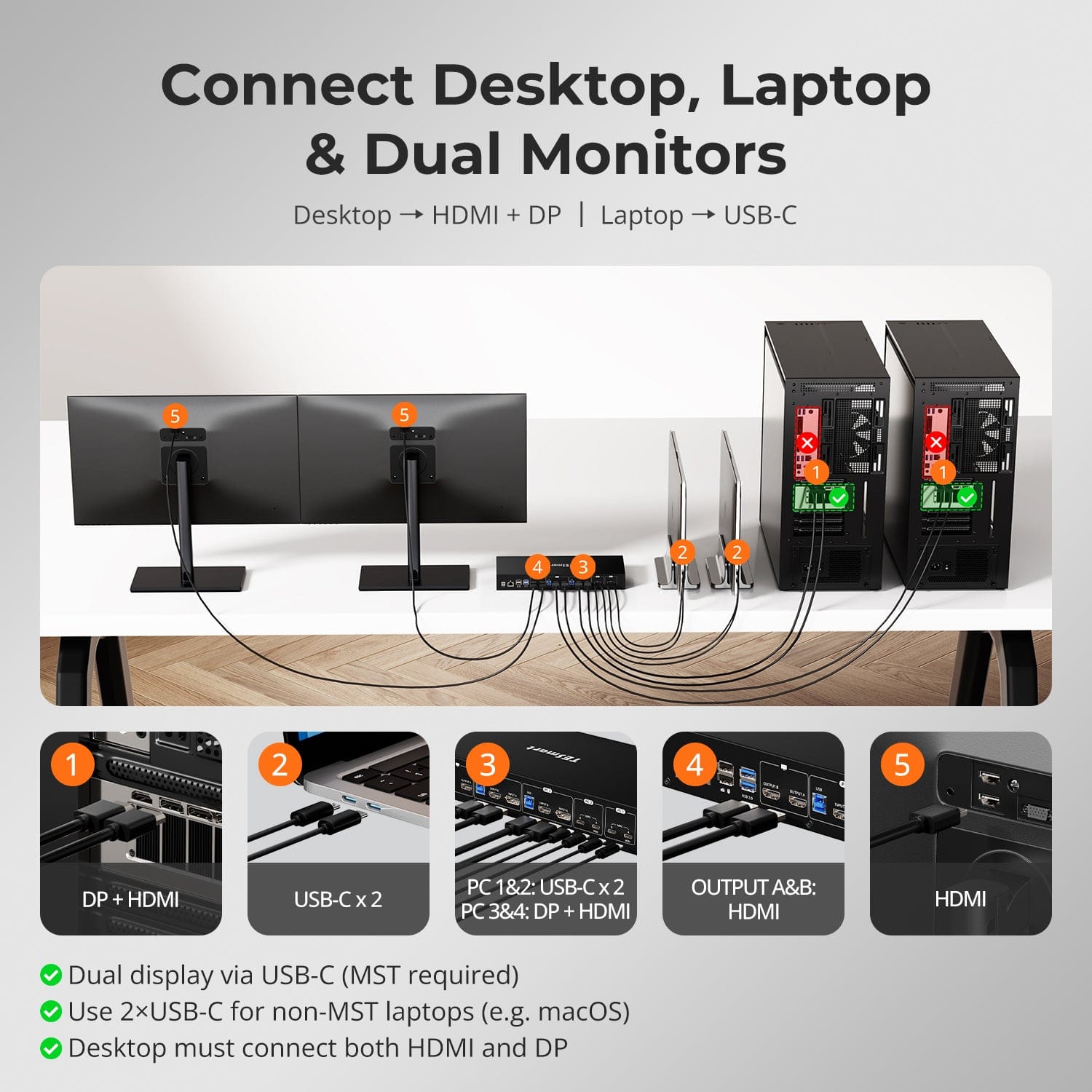
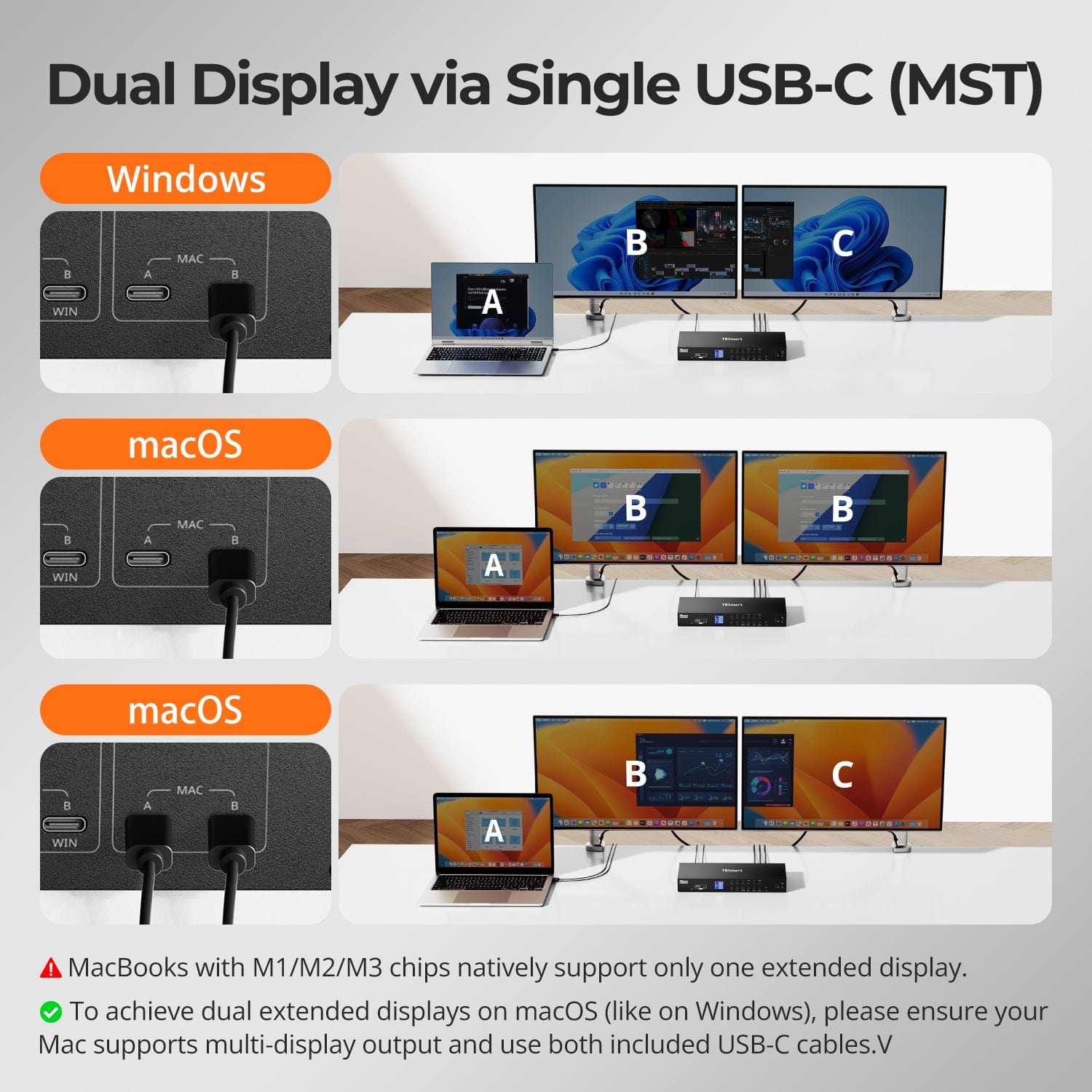
Dual Display via Single USB-C (MST)
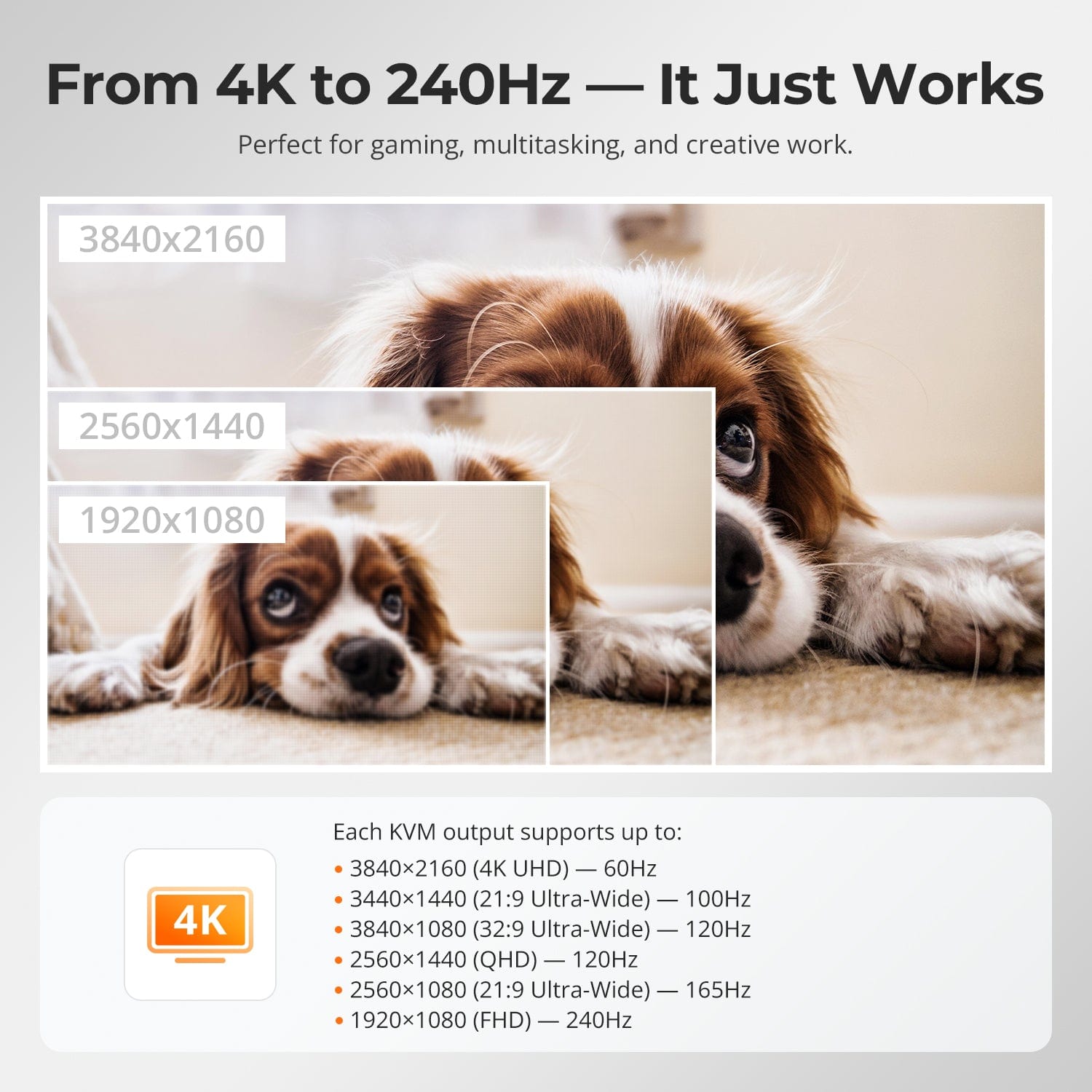
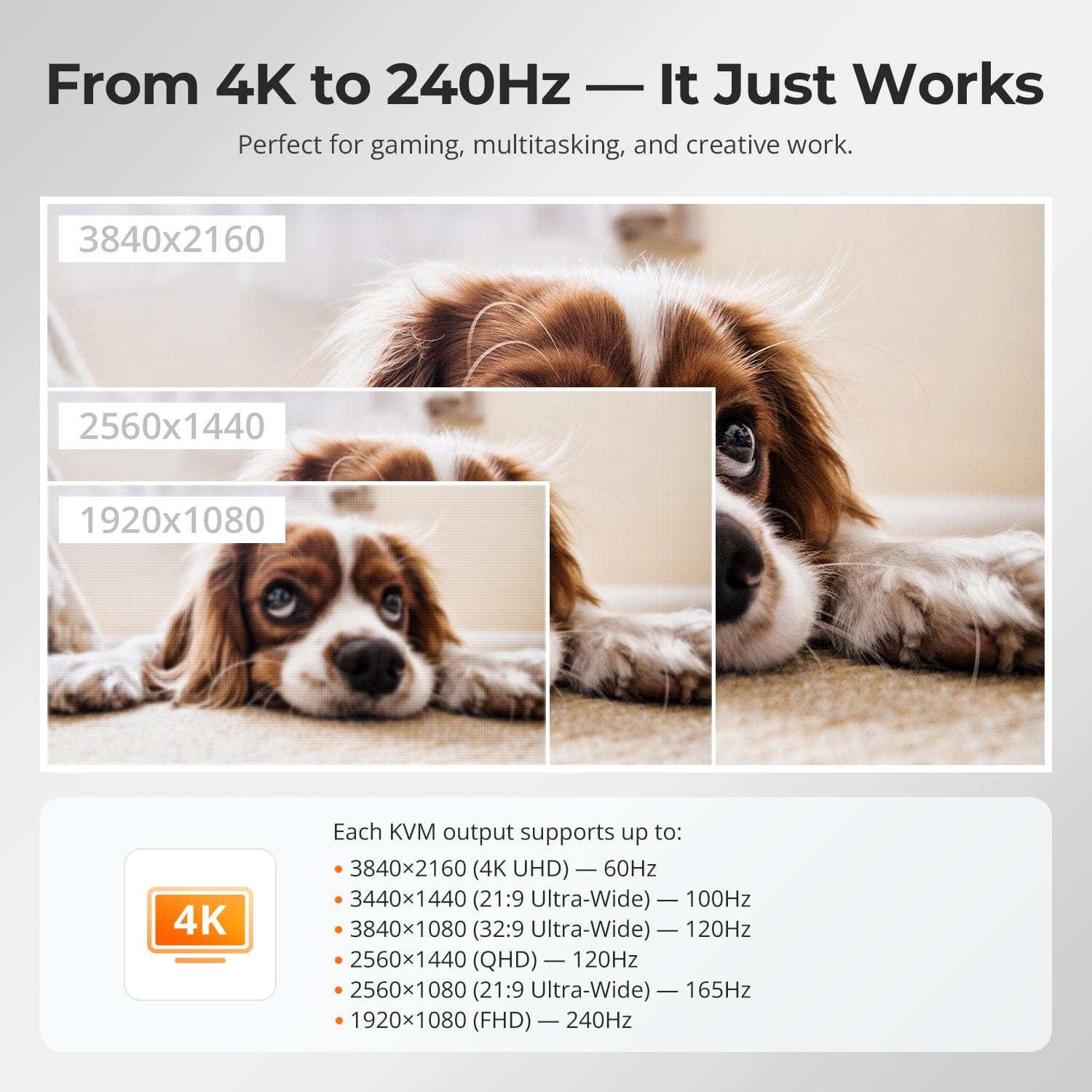
From 4K to 240Hz — It Just Works
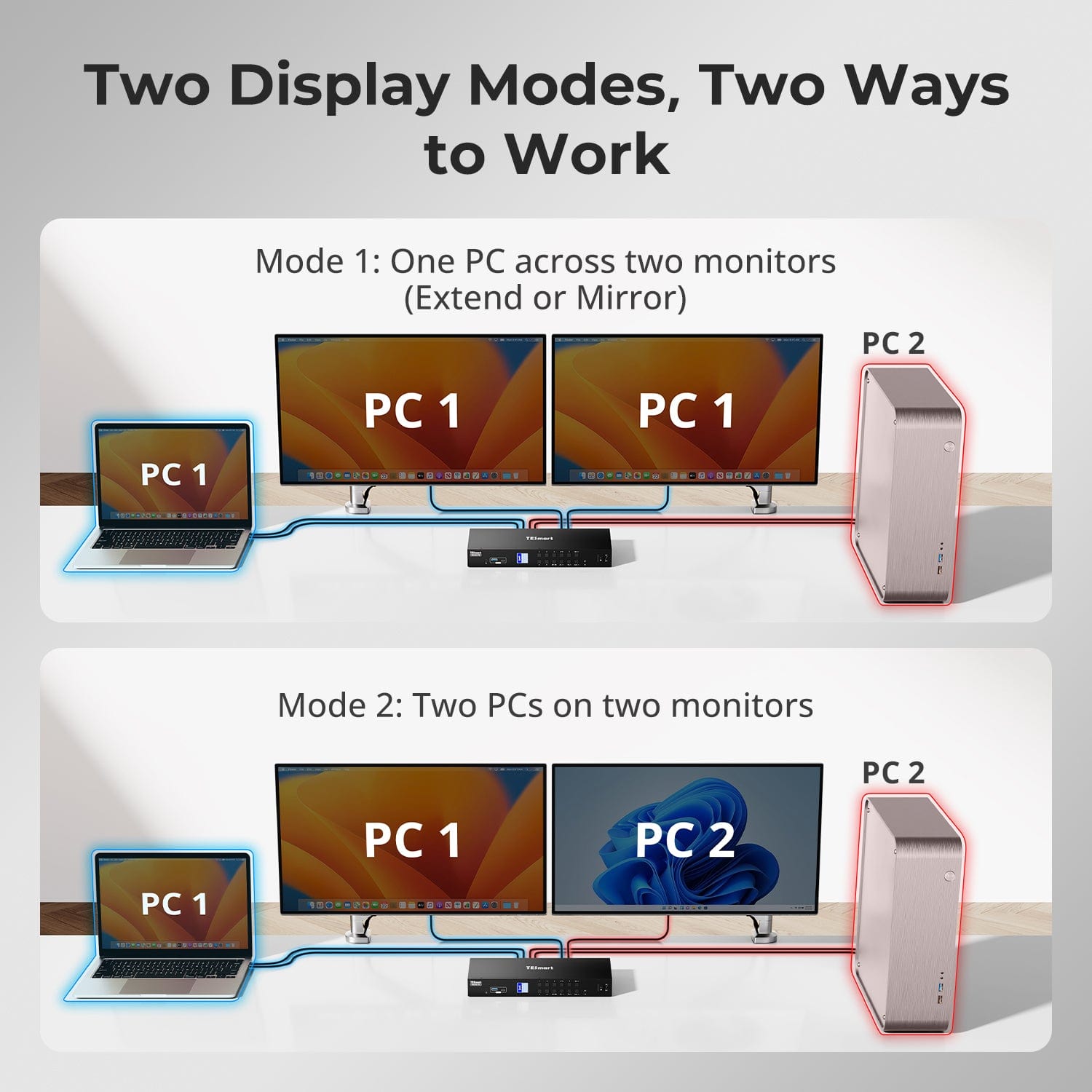
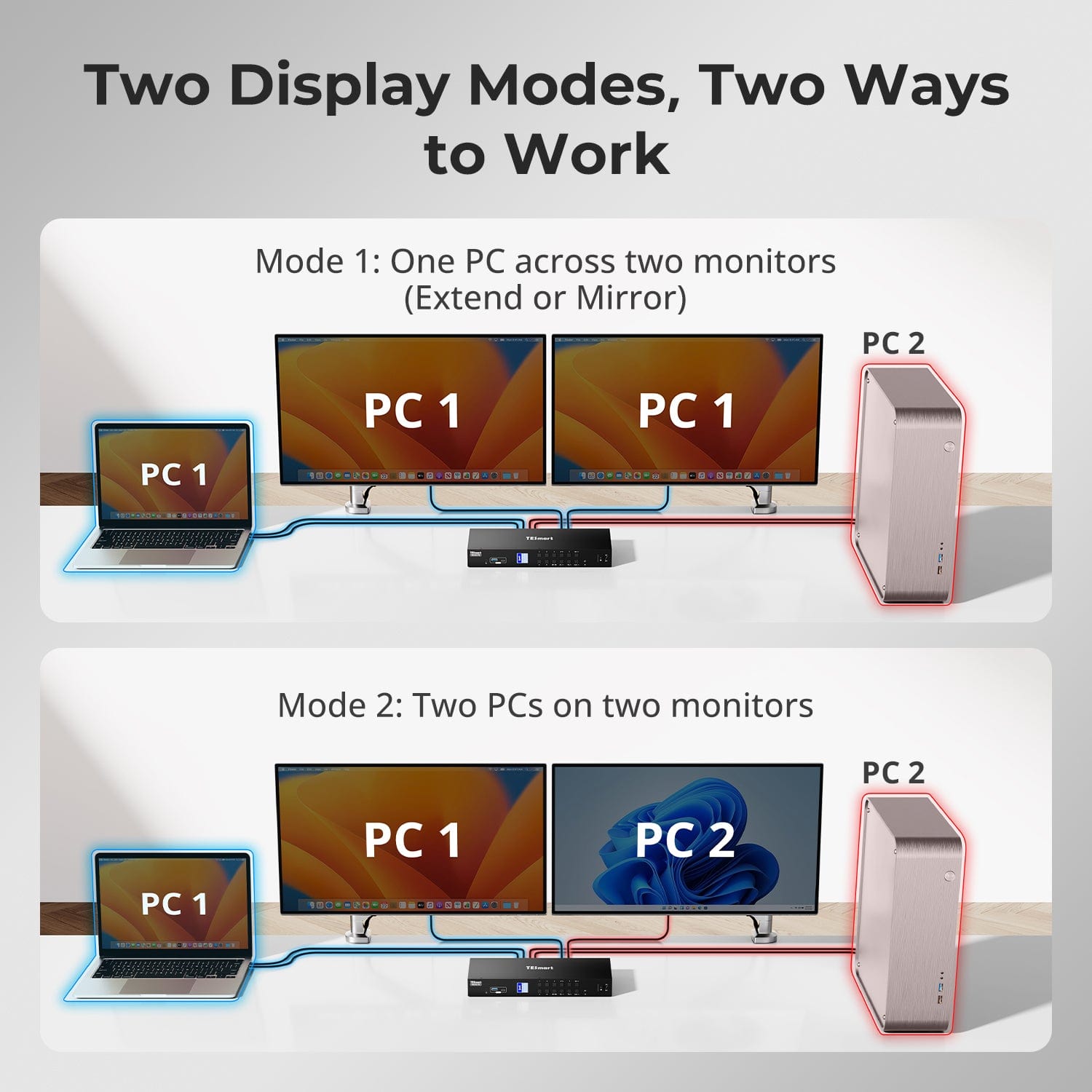
Two Display Modes, Two Ways to Work
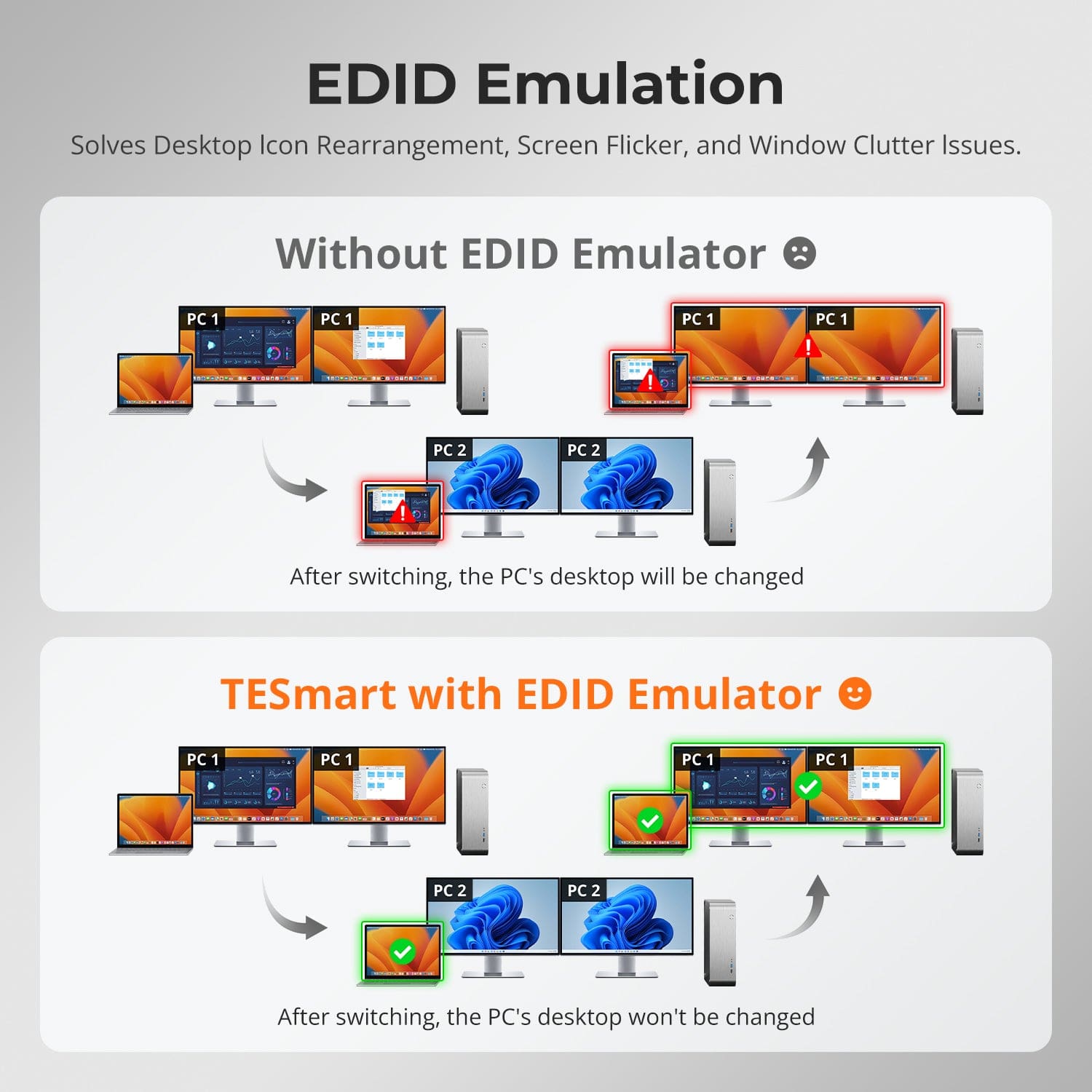
EDID Emulation — Stable Screens, No Surprises
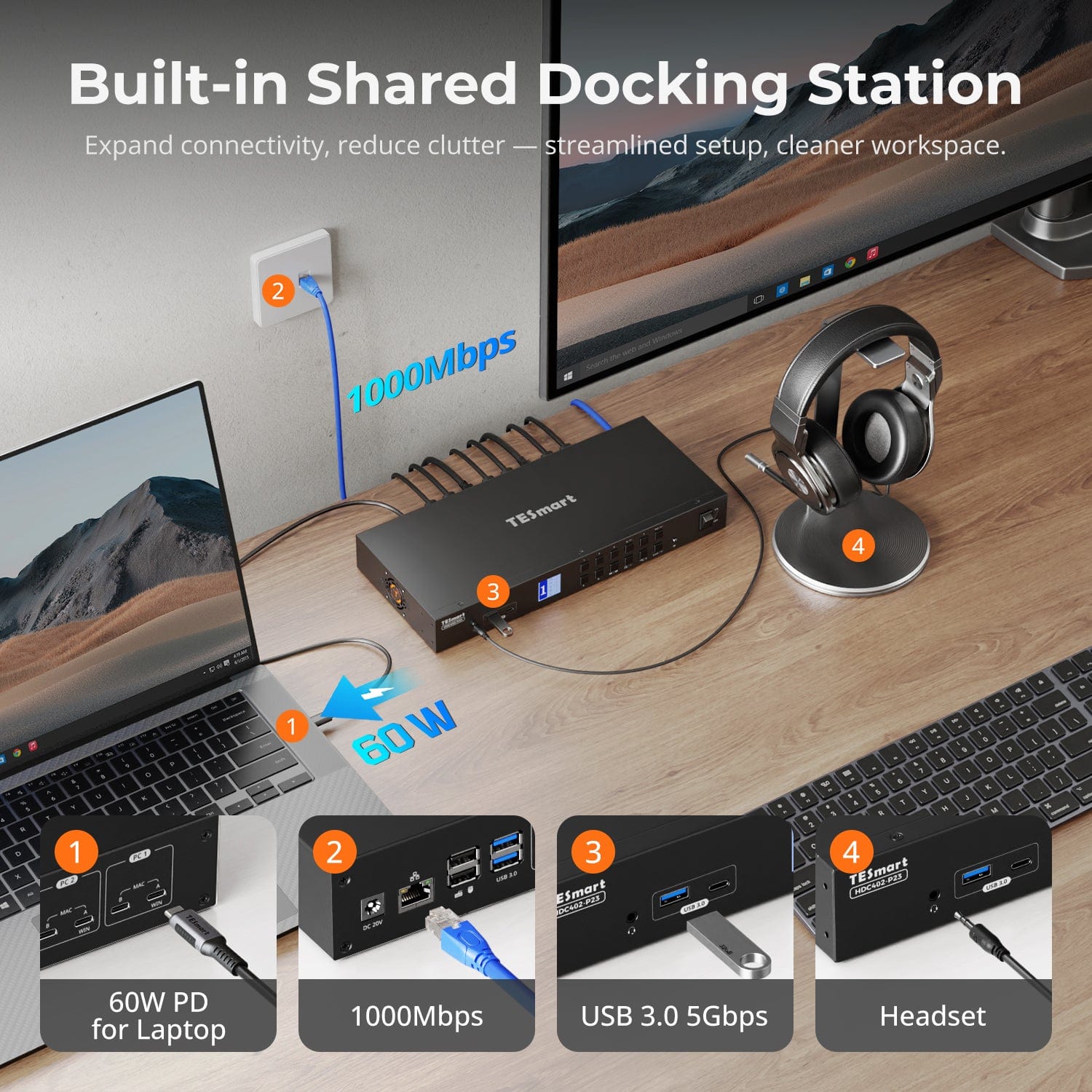
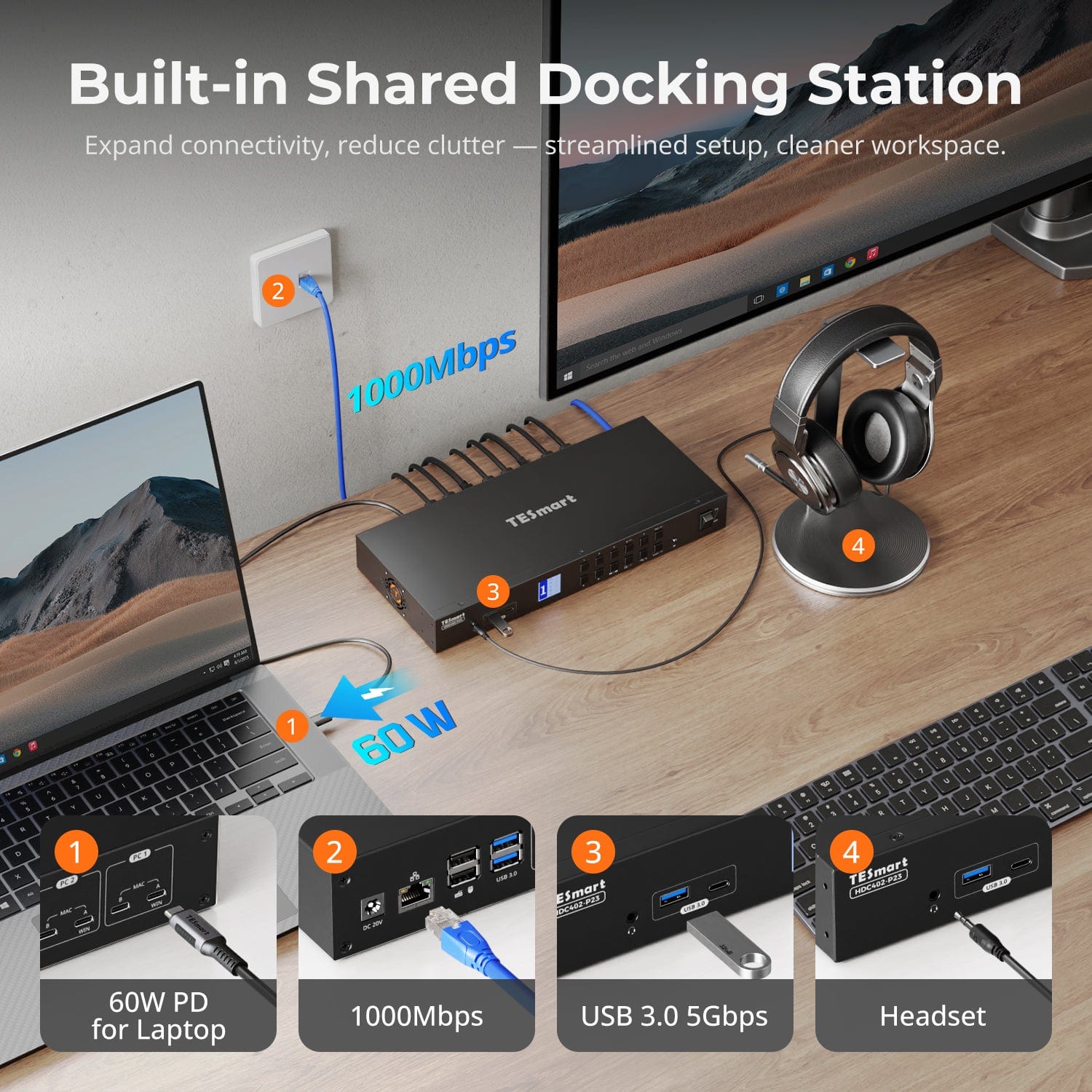
Built-in Shared Docking Station
⚠️ MacBooks with M1/M2/M3 chips natively support only one extended display.
✅ To achieve dual extended displays on macOS (like on Windows), please ensure your Mac supports multi-display output and use both included USB-C cables.
One switch, endless options. Whether for gaming, content creation, or multi-window workflows, our KVM handles a wide range of resolutions and refresh rates with ease.
Each KVM output supports up to:
- 3840×2160 (4K UHD) — 60Hz
- 3440×1440 (21:9 Ultra-Wide) — 100Hz
- 3840×1080 (32:9 Ultra-Wide) — 120Hz
- 2560×1440 (QHD) — 120Hz
- 2560×1080 (21:9 Ultra-Wide) — 165Hz
- 1920×1080 (FHD) — 240Hz
- Mode 1: One PC on Two Monitors (Extend or Mirror)
Extend your desktop across both monitors or mirror your display for presentations. Simply configure in your PC’s display settings — perfect for multitasking or dual-screen workflows. - Mode 2: Two PCs on Two Monitors
Display two computers side by side — one on each monitor. Use hotkeys to switch the KM focus between them. Ideal for hybrid setups (e.g. Mac + Windows), dev work, or live monitoring.
Switching displays shouldn’t scramble your desktop. Our built-in EDID emulator keeps your layout exactly how you left it.
- No More Icon Mess
Preserves icon positions and window sizes when switching inputs. - Flicker-Free Switching
Eliminates screen blackouts and flicker caused by display reinitialization. - Smoother Multitasking
Maintain visual consistency across workstations and monitor setups.
✅ With TESmart EDID emulation: your display stays stable and unchanged — even after switching.
⚠️ Without EDID emulation: icons shift, windows resize, and screen flicker occurs after every switch.
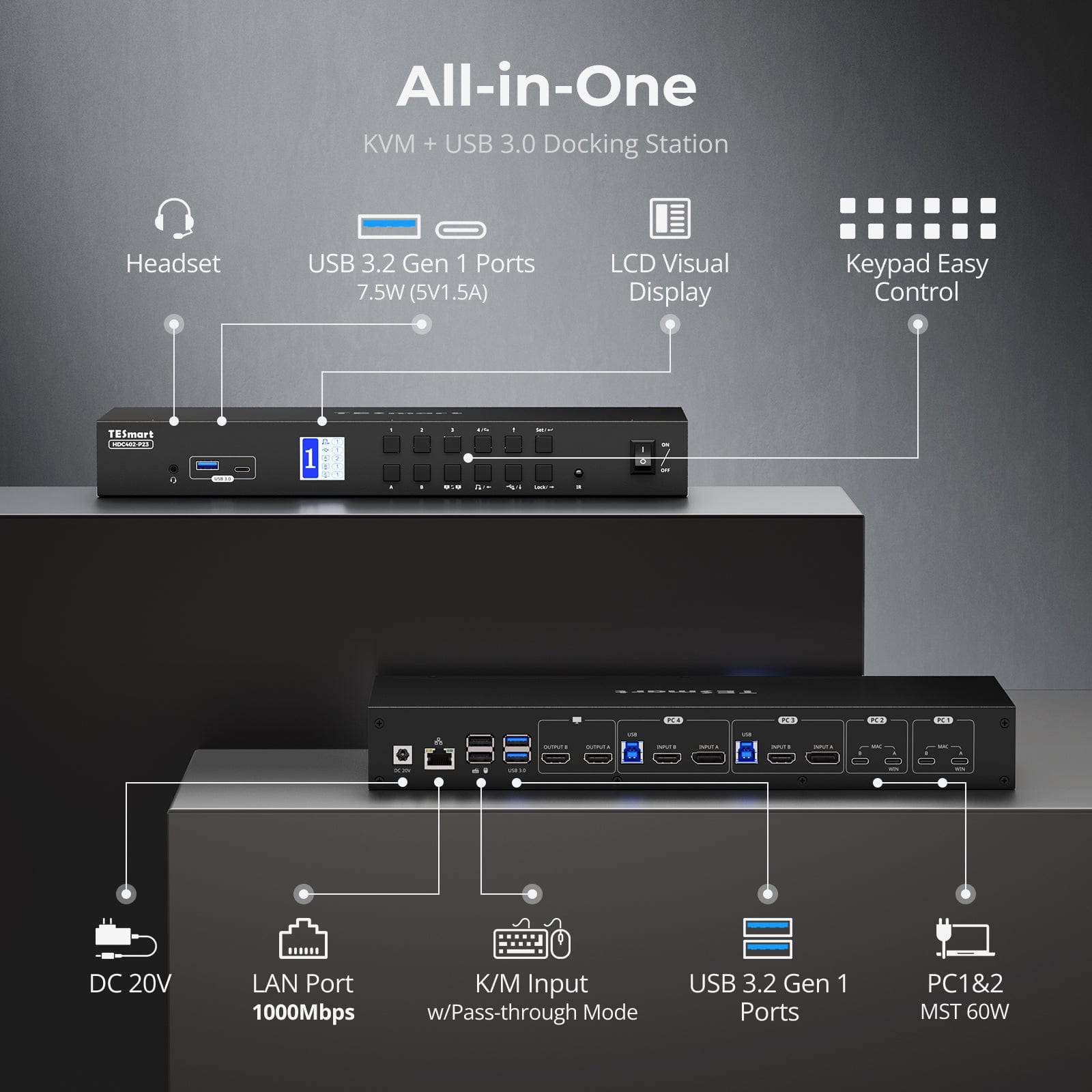
Declutter your desk with a built-in docking station — no extra hubs needed. Share essential ports across all connected devices:
- 60W USB-C PD — Power your laptop while working
- USB 3.0 (5Gbps) — Fast data for drives, webcams, and more
- 1000Mbps Ethernet — Reliable, wired network connection
- Headset Jack — Clear audio input and output for meetings
Perfect for hybrid setups, home offices, and clean cable management.
Easy Switching, 4 Ways
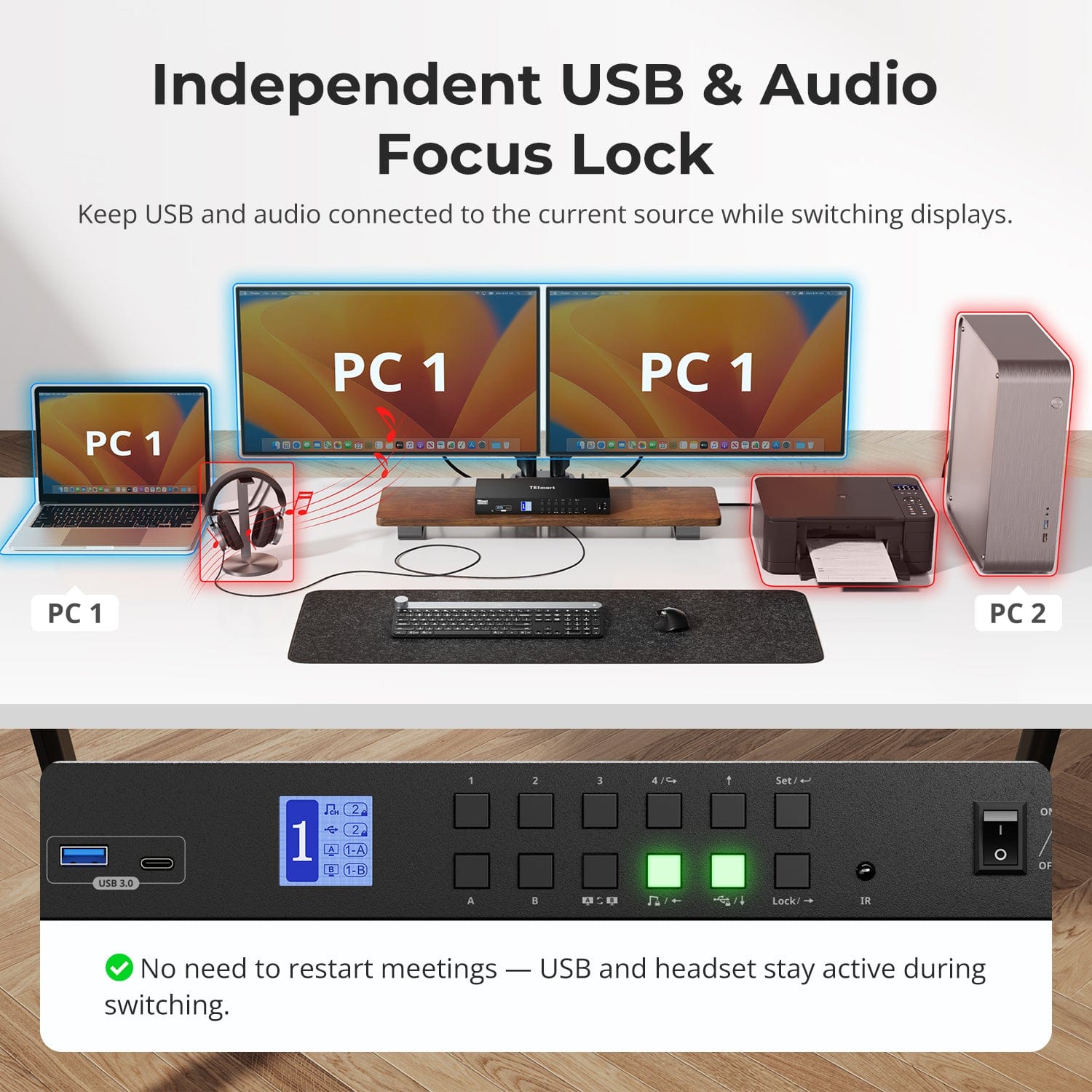
Independent USB & Audio Focus Lock
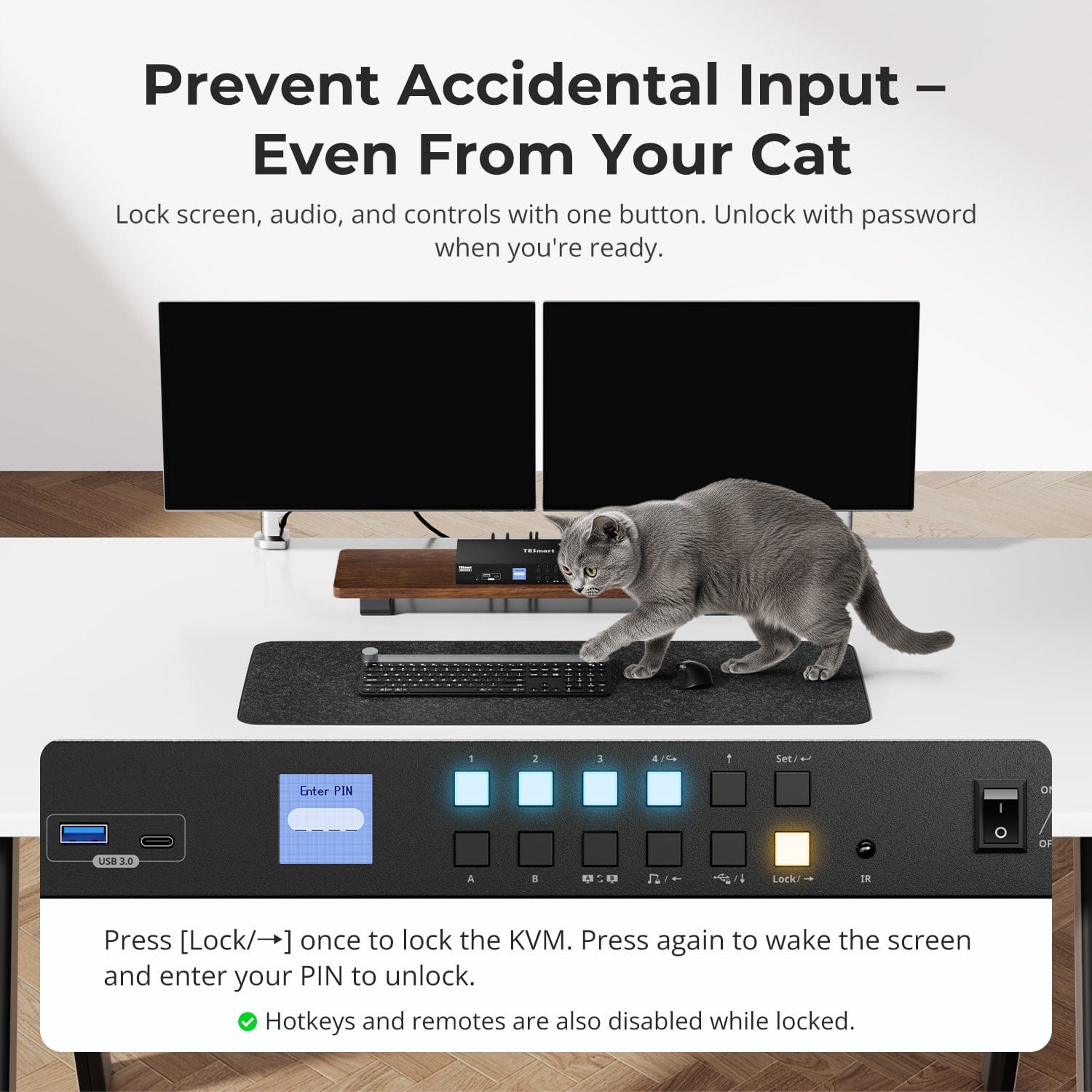
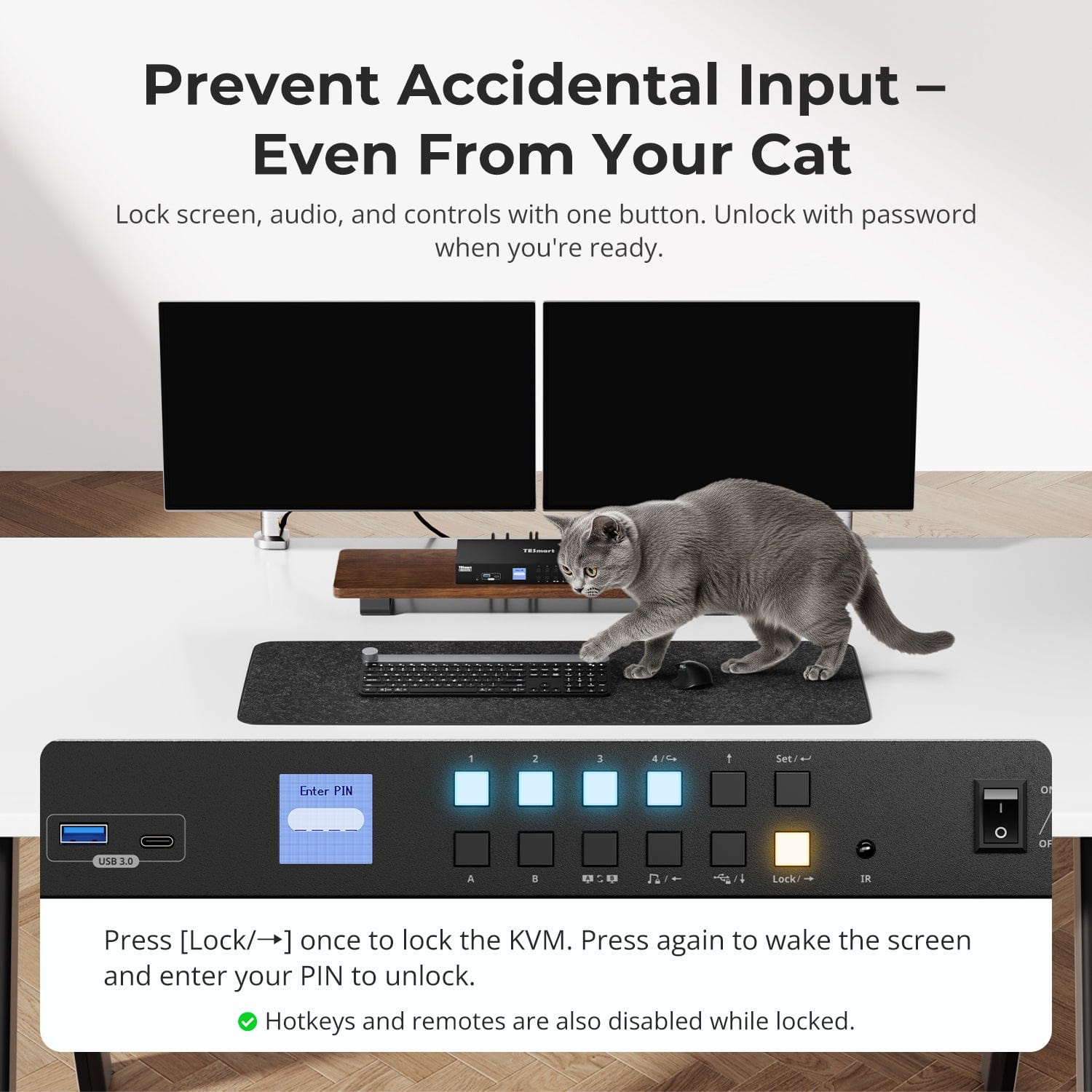
Prevent Accidental Input – Even From Your Cat
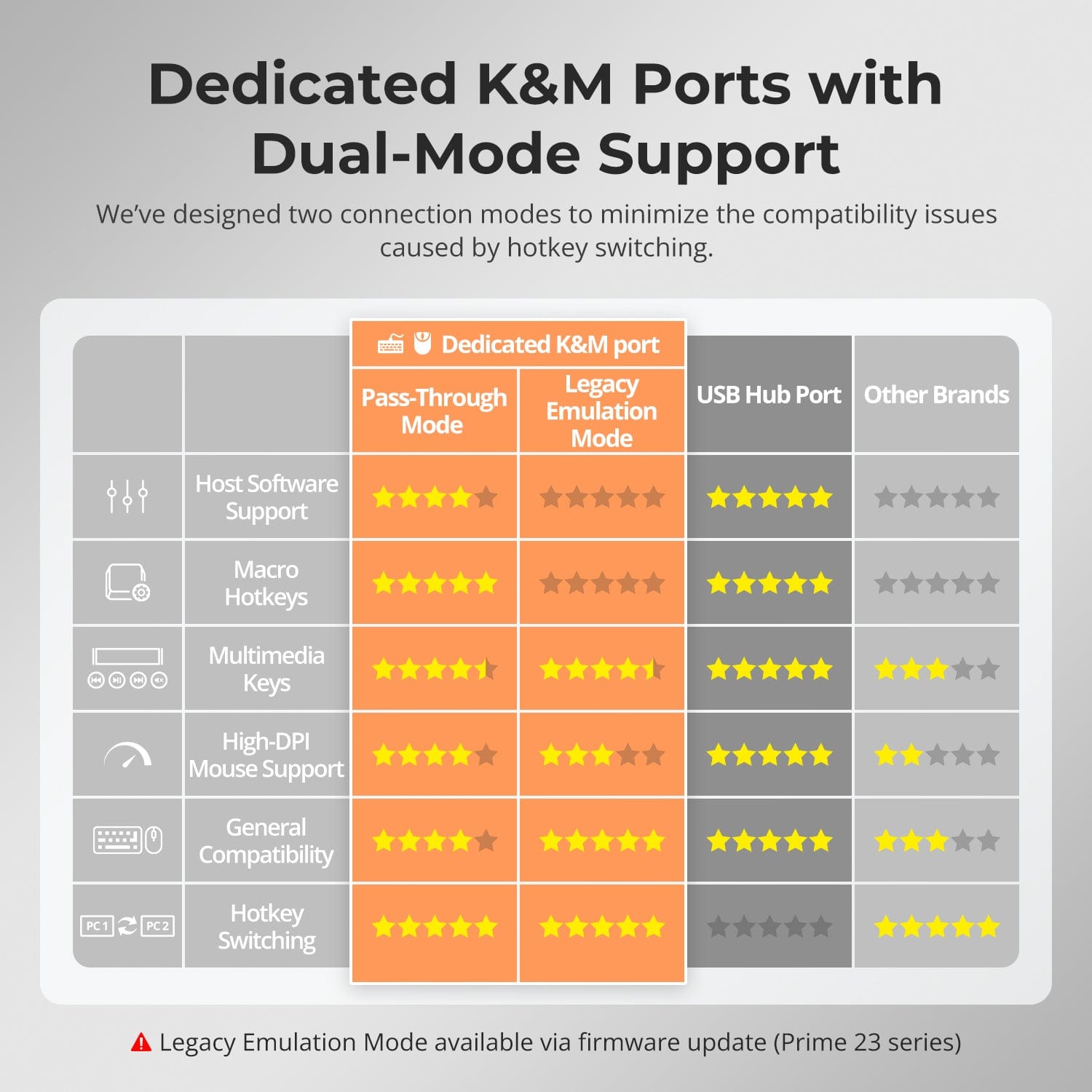
Dedicated K&M Ports with Dual-Mode Support
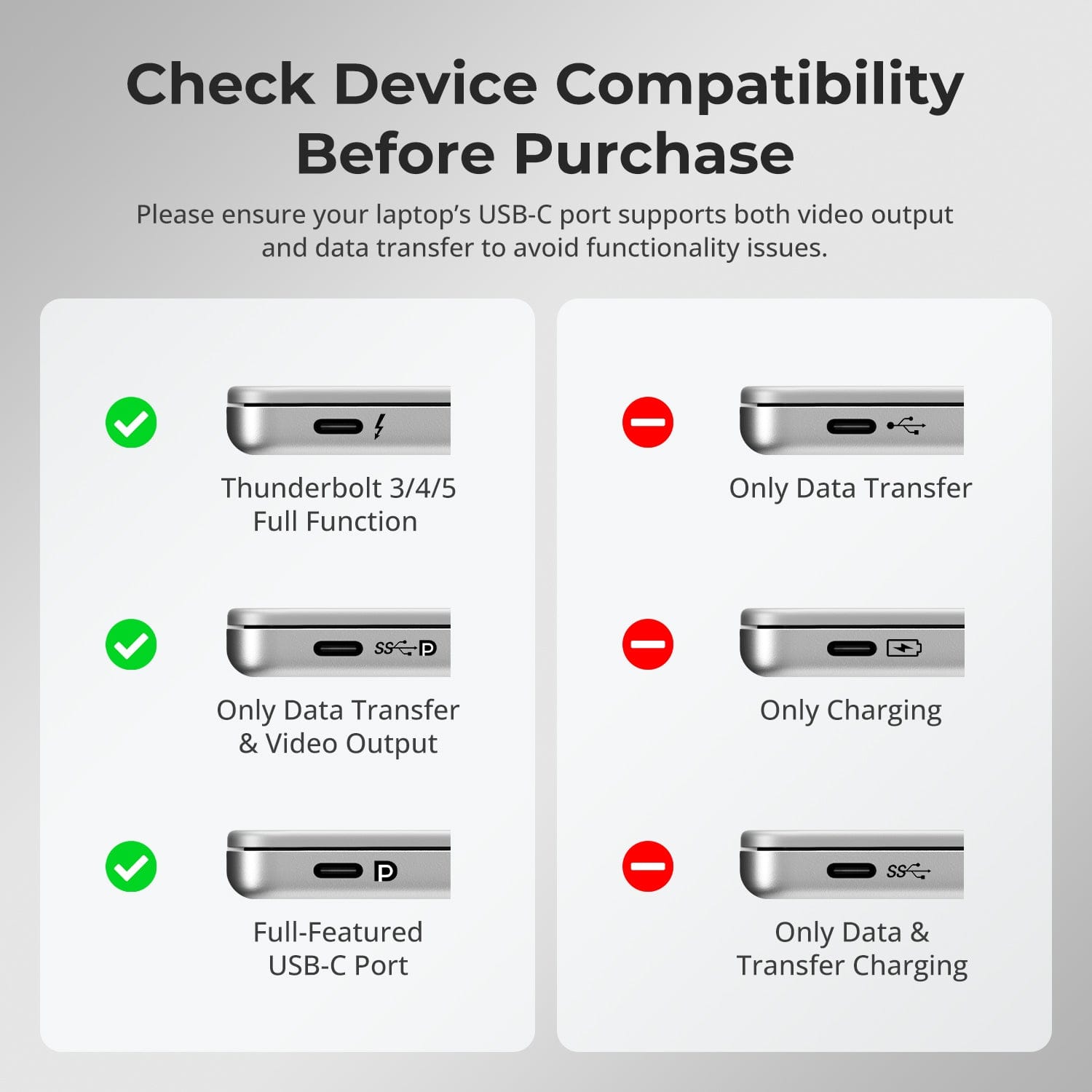
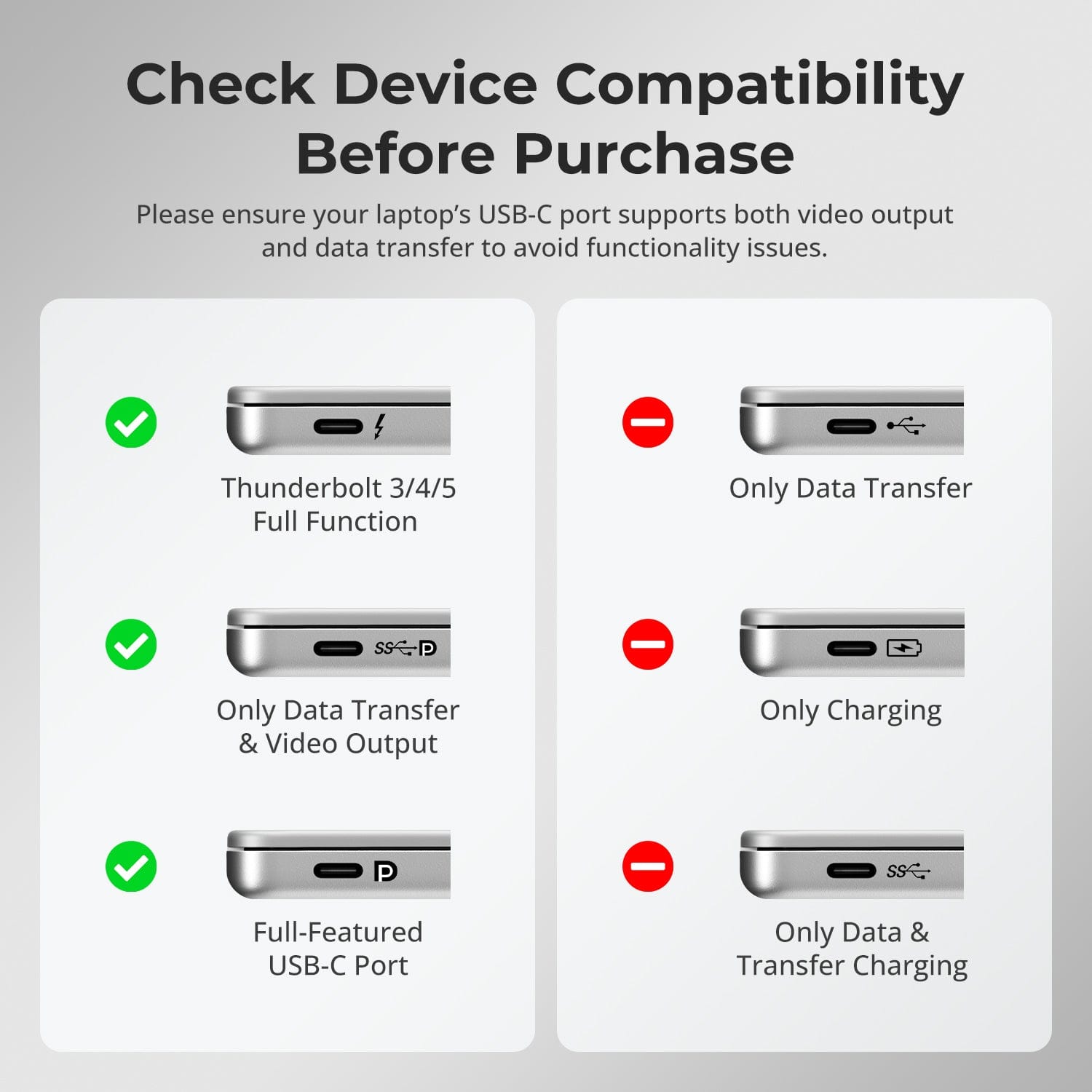
Check Device Compatibility Before Purchase
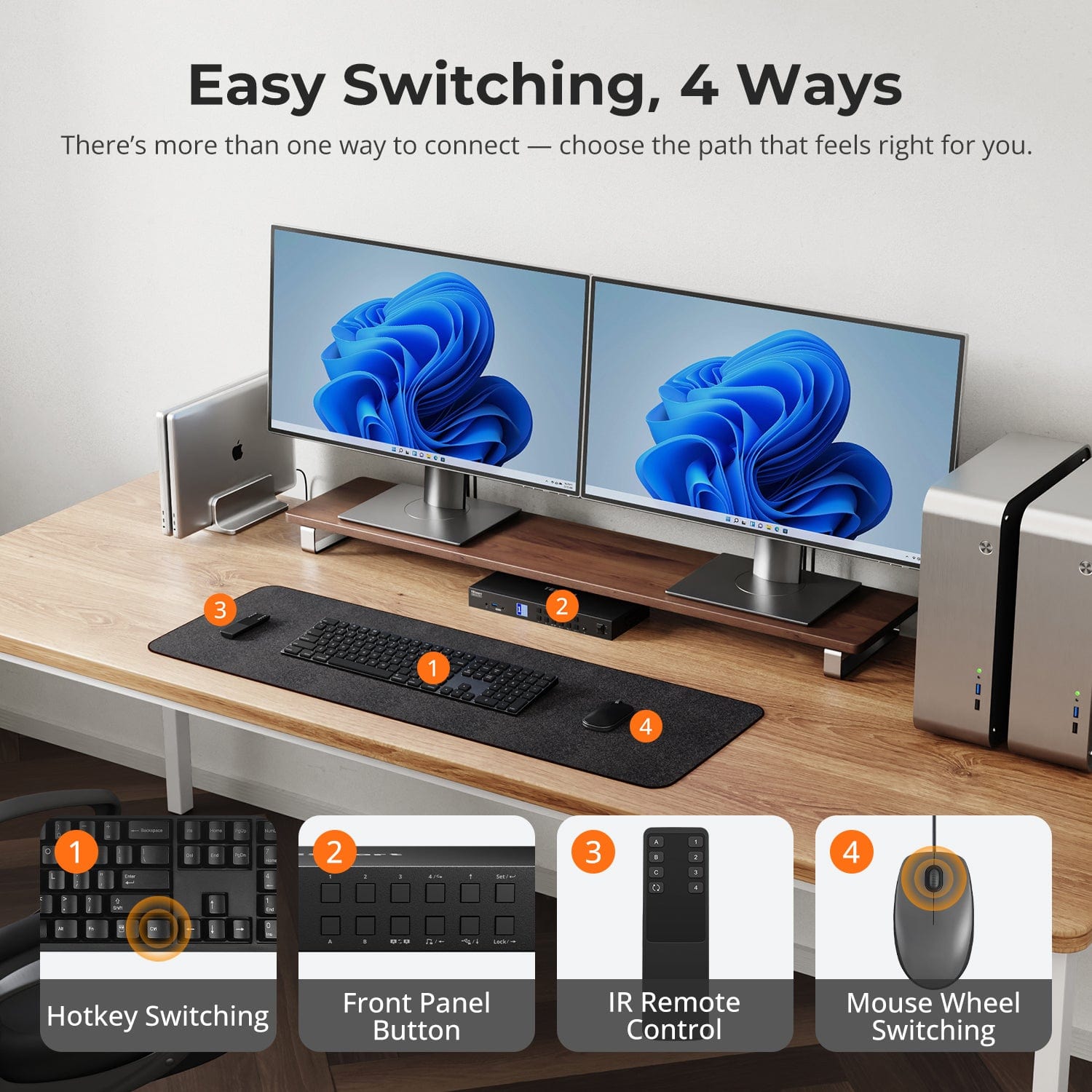
Switching shouldn’t slow you down — we offer four seamless methods to suit any setup or habit:
- Hotkey Switching — Use fixed key combos for quick source changes
- Front Panel Button — Simple, direct access anytime
- IR Remote — Stay in control from across the desk
- Mouse Wheel — Tap twice to switch instantly
Whether you're working, gaming, or presenting — choose the method that fits your flow.
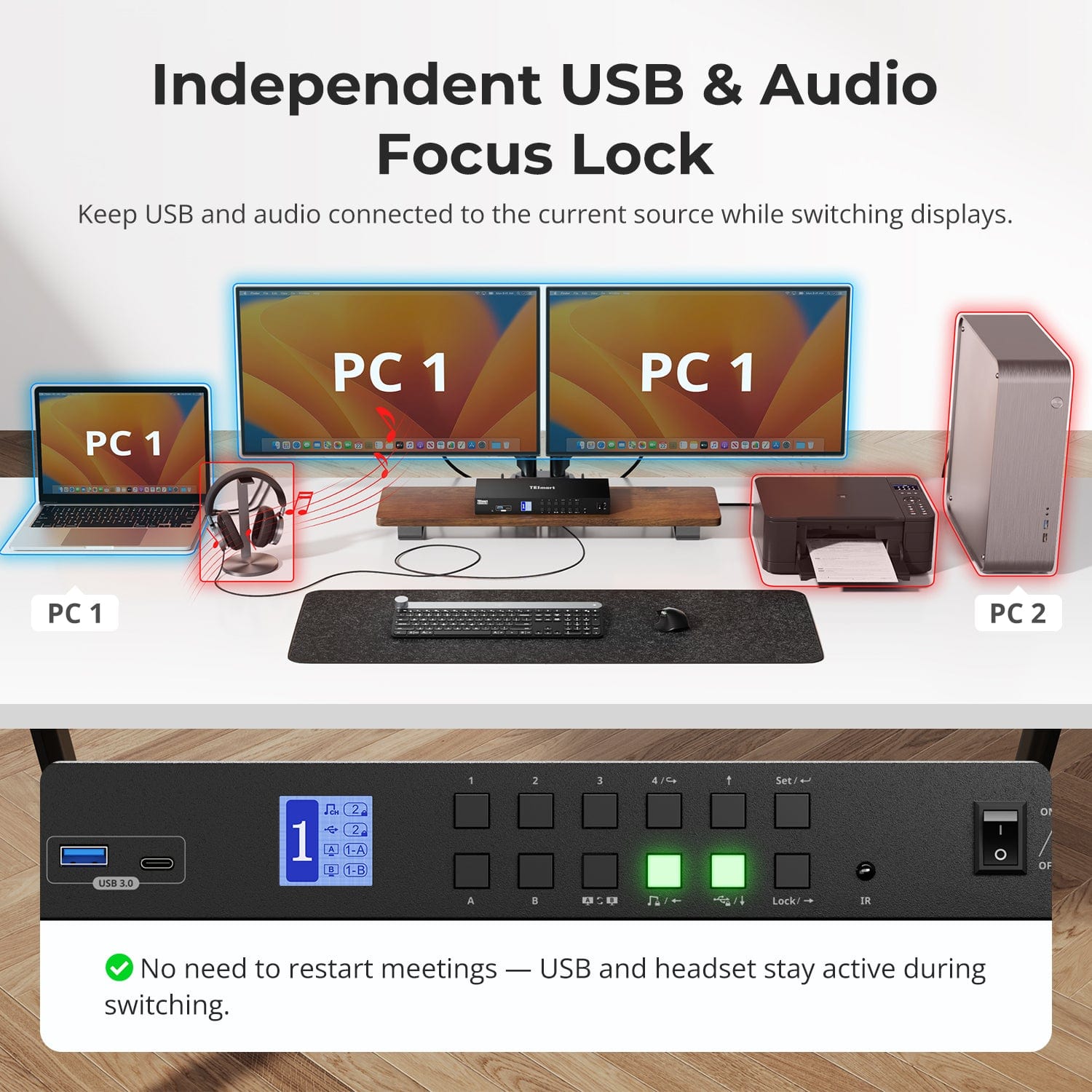
Switch displays without interrupting your USB devices or audio.
This KVM lets you lock USB 3.0 and L/R audio focus independently, so your headset, webcam, or external drives stay connected to the current PC — even while switching screens.
Highlights:
- Lock USB and audio separately
- Prevent call or device dropouts
- Lock state remains after reboot
✅ Ideal for meetings, streaming, and multitasking
⚠️ USB focus ≠ keyboard & mouse focus — they switch separately
Avoid unwanted inputs during meetings, presentations, or idle time. With one button, you can lock screen output, audio, and all control interfaces.
- One-Touch Lock
Freezes display, disables USB, audio, hotkeys, and IR control. - PIN Unlock
Resume exactly where you left off by entering your custom password. - Peace of Mind
Prevents accidental switching — ideal for homes with kids or pets.
✅ Hotkeys and remote controls are disabled while locked.
⚠️ To unlock, press the Lock button again and enter your PIN.
To improve keyboard and mouse compatibility — especially during hotkey switching — we designed two specialized connection modes:
- Pass-Through Mode (Recommended)
Direct passthrough to the PC. Supports advanced drivers, macros, high-DPI mice, and multifunction input devices. Ideal for gaming, design, and pro workflows. - Legacy Emulation Mode
Ensures universal compatibility and stable hotkey functionality across most systems. Best for office or when driver issues occur.
✅ Hotkey commands only work when your keyboard is connected to the dedicated K&M port.
⚠️ Emulation Mode disables driver-based software and advanced features.
⚠️ Bluetooth keyboards/mice are not supported.
⚠️ Legacy Emulation Mode available via firmware update (Prime 23 series)
Please ensure your laptop’s USB-C port supports both video output and data transfer to avoid functionality issues.
FAQs
Why is my MacBook Pro showing mirrored display or onlyone active screen?
- Hardware Limitation
MacBook Pro models with M1/M2/M3 chips support only one external
display natively, while M3 MacBook Pro may support two externaI monitors if the
lid is closed (clamshell mode).
- System Limitation (macOS doesn't support MST)
Even if your Mac supports dual displays, MST is not supported on macos. You
must connect two Thunderbolt ports to PC1 input portsA and B on the KVM
switch to enable dual external displays.
Does the KVM support both Mac and Windows environments?
Yes. The HDC402-P23 is compatible with a wide range of operating systems including: Windows, macOS, Unix, and Linux-based systems such as Debian, Ubuntu, Fedora, and Raspbian (including support for Raspberry Pi).
It works well in mixed operating system environmentts without requiring
additional configuration.
How to adjust the fan speed?
The KVM switch supports four fan modes, each indicated by the inumber of beeps from the buzzer. The default mode is Mode 2.
Adjusting the fan mode: Press [Right-Ctrl] > [Right-Ctrl] > [F3]to cycle through
the modes:
- Fan Mode 1: Fan is turned off. The buzzer will beep once.
- Fan Mode 2: Fan operates automatically based on the cuirrent temperature.
The buzzer will beep twice. - Fan Mode 3: Fan runs continuously at low speed. The buzzer wi| beep three
times. - Fan Mode 4: Fan runs continuously at high speed. The buzzer will beep four
times.
Why can’t my computer use Wi-Fi after connecting to theKVM?
The KVM switch has a built-in network card, which is enabled by default.
Computers may prioritize the wired connection.
If you need to use Wi-Fi instead of the KVM's wired networkconnection, you can:
- Disable the KVM's built-in network adapter:
Press [Right-Ctrl]→ → (Right-Ctrl] → [F4] to turn off the built-in network
card.
Note: Enable it will trigger the buzzer to beep twice and disable it will trigger
the buzzer to beep once.
Disable the USB network adapter in the computer settings (Windows 11
example):
Method 1: Advanced Network Settings
1) Press [Win + I] to open Windows Settings.
2)Go to Network & Internet → Advanced network settings.
3)Find the adapter named Realtek USB GbE Family Controller inthe list.
4)Click Disable.
Method 2: Device Manager
(1)Press [Win + X] and select Device Manager.
2) Expand Network adapters and locate Realtek USB GbE Farmily Controller.
3) Right-click and choose Disable device.
After performing either method, your computer will prioritize Wi-Fi while still
connected to the KVM switch.
Why does my laptop show "Slow Charging"?
Charging Power Limitation
To maintain stability and reduce heat, KVM Switch offers upto 60W (20V 3A)
charging. This is typically sufficient for business laptops. Howeverif yourlaptop
does not support 20V input, or if it's a high-performance device, charging speed may be limited.
For High-Power Devices(Gaming/Workstation Laptops)
Devices requiring 90W-120W or more may charge slowly. We recommend
using the original laptop power adapter in parallel with the KVMconnection.
Additional Notes
1) Ensure good ventilation around the KVM to prevent overheating.
2) If the KVM will not be used for an extended time, it's best to power it off.
Why are my keyboard and mouse not working properly?
Common symptoms:
- Keyboard input unresponsive or delayed;
- Sticky keys or keystroke duplication;
- Mouse lagging;
- Hotkeys not working.
Recommended Solutions:
- Try switching to Legacy Emulation Mode to improve compatibility with a wider range of keyboards and mice: Press [Right Ctrl] + [Right Ctrl1+ [F2].
- If the issue persists, please reach out to our technical suipport team at support@tesmart.com for expert assistance and guidance on troubleshooting and resolving the problem.
Does the KVM Switch support firmware upgrades?
Yes, TESmart KVM switches support official firmware upgraddes designed to
resolve common issues and enhance compatibility.
Important Note:
Firmware upgrades carry inherent risks. Installing an incorrect version or
performing the process incorrectly may result in deevice malfunction.
Therefore, if your device is functioning normally, it is strongly recommended
not to perform a firmware update on your own.
If an upgrade is required, please contact our technical support team for:
1) The correct firmware version for your specific model.
2) Step-by-step upgrade instructions.
3) Technical assistance throughout the process.
-
Recycling & Trade-in
Up to 50% Credit on Recycling
-
Free Shipping
US / UK · 3–5 Business Days
-
30-Day Free Returns
Hassle-Free Return & Purchase Guarantee
-
Extended Warranty: 1+4 Years
Register to unlock 4 extra years of coverage
