

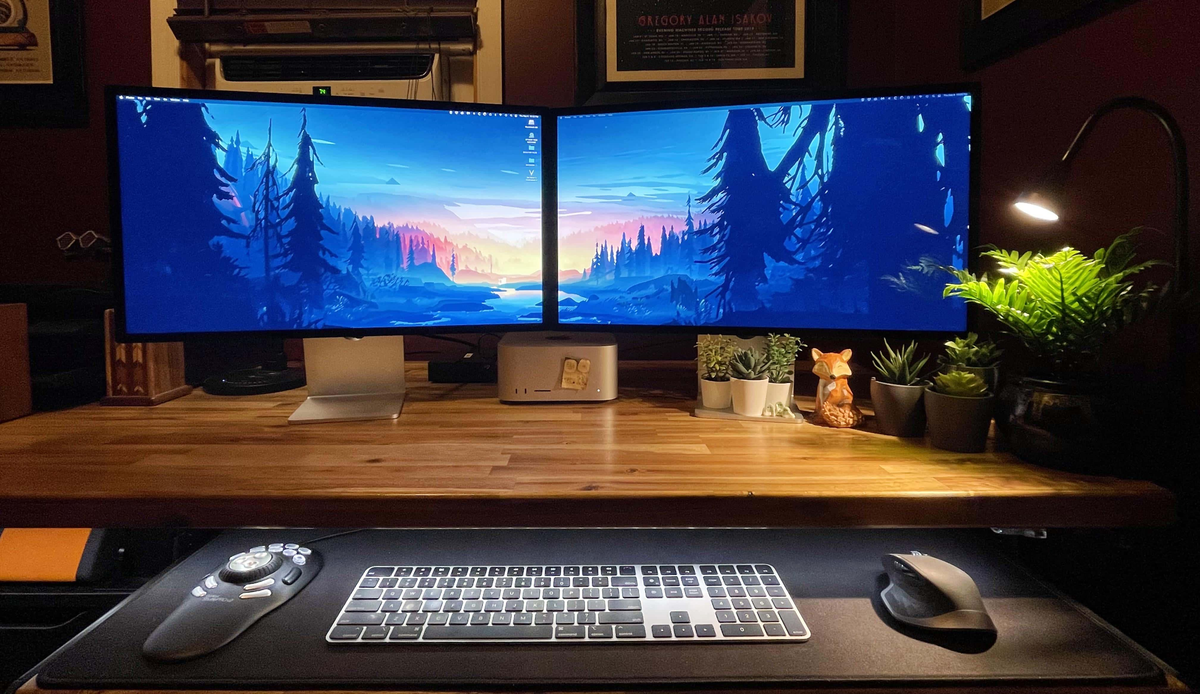
In recent years, Apple Studio Display has become the centerpiece of more and more professional desktop setups. For video editors, software developers, photographers, and designers, it is no longer just a 5K Retina monitor. Instead, it serves as a desktop connectivity hub that combines Thunderbolt expansion, a USB hub, a built-in camera, microphones, speakers, and Power Delivery in a single device.
In the past, a monitor's primary role was simply to display content. Today, Apple Studio Display handles far more than video output. Through a single Thunderbolt cable, it delivers display signals, data transfer, laptop charging, audio and video device connectivity, and peripheral communication. For users working with a single computer, this creates a remarkably clean desktop where one cable is all that's needed for display, power, and accessories.
However, as more professionals adopt dual-computer workflows—such as a MacBook Pro paired with a Mac mini, a MacBook Pro connected to a Windows workstation, or a dedicated development machine alongside a testing system—the desktop becomes significantly more complex. The challenge is no longer simply managing a monitor, but managing an entire workflow. Users need an efficient way to switch between two computers without repeatedly unplugging Thunderbolt cables while keeping both Apple Studio Displays fully functional. They also expect both computers to remain charged continuously and want cameras, speakers, USB hubs, networking, and Thunderbolt peripherals to stay connected and stable throughout the switching process. These evolving requirements have fundamentally changed the role of the Thunderbolt 4 KVM. Rather than functioning as a simple switch, it is becoming the central hub of the modern professional desktop.

Why Traditional Thunderbolt KVMs No Longer Meet Professional Workflows
When shopping for a Thunderbolt KVM for the first time, most users focus on hardware specifications such as the number of supported computers, display outputs, or available USB ports. For Apple Studio Display, however, those specifications are no longer the most important considerations. Unlike a conventional monitor, Apple Studio Display carries much more than video through a Thunderbolt connection. DisplayPort video, PCIe data, USB communication, the built-in camera, microphones, audio, and Power Delivery all share the same Thunderbolt link. As a result, every time users switch computers, the system is not merely changing the display signal—it is rebuilding the entire Thunderbolt device connection.
Most Thunderbolt KVM switches available today rely on a Synchronized Switching architecture. When users change the active computer, every connected display, USB peripheral, and Thunderbolt device switches together as one complete system. This approach works well in traditional office environments, but it often falls short in professional workflows.
For example, a video editor may want one Apple Studio Display to remain dedicated to the editing timeline while the second display monitors rendering progress. A software developer may prefer to keep one monitor permanently connected to the development environment while switching the other between different operating systems. Financial analysts often need to monitor multiple platforms simultaneously instead of moving their entire desktop from one computer to another.
As dual Apple Studio Displays, high-speed Thunderbolt SSDs, video capture devices, and numerous USB peripherals become standard components of professional workstations, a Thunderbolt KVM is expected to manage far more than display switching. The quality of the user experience is no longer determined by the number of available ports, but by how effectively the entire system manages an increasingly complex workflow.

What Professional Users Really Need Is More Than Additional Ports
For today's professional workstation, the value of a Thunderbolt 4 KVM is no longer measured by how many devices it can connect. Instead, it is defined by how efficiently it manages an entire workflow.
Traditionally, a KVM switch was designed to share a monitor, keyboard, and mouse between multiple computers, making interface count one of its most important specifications. As Apple Studio Display, Thunderbolt storage, video capture devices, and multiple host computers become standard components of professional desktops, however, the nature of the challenge has changed. Productivity now depends less on the number of available ports and more on whether all connected devices can work together reliably in a complex environment.
Take video production as an example. Two displays usually serve different purposes. One monitor is dedicated to the editing timeline, while the other is used for media management, full-screen preview, or render monitoring. If both displays reconnect every time the active computer changes, the editing workflow is interrupted and project organization may be affected.
Software developers have similar requirements. One display may remain dedicated to a code editor, while the second switches between macOS, Windows, or Linux testing environments. Instead of moving the entire desktop, developers prefer to allocate display resources according to the task at hand.
The same applies to financial analysis, engineering, and IT operations, where different computers often perform different jobs while separate displays monitor different systems simultaneously.
As a result, professional users are no longer looking for more ports—they need more flexible resource management. Those resources include not only displays, but also USB peripherals, network connectivity, audio devices, and Power Delivery. Keyboards and mice should switch instantly without affecting other USB devices. Both laptops should continue charging regardless of which computer is active. Audio and networking should be managed independently instead of always following video switching.
Together, these requirements point to a clear industry trend: the KVM is evolving from a simple hardware switch into the management center of an entire professional workflow. A modern Thunderbolt 4 KVM must do more than connect devices—it must reduce interruptions, simplify desktop organization, and enable every connected device to work together as one integrated system. That is precisely why technologies such as Matrix Switching, independent HID management, continuous Power Delivery, and a native Thunderbolt architecture have become defining features of professional Thunderbolt KVM solutions

How Does the TKS202-X4 Solve These Challenges?
To meet the evolving demands of professional workstations, TESmart designed the TKS202-X4 with a fundamentally different philosophy. Rather than simply adding more ports or increasing hardware specifications, its architecture focuses on minimizing workflow interruptions and improving collaboration between multiple computers. Instead of functioning as a traditional KVM switch, the TKS202-X4 is designed to manage an entire Thunderbolt workspace more efficiently.
Matrix Switching: Let Displays Follow Your Workflow, Not Your Computer
Traditional KVM switches are built around a simple concept: switch the host computer, and every connected display and peripheral follows. The TKS202-X4 takes a different approach with Matrix Switching.
Its two Thunderbolt outputs can be assigned independently to different host computers, allowing two Apple Studio Displays to operate separately instead of always switching together. For example, during video production, one display can remain dedicated to the Final Cut Pro timeline while the other switches to a second workstation to monitor DaVinci Resolve rendering. Developers can keep one display permanently connected to their coding environment while using the other to switch between different operating systems for testing.
By allowing each display to serve a different purpose, Matrix Switching reduces unnecessary interruptions and enables dual Apple Studio Displays to function as a truly collaborative workspace rather than two monitors that always move together.

Independent HID Management: Keep Your Hands on the Keyboard
An efficient workflow should never be interrupted simply because you need to switch devices.
To achieve this, the TKS202-X4 includes dedicated HID ports and a dedicated HID hub that separates keyboard and mouse traffic from standard USB peripherals. This provides a reliable foundation for keyboard hotkeys, allowing users to switch host computers, assign display outputs, manage USB devices, and control audio routing without touching the KVM itself.
For installations where the KVM is mounted behind a monitor, under a desk, or inside a rack, keyboard-based control keeps the entire switching process fast and unobtrusive, allowing the KVM to become part of the workflow instead of another device that requires manual interaction.
Dual 60W Power Delivery: Keep Both Computers Powered
For professionals who use two laptops, charging strategy is just as important as display switching.
Many Thunderbolt KVM switches only provide Power Delivery to the currently active computer. Once the user switches to another host, the previously connected laptop stops charging.
The TKS202-X4 features dual independent 60W Power Delivery, allowing both connected computers to receive continuous charging at the same time. Regardless of which computer is currently connected to the displays, each host can receive up to 60W of power.
This means two MacBooks can remain connected without requiring separate power adapters, eliminating concerns about battery drain during long working sessions and delivering the clean, single-cable desktop experience that Thunderbolt was designed to provide.

Unified Management of USB, Audio, and Network Resources
In addition to display switching and charging, the TKS202-X4 centralizes the management of networking, audio, and USB peripherals.
Its built-in Gigabit Ethernet port allows two host computers to share a single wired network connection, eliminating the need for multiple Ethernet cables or additional networking hardware.
Independent audio routing enables audio and video to be switched separately. For example, users can switch the displays to another computer while continuing to play audio from an ongoing video export or online meeting on the original system, reducing unnecessary changes to audio output devices.
The USB layout is also optimized for real-world workflows. The front-panel 10Gbps USB-A and USB-C ports are ideal for temporary devices such as portable SSDs and high-speed flash drives, while the rear USB-A ports are intended for permanently connected devices like printers, wireless receivers, and webcams.
Rather than simply rearranging ports, this design reflects the way professionals actually use their desktops. High-speed storage and frequently connected devices remain easily accessible, while permanent peripherals stay organized behind the workstation, resulting in a cleaner, more efficient desktop environment.

Dual Intel JHL8440: A More Independent Thunderbolt Architecture
The TKS202-X4 features a dual Intel JHL8440 Thunderbolt 4 controller architecture, one of its most important technical advantages.
The Intel JHL8440 is Intel's official Thunderbolt 4 controller, responsible for managing the core functions of a Thunderbolt connection, including DisplayPort tunneling, PCIe communication, USB data transfer, and Power Delivery.
In a conventional Thunderbolt design, a single controller is typically responsible for handling all Thunderbolt traffic. While this architecture is sufficient for general office use, the controller must manage every connected device—including displays, USB peripherals, storage, networking, audio, and charging—through a single data path.As the number of connected devices grows, so does the complexity of managing those resources efficiently.
The TKS202-X4 adopts a different approach.Instead of relying on a single controller, it uses two independent Intel JHL8440 controllers to manage separate Thunderbolt data paths.
This design is not intended to increase theoretical bandwidth. Rather, it improves overall system organization by separating different Thunderbolt domains and reducing resource contention between multiple high-speed data streams.
The architecture delivers three key advantages:
1. Resource Isolation – Different Thunderbolt workloads are handled independently, reducing competition between data streams.
2. Domain Isolation – Each connected host maintains a more independent Thunderbolt Domain, minimizing interference when switching between computers.
3. Topology Isolation – Separate Thunderbolt paths create a cleaner device topology, resulting in a more stable and predictable workstation.
Instead of pursuing higher benchmark performance, the dual-controller architecture focuses on what matters most in professional environments: long-term stability, reliable device management, and a smoother workflow.

Conclusion: KVM Is No Longer Just About Switching Devices
As professional desktop environments continue to evolve, the role of a Thunderbolt 4 KVM has changed dramatically.
Today's users are no longer managing only displays. They are managing complete workstations that include displays, Power Delivery, USB peripherals, networking, audio devices, and a growing collection of Thunderbolt accessories.For professionals using dual Apple Studio Displays, an ideal KVM should do more than simply connect devices. It should allow the entire workspace to operate more naturally, more reliably, and more efficiently.
The TESmart TKS202-X4 was designed with this philosophy in mind.By combining Thunderbolt Matrix Switching, dual Intel JHL8440 Thunderbolt 4 controllers, dual independent 60W Power Delivery, independent HID management, and unified USB, audio, and network management, it helps developers, content creators, engineers, designers, and enterprise users build a desktop environment that supports modern multi-computer workflows.
As professional workspaces continue to embrace Thunderbolt, the purpose of a KVM is no longer simply to switch between devices.It is to manage an entire workflow.The TKS202-X4 is designed to make that workflow more stable, more efficient, and ready for the next generation of professional desktop computing.
Related Guides
If you're building a setup around Apple Studio Display, these resources may help:
Thunderbolt™ Technology: A Universe of Possibilities
Studio Display - Technical Specifications - Apple
Connect PS5/Xbox to Mac Studio Display via Thunderbolt™-compatible KVM – TESmart
Share:
Wireless Mouse Lag Through a KVM Switch: USB Ports, HID and Interference Explained
CKS201-M23 vs HKS202-P23 vs DKS202-M24: Which KVM Switch Fits Your Setup?