KVM Switches for Apple Studio Display and Thunderbolt Workflows: A Practical Guide for Multi-Computer Workstations
Table of Contents
- Introduction
- Common Multi-Computer Workflows for Apple Studio Display
- Why Apple Studio Display Needs a Different KVM Approach
- Using TKS202-X4 in Setups Built Around Thunderbolt Displays
- Advantages of Using TKS202-X4 in a Multi-Computer Workstation
- Compatible with Thunderbolt 4 — Transparent & Tested
- Comparing KVM Options for Thunderbolt Display Workflows
- When This Type of KVM Is the Right Choice
- Related Guides
- FAQ
Introduction
Apple Studio Display and Pro Display XDR are designed around Thunderbolt connectivity rather than traditional HDMI or DisplayPort monitor inputs. Unlike most monitors, these displays function as full Thunderbolt devices that combine video, USB data, audio, and power delivery through a single cable.
Because of this architecture, many conventional KVM switches are not suitable for Apple Thunderbolt display workflows. HDMI or DisplayPort KVM switches may support high resolutions, but they do not maintain the type of connection Apple Studio Display expects for full functionality.
For users who want to share an Apple Studio Display between multiple computers, the key is not simply choosing a higher-resolution KVM. The more important requirement is choosing a KVM solution that works properly in setups built around Thunderbolt displays and laptops.
This article explains what to consider when choosing a KVM for Apple Studio Display workflows, and how solutions such as the TESmart TKS202-X4 fit into modern multi-computer workstation setups.
Common Multi-Computer Workflows for Apple Studio Display
Many Apple users want to connect multiple computers to a single Apple Studio Display. This often happens in professional work environments where switching between systems is part of the daily workflow.
MacBook and Desktop Mac Setup
A common configuration is using a MacBook for mobility while keeping a Mac mini or Mac Studio permanently connected at the desk. Both computers need access to the same display, keyboard, mouse, and USB peripherals.
Switching between these systems without unplugging cables helps maintain a clean and efficient workspace.
Mac and Windows Dual-System Setup
Some professionals regularly work across operating systems. Developers, engineers, and IT professionals may use macOS for development while running Windows for testing or specialized software.
Sharing the same display and peripherals across both systems simplifies the workflow and reduces hardware duplication.
Creator and Production Workstations
Creative professionals often operate multiple machines for editing, rendering, or testing. A shared workstation allows them to manage different systems while maintaining a single high-quality display environment.
In these scenarios, the KVM becomes the central device that connects everything together.
Why Apple Studio Display Needs a Different KVM Approach
The key difference here is not whether the KVM has enough video bandwidth on paper, but whether the full display workflow can be maintained correctly.
Most KVM switches are designed around HDMI or DisplayPort monitor outputs. Apple Studio Display, however, is used in a workflow built around Thunderbolt connectivity, where the display is expected to handle more than just video.
In practice, users often expect the display environment to continue supporting:
High-resolution video output
USB hub connectivity
Display audio devices
Integrated peripherals such as camera and speakers
Power delivery to connected laptops
That is why choosing a KVM for Apple Studio Display is different from choosing a standard HDMI or DisplayPort KVM for ordinary monitors.
Using TKS202-X4 in Setups Built Around Thunderbolt Displays
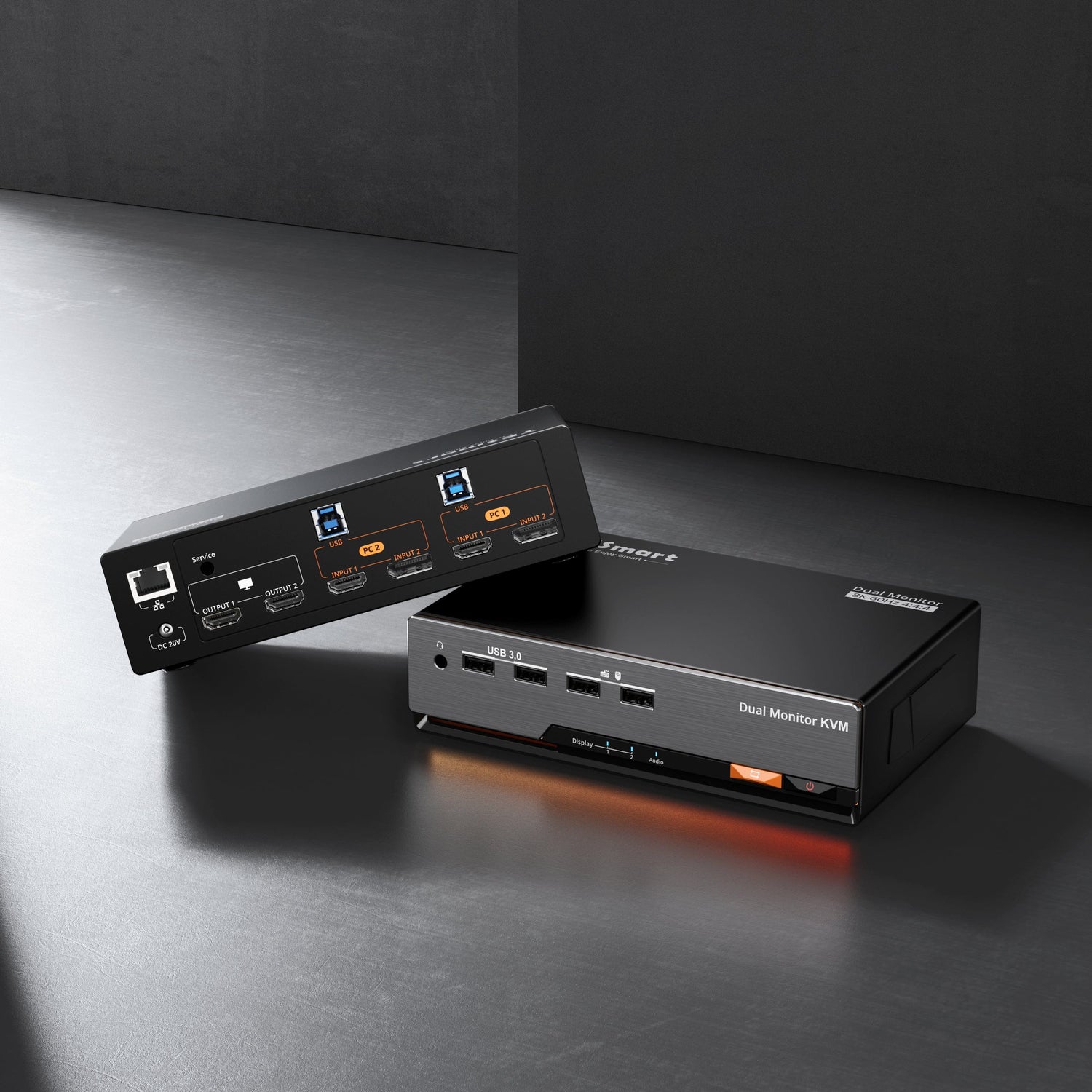
TESmart’s TKS202-X4 is designed for workstation environments where users want to switch between computers while working with Apple Studio Display and other Thunderbolt-based desk setups.
Rather than framing the product simply as a generic high-resolution switch, it is better understood as a KVM solution for users who need a cleaner and more practical way to manage multi-computer workflows built around premium Apple and laptop-centric workstations.
Typical use cases in this type of workstation setup include:
Sharing an Apple Studio Display between two computers
Sharing USB peripherals across systems
Maintaining a single keyboard and mouse for multiple devices
Switching computers using buttons, hotkeys, or remote control
For users building a desk around Apple Studio Display, the goal is a smoother switching experience without constantly reconnecting the display and peripherals.
Advantages of Using TKS202-X4 in a Multi-Computer Workstation
While many switching devices focus only on basic display sharing, workstation environments often require more flexible configurations. The TKS202-X4 introduces several practical capabilities that can improve everyday workflows.
Independent Dual-Monitor Switching
One useful feature in multi-system environments is the ability to operate displays independently.
The TKS202-X4 supports independent dual-display switching, which allows each monitor to show a different computer at the same time.
For example:
Display 1 → PC1
Display 2 → PC2
This capability is particularly useful for developers, engineers, and system administrators who need to monitor multiple systems simultaneously. Users can observe logs or processes on one system while actively working on another.
When needed, both displays can also switch to the same computer, allowing the workstation to function as a traditional dual-monitor setup.
Laptop Charging Through a Single-Cable Workflow
Another important advantage in modern laptop-centered desk setups is power delivery.
When a laptop is connected through an appropriate single-cable workflow, the same connection can support charging power while also supporting display and device access, depending on the full setup design.
This reduces the need for a separate charging adapter and simplifies the desk environment.
The importance of this type of setup is increasing as more users build workstations around laptops and fewer bundled accessories. In these situations, a properly designed KVM-centered desk can function as both a switching point and a cleaner docking experience.
A Cleaner Workstation Experience
Combining display switching, USB device sharing, and laptop charging creates a simplified workstation environment.
Instead of connecting multiple cables, users can plug into a more centralized desk setup and gain access to:
the shared display environment
keyboard and mouse
connected USB devices
laptop charging in supported workflows
This type of setup helps keep desks cleaner while making it easier to move between computers.
Compatible with Thunderbolt 4 — Transparent & Tested
Designed for seamless use with Thunderbolt 4 laptops, including devices such as MacBook Pro and Dell XPS.
Extensively tested across real-world workstation setups to support stable dual 4K@60Hz display performance and reliable device connectivity.
Not yet Intel® certified for Thunderbolt, but validated for compatibility across common Thunderbolt workflows.
Certification is currently in progress.
Comparing KVM Options for Thunderbolt Display Workflows
KVM solutions for Apple Studio Display and similar desk environments are still a relatively specialized category. Rather than comparing products only by raw specifications, it is often more useful to compare how they are intended to be used.
Design Focus
Some solutions focus primarily on switching a display between computers.
Other designs are built around workstation environments where multiple computers share displays, peripherals, and workspace hardware.
The TKS202-X4 is designed with this workstation model in mind, allowing users to move between systems while maintaining a consistent set of peripherals and displays.
Peripheral Integration
Many professional setups involve more than just display switching. Users often share devices such as external storage drives, webcams, audio interfaces, and other USB equipment.
Workstation-oriented KVM solutions aim to manage these peripherals alongside display switching so that users do not need to reconnect devices each time they change computers.
Display Workflow Compatibility
Apple Studio Display behaves differently from a traditional HDMI or DisplayPort monitor because the overall desk workflow expects more than a simple video-only connection.
Any switching device used in these environments must be evaluated based on whether it supports the complete user experience the workstation requires, rather than only on video resolution alone.
Choosing Based on Workflow
Selecting the right KVM often depends on the type of workflow being supported.
For simple display switching between two computers, several options may appear similar.
For setups where multiple computers share peripherals and operate as part of a unified workstation, a design that integrates display switching with peripheral management may provide a smoother experience.
When This Type of KVM Is the Right Choice
This type of KVM solution is worth considering if your setup includes:
Apple Studio Display or Pro Display XDR
Thunderbolt-based laptop workflows
Multiple computers sharing one premium display environment
USB peripherals connected through the workstation
If your monitors use standard HDMI or DisplayPort inputs instead, a traditional KVM switch may still be sufficient.
However, for Apple Studio Display and similar premium desk workflows, display compatibility and switching design matter far more than resolution alone.
Related Guides
If you are building a multi-computer setup around Apple Studio Display, you may also find these guides helpful.
Apple Studio Display KVM Guide: Why Most KVM Switches Don’t Work
How to Connect PS5 or Nintendo Switch to Apple Studio Display
Thunderbolt vs USB-C: Understanding the Difference
FAQ
Q1: Can Apple Studio Display be shared between two computers?
Yes. With the right KVM solution and compatible setup design, Apple Studio Display can be shared between multiple computers in a more practical workstation environment.
Q2: Does this type of KVM affect display resolution?
The actual display result depends on the complete setup design, connected devices, and workflow compatibility. In Apple Studio Display setups, compatibility and switching stability matter just as much as resolution support.
Q3: Can this kind of setup work with both Mac and Windows systems?
Yes. Many multi-computer workstation environments include both macOS and Windows devices, as long as the connected hardware and workflow are planned correctly.
Q4: Is this product Intel® certified for Thunderbolt?
Not yet. It has been validated for compatibility in common Thunderbolt workflows, and certification is currently in progress.
Thunderbolt and the Thunderbolt logo are trademarks of Intel Corporation or its subsidiaries.